Data Access using TableAdapter
This could also have been called “Data Access without having to write the SQL yourself”. When I start coding a web application, I usually start with the database. Creating tables, defining columns, creating indexes. That’s the first step.
The third step is where some of the fun starts - you get to start creating entities and storing them in the database, searching for them, populating DataGrid’s with them, and so on…
But there’s that second step. The one where you need to write some code to bridge between the rest of your app and the objects in the database. That step is no fun. It usually involves writing a bunch of classes, one for each table you have in the database. There’s nothing really interesting or innovative about it; it’s just plumbing you’ve got to create.
Visual Studio 2005 can help here.
A new addition to Visual Studio is the TableAdapter object.
Let’s say you have a database with a table called Recipients, which looks like this:

Now you want to work with this data in your code. You could start creating an OdbcConnection or SqlConnection and coding up SqlCommand’s, but lets see how the IDE can help here. Right-click on the Project, and pick Add New Item… and add a DataSet named Recipients.xsd:
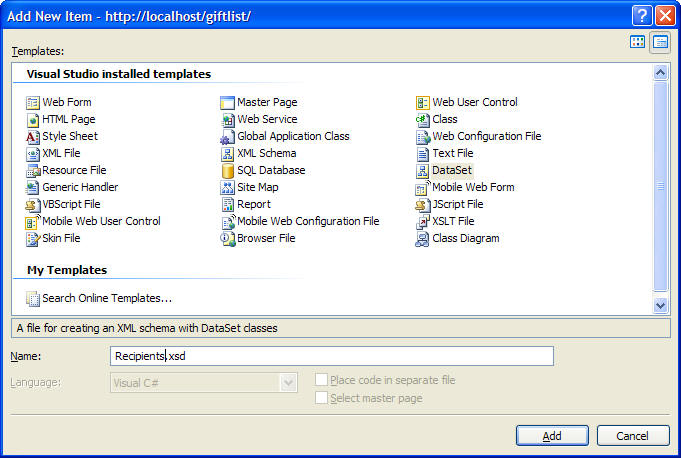
It’ll ask you if you want to put the code for it in the App_code folder; sounds like a good idea.
Next dialog lets you choose a database connection, or create a new one. Database connections are defined using a Connection String, which identifies the database to connect to, the drivers to use, authentication, and other options. Defining a connection string, storing it in a config file, and reading it and using it to initialize a connection is work you don’t have to do anymore, thanks to the new Data Connection dialog:
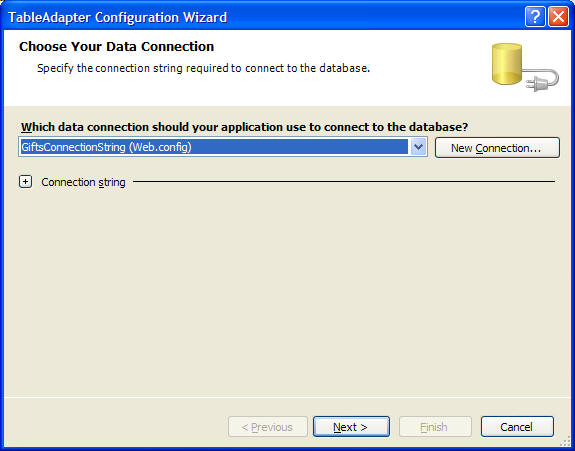
Use this dialog to locate your database and define a connection string for it. This will create an entry in the web.config file (or app.config file):
<connectionStrings>
<remove name=”LocalSqlServer” />
<add name=”GiftsConnectionString” connectionString=”Data Source=Titan;Initial Catalog=Gifts;Persist Security Info=True;User ID=Rainbow;Password=secret;Pooling=False”
providerName=”System.Data.SqlClient” />
</connectionStrings>
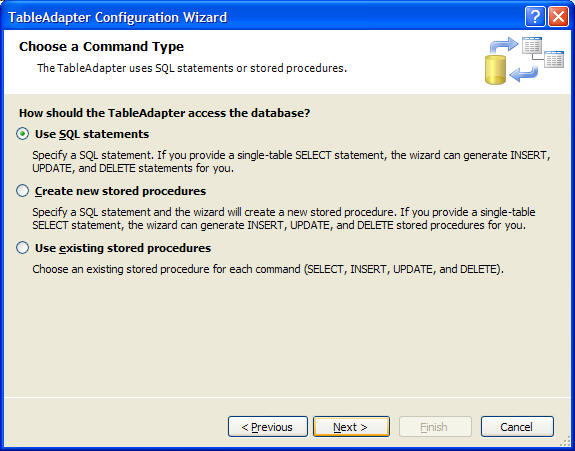
The next question it asks is do you want to use existing stored procedures, create new stored procedures, or use SQL statements to define the DataSet. For now we’ll use SQL statements:

Now the TableAdapter Configuration Wizard needs an SQL statement, so that it can execute it and use the results to generate the corresponding SQL to update, insert, and delete data. But the point of this article is to use an SQL database without writing any SQL.. so click on the Query Builder.

Once you choose the table (Recipients) it is placed in the area at the top, where you can choose which fields you want the DataSet to contain. Click the checkboxes in the Recipients box at the top to add them to the query. Notice that the Filter is ‘= @Param 1′. A nice shortcut here is that if you enter a ? in the Filter field, then the statement is adjusted so that the associated row is a paramter. This makes sense in this case because Recipient_ID is the key that we’re going to use to identify Recipient rows.
Hit OK; Now we’re back in the TableAdapter Configuration Wizard, with the SQL filled in:
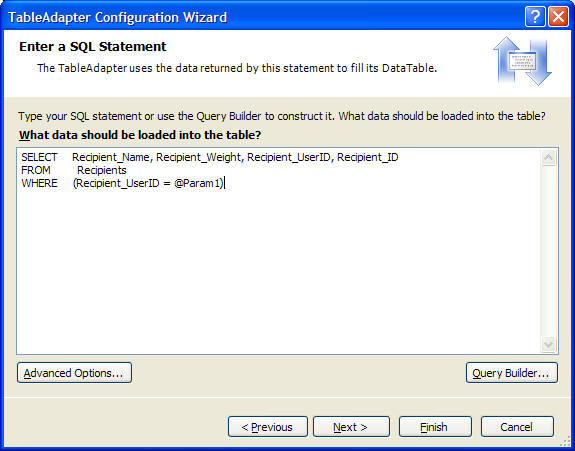
Click on Advanced Options. Because we have an ID field that’s an Identify field (meaning it’s value is assigned by the database), the value we put there isn’t going to be stored in the database. When we add a new Recipient, it’s ID will be the next available value. To keep our DataSet in sync with the database, the generated class can query for it’s ID after inserting it if you turn Refresh Data Table:
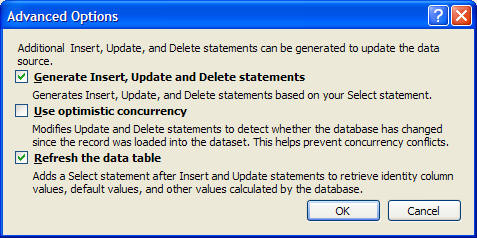
You can click Finish at this point, to generate the DataSet.
If you look at the generated Recipients.xsd file, you’ll see it’s written the SQL for INSERT based on the SELECT statement that you built.
Now we can start writing code!
I added a “using RecipientsTableAdapters;” to the top of C# file for this example code to make it a bit less verbose.
RecipientsTableAdapter adapt = new RecipientsTableAdapter();
Recipients.RecipientsDataTable table = adapt.GetData(1);
That’s it - we’ve just retrieved the Recipients records which have a Recipient_ID of 1 (the paramter to GetData is the Recipient_UserID parameter that we defined). We can iterate through them using the typed RecipientsDataRow object:
foreach (Recipients.RecipientsRow row in table)
{
Trace.Write(row.Recipient_Name);
}
To add a new row:
table.AddRecipientsRow(“Bob”, 100, 1);
adapt.Update(table);
To remove a row:
table.RemoveRecipientsRow(rowToRemove);
To update a row, modify the row object, and then call Update on the adapter.
The tedious part is done: you now have a C# object that wraps the data access, and you didn’t have to write it.
You’re not quite done yet though - it’s not a good idea to use these objects throughout your code - they’re really just wrapping up the database access into a nice package for you. You should still create an object that represents a Recipient that you can use throughout your code, and the Recipient object will take care of talking to the database. This level of indirection will make the software much easier to maintain, especially if anything related to how the Recipient is stored in the database changes.
November 1st, 2005 at 9:57 am
[...] I just posted an article on accessing databases using the TableAdapter object in VS 2005. It’s mostly for my own reference in the future but maybe others will find it useful. [...]
November 22nd, 2005 at 10:44 pm
[...] I found an interesting article recently at http://blog.stevex.net/index.php/data-access-using-tableadapter/ titled Data Access using TableAdapter A new addition to Visual Studio is the TableAdapter object. [...]
November 22nd, 2005 at 10:48 pm
[...] I found an interesting article recently at http://blog.stevex.net/index.php/data-access-using-tableadapter/ titled Data Access using TableAdapter A new addition to Visual Studio is the TableAdapter object. [...]
November 22nd, 2005 at 10:52 pm
[...] I found an interesting article recently at http://blog.stevex.net/index.php/data-access-using-tableadapter/ titled Data Access using TableAdapter A new addition to Visual Studio is the TableAdapter object. [...]
December 1st, 2005 at 5:28 pm
What is your opinion of using the TableAdapter in 2.0 versus using something like NHibernate? I struggled with TypeDatasets in 1.0/1.1 and have found them to be kind of hard to use and a bit brittle. The TableAdapter looks promising, but I’m still struggling with how to build generic searches from a table or a set of related tables. Most of the examples I see out there of the typed Datasets just shows you how to retreive data by a known ID. For example I’d like to do a query like
SELECT * FROM RECIPIENTS
WHERE Recipient_Name LIKE ‘B%’
AND Recipient_Weight > 10
AND Recipient_Weight
December 1st, 2005 at 5:54 pm
Kevin, I believe you should be able to write your SQL statement into the tableAdapter wizard with params like the article shows, except it would only support fetching data (which is what you wanted to do anyway, right?)
I’m also curious about using typed datasets in 2.0 vs NHibernate. right now I’ve been spiking the datasets but have been advised to use NHibernate instead..
What’s really bugging me for now is updating in a transaction.. has anyone had any success with this (in .Net 2.0)?
my transactions keep getting stuck (I’m using a system.transactions.transactionScope for this) but that transactions keep getting stuck for ~60 secs and finally uncommitted..
Any other way to wrap tableadapter’s Update() in a transaction?
Thanks,
- Avi
January 9th, 2006 at 9:42 pm
My VS 2005 Team does nto work this way! What does it mean?
My system changes directions right after I add a new Dataset.xsd. I do not get the “Table Adapter Configuration Wizard”. No matter what I do, I cannot find a TableAdapter!
April 19th, 2006 at 6:52 pm
Hi!
That’s the first explanation about that stuff that was suitable to my simple mind. That makes me courage.
June 26th, 2006 at 12:38 pm
Good stuff, but I have one question.
I have seen this example and many like it where we loop through rows or bind the data to a grid, but what if we just want to open up one record and return the results into local variables?
I’m looking to do something like this:
contactsTable = contactsAdapter.GetBeta(”carrots”);
if (contactsTable.Count == 0)
{
Response.Write(”you have nothing!”);
}
else
{
string contactName = contactsTable.Rows[""];
Response.Write(contactName);
}
Does this make sense? thanks!
July 4th, 2006 at 6:34 am
Hi JQ,
You could access the first row with Rows[0] but you should also look at ExecuteScalar on the command object for getting single values without the overhead of a dataset.
July 19th, 2006 at 5:18 am
what are the disadvantages of using TableAdapter ?
May 20th, 2007 at 2:48 am
hi, im trying this example with vs orcas, I cant get it to work no matter what.
August 7th, 2007 at 8:46 am
I love the TableAdapters GUI but just -try- refreshing it after you make sproc and/or schema changes. You -can’t-!!! Someone prove me wrong…
August 9th, 2007 at 8:14 am
After changing a sproc / table schema, simply right click the table in the dataset designer, select Configure… then, in the Wizard, select Finish.
I found that I had to close+reopen the xsd and reported to MS - they said it was not repro in VS9…so might not have been fixed.
August 22nd, 2007 at 2:56 pm
How can I use the wizard to create a text search query that uses the CONTAINS() function?
November 12th, 2008 at 6:05 am
I have designed XSD dataset,and iam trying to insert records to database using adapter,but in my database all columns are allow nulls true.here iam trying to pass null values(empty) to database but it is giving exception as DBNull
November 27th, 2008 at 4:13 am
I wanted to retrieve the data by the adapter and this tutorial showed how easy it was.. .. good work..
February 6th, 2009 at 1:13 am
I am abit of a noob - so I apologise if this is a silly question.
I am playing with the TableAdaptor and it works quite well for retrieving data, I have the following situation I would like some guidance on
I have a table in a database that has about 15 columns and 17 rows.
I want to retreive the whole table in one go, form that table I want to extract one value and assigning it to a text box..
It seems as though I can create multiple table adaptors for each text box I want to populate, but that sounds like I will be creating huge amounts of network traffic polling for information. Is there a way to import the table using a table adaptor and then selectively poll for specific value as required, from that ‘cached’ dataset rather then repolling the database for one value.
Cheers
Matt
February 26th, 2009 at 10:35 am
@Matt
that’s basically what’s happening in the example above. Steve has created a dataTable object named “table” and then filled it with the results of the SQL query. that table can be read and reread, etc without having to go back to the database. if you change the query to get a larger subset (in your case all records), and then put some filtering logic in your code (instead of in the SQL query), you can do what you want.
pseudo code:
for each row in dataTable
if name is ‘myName’ then blah
next
cheers
/JL
April 11th, 2009 at 10:40 am
What means the ‘param1′ signature in the first screen ? Shouldnt we write a name of variable ( of which value String in our program will be needed) ?