Windows Movie Maker has stopped working

I’ve been using the Windows Movie Maker tool in Vista to do some simple video editing, and it’s been working beautifully for me.. until recently when it just stopped.

Now when I import any video clip, even ones that worked before, I get:
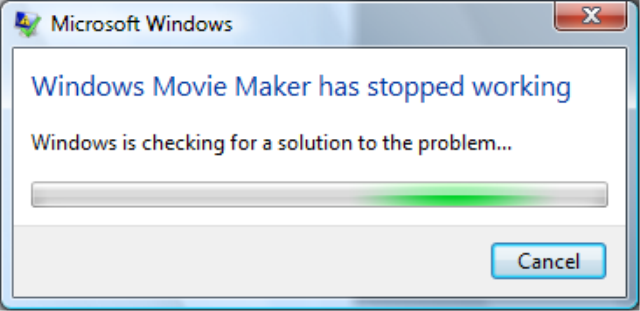
Then

WMM has compatibility options to disable video filters – I disabled what QuickTime, DivX and Nero installed (three applications that shouldn’t cause Windows Movie Maker to break, since they’re so commonly used) and that didn’t help.

Any ideas?  It went from a useful tool to just completely broken.

224 Responses to “Windows Movie Maker has stopped working”

  1. Ivica Petrovic Says:

    I have the same problem with Windows DVD Maker
    After “Adding pictures and video to the DVD” window, when I click
    on Next I get the following message:

    “Windows DVD Maker has stopped working”

    There is no online solution for this problem. Here are the problem details:
    ——————-
    Problem signature:
    Problem Event Name: APPCRASH
    Application Name: DVDMaker.exe
    Application Version: 6.0.6000.16386
    Application Timestamp: 4549b5b0
    Fault Module Name: iac25_32.ax
    Fault Module Version: 2.0.5.53
    Fault Module Timestamp: 4549bcd1
    Exception Code: c0000005
    Exception Offset: 00003548
    OS Version: 6.0.6000.2.0.0.256.1
    Locale ID: 1033
    Additional Information 1: 8d13
    Additional Information 2: cdca9b1d21d12b77d84f02df48e34311
    Additional Information 3: 8d13
    Additional Information 4: cdca9b1d21d12b77d84f02df48e34311
    ——————–

  2. stevex Says:

    In my case, it was Nero. Uninstalling Nero fixed the crash. If you have Nero installed, it’s worth a shot.

  3. Raf21 Says:

    How about alcohol? Will uninstalling it fix the problem?

  4. Sabby_rm Says:

    I too have the same problem as Ivica I have not been able to use windows DVD maker a all snce installing Vista.

    This is the message I get.

    Problem signature
    Problem Event Name: APPCRASH
    Application Name: DVDMaker.exe
    Application Version: 6.0.6000.16386
    Application Timestamp: 4549b5b0
    Fault Module Name: ffdshow.ax
    Fault Module Version: 1.0.0.1
    Fault Module Timestamp: 416b7dc4
    Exception Code: c0000005
    Exception Offset: 00005f5e
    OS Version: 6.0.6000.2.0.0.256.1
    Locale ID: 3081
    Additional Information 1: 8d13
    Additional Information 2: cdca9b1d21d12b77d84f02df48e34311
    Additional Information 3: 8d13
    Additional Information 4: cdca9b1d21d12b77d84f02df48e34311

    Files that help describe the problem (some files may no longer be available)
    Version.txt
    AppCompat.txt
    memory.hdmp

    I Never bothered installing Nerobecause of its known incombapatability……. but was told that there is a Version of Nro you can use. Does anyone know what it is or if there is an alternative burning software I cn use?

  5. DC Says:

    This worked for me too… got rid of Nero and all was well!

  6. Deano Says:

    Hi
    I had same errors as Sabby and Ivica. I followed SteveX’s advice and uninstalled Nero 7 and it now works fine.
    Cheers

  7. Robert Rawson Says:

    Primarily I have always used a multitude of software to burn movies to DVD and was quite please when Microsoft introduced the DVD Maker into9 the Vista line. Like so many other readers however, i did encounter conflict issues with other software and the primary candidate being Nero 7.

    The Nero upgrade to version 7 assured me it was compatible with Vista and for CD burning or DVD compression to DVD5 (4.7Gb Disk) it certainly works fine. The issues raise their head when you try to use the DVD Maker in Vista.

    An example scenario is that you would transfer from movie maker or add files in the program using the + button. The file (video) would load into memory appear on the screen and then promptly crash without you being able to proceed further.

    On removal of Nero, Roxio Media Creator 9 and Ulead Video Studio 10 the program works fine. I removed each item of software individually rebooting at each stage to see where the software conflict lay. It would appear Nero causes the issues with DVD Maker but ROXIO Media Creator 9 adds problems with DLA and slows the system right down.

    Ulead Video Studio 10 was compatible (patch available from Ulead.com) and did not cause any major issues and most probably I will be re installing it.

    Regards

    Robert

  8. Jonny5 Says:

    I had the same problem, and uninstalling Nero did not resolve the issue… I have read elsewhere that divX install can mess this up, too, but I am reconsidering Vista as a whole – if I cannot use DivX, I cannot use Vista…. Vista Service Pack will hopefully have the solution in a few months.

  9. GangstaNerd Says:

    I also had this problem, when I looked up the problem. My computer wanted me to upgrade DivX pro to the new DivX 6.5 . The version that comes with vista is version 5. sumthin. I noticed I had the problem with some .avi files… not all… which means it may require newer codecs. But the problem is the new one COSTS MORE MONEY! After I just bought my comp…i gotta buy more for it…geez

  10. Dave Says:

    You actually have to adjust some settings in Windows Movie Maker in order to fix the problem. Apparently Windows Movie Maker and Windows DVD Maker are related somehow.

    In Windows Movie Maker, go to Tools -> Options, and search for the tab where it lists the decoders installed on your machine. Uncheck the ones unrelated to Windows DVD Maker (in my case the Nero decoders). I just unticked all the nero ones, it saves you from removing Nero completely

    My problem was gone.

  11. Rexjim Says:

    Thanks Dave worked a treat
    Jimmy

  12. Dajackal Says:

    Thanks Dave….this problem was driving me freaking crazy ! Site after site and finally a working solution. Hats off to ya :)

    Andy

  13. Ken Says:

    I have the same problem listed below, however, REMOVING NERO DID NOT WORK, and I cannot get Movie Maker to publish anything. I have unselected all of the vid filters in TOOLS, still, same problem. In fact, all I am trying to do is add a series of pictures to create a slideshow in a movie format…a simple task….so I thought.

    Does anyone know how to reinstall Movie Maker from a Vista DVD??
    Is there any other solution????

  14. AP Says:

    I downloaded the latest updates for Nero and it solved all the problems.

  15. Richard Says:

    Dave, you are a legend! Thanks so much!

    ————————————————————————
    Dave Says:

    March 4th, 2007 at 3:37 pm
    You actually have to adjust some settings in Windows Movie Maker in order to fix the problem. Apparently Windows Movie Maker and Windows DVD Maker are related somehow.

    In Windows Movie Maker, go to Tools -> Options, and search for the tab where it lists the decoders installed on your machine. Uncheck the ones unrelated to Windows DVD Maker (in my case the Nero decoders). I just unticked all the nero ones, it saves you from removing Nero completely

    My problem was gone.

  16. Jamie Cooper Says:

    Please help. Having problems with DVD maker when I try to publish my movie using it , it stops working. Comes up with Impgd10.ax error. Any suggestions please
    Jamie

  17. Jamie Cooper Says:

    PS I don’t have Nero on my computer

  18. carly Says:

    OKAY, after attempting to publish my movie 33 times, uninstalling nero quicktime, divx, ulead and every single other thing that “might” be the problem, i FOUND THE SOLUTION.
    If you are working on a project that incorporates different movie file types (mine incorporated both avi and wmv) and the movie will not publish, the problem is the difference in the file types. I attempted publishing a movie with only avi clips and another movie with only wmv clips and both movies worked.
    The file type doesn’t matter, as long as all of them are the same. To convert your video files, i would suggest using Replay converter, which can be found here: http://applian.com/replay-converter/demo.php

    Hope this helps!

  19. James Says:

    Having serious issues with VideoStudio 10, 9 and 7!! the ffdshow.ax file is the culprit, according to the error message, and I can’t fix it!! It’s stopping Nero from capturing video as well. How do I resolve this? Is it something to do with DivX 6 which I recently installed?!

  20. The Wend . . . Says:

    All of these comments illustrate the frustration of trying to use this great software we are sold. For me, it has been a nightmare (staying up all night) trying to get some feel good projects done. My wife bought me a spankin’ brand new computer and I was working on a video project that we wanted so much to have done. After enduring the agony of getting one test dvd burned, we were in heaven. Attempts to burn the final one was living hell. Unlike Carly “who after attempting to publish my movie 33 times”, I managed to beat her record (34 times and still counting!).

    These type of computer and software malfunctions are becoming more and more common these days. My luck has taken a drastic turn for the worse as every software, system, and computer I work with these days, results in more time spent fixing and patching things up rather than getting things done. Progress.

    Thanks for the comments by all. At least I can begin the loveable task of getting it to work again. Ulead, Windows, Nero, etc., etc., etc., should give us a rebate for all the time, pain and suffering endured while paying for products that clash with one another. This type of frustration is escalating I continue to utilize my better than average computer skills. So thanks for reading as I turn down the frustration meter and rev up the optimism. I have some other tries to be made. However, I might return to the days of yesteryear and draw my movie, like when in second grade you learned how to create a drawing, replicate it on numerous sheets of paper, and fan them with your thumb to make a stick man walk.

  21. dave Says:

    no problem guys, i hope you all get your movies done. seriously tho it took me nights as well trying to figure somthing out. it was especially bad for me because i had a movie due for a film festival and i couldnt get the dvd player to burn. boy was i happy when i say that percent sign go up. Good luck everyone

  22. Allen Says:

    DEP was not allowing me to import video from a DV camera, but the problem turned out to be importing by AVI. By importing the file as Windows format, it worked like a charm!

  23. K.O.D Says:

    I hate Vista a slight bit now!!!!

    Problem Event Name: APPCRASH
    Application Name: DVDMaker.exe
    Application Version: 6.0.6000.16386
    Application Timestamp: 4549b5b0
    Fault Module Name: iac25_32.ax
    Fault Module Version: 2.0.5.53
    Fault Module Timestamp: 4549bcd1
    Exception Code: c0000005
    Exception Offset: 00003548
    OS Version: 6.0.6000.2.0.0.768.3
    Locale ID: 2057
    Additional Information 1: 8d13
    Additional Information 2: cdca9b1d21d12b77d84f02df48e34311
    Additional Information 3: 8d13
    Additional Information 4: cdca9b1d21d12b77d84f02df48e34311

    My Windows DVD Maker use 2 work but now it crashed, i got this laptop with Cyberlink Power2Go and it was still working fine, den one day it started crashing…it must be a file on my laptop that is not allowing it to work….but i dnt know!!!

    if you find the solution can u please email me

  24. grahame Says:

    hi all, i have purchased a new system (dell)and i have tryed using the windows dvd maker, i get the same prob, it starts with encoding gets to about 10%,then says windows dvd maker has stopped working ,then finding a solution, then dvd maker is restarting dispite removing roxio 9, i still havent been able to burn a dvd movie, can anyone help?

  25. LordPoo Says:

    THANKS DAVE
    YOU ARE MY HERO! I was going to go crazy because my project was due at 7 and its almost 5. THANK YOu now i cna go to sleep!

  26. Abad Says:

    Oh my god ! … I was creating a movie with Windows Movie Maker last few hours … Finally I done ….
    But there is a problem after Publishing the movie on Computer or CD …. What is the solution ?
    I don’t have QuickTime , Nero and DIVX …. !
    I just have ROXIO CREATOR HOME !
    Please guys/gals Help me … E-mail me or reply here .

  27. Alphonso Says:

    I have window vista preium. Movie maker captures and edit my video. The sadest thing is it will not publish or burn the movie. The message that pops up is : windows movie maker has stopped working…a problem has caused it to stop working correctly…checking online for solution. It never checks for the solution.

    I have nero 7, pinnacle studio, roxio installed.
    Please help me find the solution.

  28. musu Says:

    Hi all, I sure hope someone here can assist me with my movie maker problem. I’ve been trying to edit a WMV file. I can import, edit, and save the project, however, when I try to publish it I get the error message at the top of this thread. If I cut down the file size to six (6) minutes or less its successful, however, anything longer that six (6) minutes and either I get the error message or the computer crashes with the blue screen of death – this is with all codec filters off.

    Here is what the error log indicates:

    Problem signature
    Problem Event Name: APPCRASH
    Application Name: MOVIEMK.exe
    Application Version: 6.0.6000.16386
    Application Timestamp: 4549b5b6
    Fault Module Name: wmvdecod.dll
    Fault Module Version: 11.0.6000.6324
    Fault Module Timestamp: 4549be1d
    Exception Code: c0000005
    Exception Offset: 00045aee
    OS Version: 6.0.6000.2.0.0.256.1
    Locale ID: 1033
    Additional Information 1: 8d13
    Additional Information 2: cdca9b1d21d12b77d84f02df48e34311
    Additional Information 3: 8d13
    Additional Information 4: cdca9b1d21d12b77d84f02df48e34311

    Please help – Anyone have any idea on how to correct this problem?

  29. BlitzMuzic Says:

    I have created a movie in Windows Movie Maker that was downloaded from my Mini DV. When I try to publish this video to DVD, Windows DVD Maker stops working. I don’t have Nero or any other burner programs on my computer. Any suggestions?

  30. chris Says:

    i have no idea whats wrong

    Problem signature:
    Problem Event Name: APPCRASH
    Application Name: DVDMaker.exe
    Application Version: 6.0.6000.16386
    Application Timestamp: 4549b5b0
    Fault Module Name: StackHash_1703
    Fault Module Version: 0.0.0.0
    Fault Module Timestamp: 00000000
    Exception Code: c0000005
    Exception Offset: 03f5b5ed
    OS Version: 6.0.6000.2.0.0.768.3
    Locale ID: 1033
    Additional Information 1: 1703
    Additional Information 2: 2264db07e74365624c50317d7b856ae9
    Additional Information 3: 1344
    Additional Information 4: 875fa2ef9d2bdca96466e8af55d1ae6e

    please help

  31. Cov Says:

    Cheers Dave, I disabled all the stuff there and it’s working nicely..

  32. WaveK89 Says:

    Problem signature
    Problem Event Name: APPCRASH
    Application Name: MOVIEMK.exe
    Application Version: 6.0.6000.16386
    Application Timestamp: 4549b5b6
    Fault Module Name: AxisOverlay.ax
    Fault Module Version: 1.0.1.6
    Fault Module Timestamp: 40e3fdda
    Exception Code: c0000005
    Exception Offset: 00001412
    OS Version: 6.0.6000.2.0.0.768.3
    Locale ID: 1033
    Additional Information 1: 8d13
    Additional Information 2: cdca9b1d21d12b77d84f02df48e34311
    Additional Information 3: 8d13
    Additional Information 4: cdca9b1d21d12b77d84f02df48e34311

    Extra information about the problem
    Bucket ID: 355592299

    I saw something about this Axis program that needed to be installed to conrtol cameras on the internet. Had to do something with ActiveX. I tried installing, but nothing worked for me, so I deleted it. When I went WMM, I could not import or use any files, let alone delete them. I decided to delete every trace of this Axis SDK. The problem stil persists. Now, it’ saying that it cannot import my music even the ones I’ve imported before (mp3′s). I just don’t see what it has to do with this…Any ideas? Please and thank you

  33. Joe Reyes Says:

    Whoo Hoo!!!!! I’m running Vista. I couldn’t get my movie published with Movie Maker 6.0, but it worked with Movie Maker 2.6 when I cleared all of the filters. Thanks to all who provided the answers! Apparently Microsoft hasn’t figured this out yet, since I can’t get an answer from their website. I guess the “Windows is searching for a solution” is just there to make us feel like Microsoft is trying when they’re busy counting all of the money they’ve earned from such a poor product.

  34. Faz Says:

    my poblen is slightly differernt i can add small files but when i try and add a larger file lets say over 200mb a msg comes up saying windows dvd maker stopped working when i got my laptop i was happy that i got vista but now am really getting annoyed first i used to get a msg saying windows explorer not working so i got that fixed know my windowsdvd maker not working if anyone finds a solution plz post it.

  35. Christian Park Says:

    Hi,

    I am having a similar problem. I can publish a movie made with just pictures, but not with movie footage. All the footage is the same file format.

    I have nero 7 and have deleted it, but it still won’t work.

    any ideas?!

    Christian

    Problem Event Name: BEX
    Application Name: MOVIEMK.exe
    Application Version: 6.0.6000.16386
    Application Timestamp: 4549b5b6
    Fault Module Name: StackHash_8d13
    Fault Module Version: 0.0.0.0
    Fault Module Timestamp: 00000000
    Exception Offset: 00000000
    Exception Code: c0000005
    Exception Data: 00000008
    OS Version: 6.0.6000.2.0.0.768.3
    Locale ID: 2057
    Additional Information 1: 8d13
    Additional Information 2: cdca9b1d21d12b77d84f02df48e34311
    Additional Information 3: 8d13
    Additional Information 4: cdca9b1d21d12b77d84f02df48e34311

  36. coldcell Says:

    i use to have the same problem with nero7 and now i have uninstalled nero and uncheck all the codec options in movie maker
    i am just getting this felling that encoding take a long time…my progress shows 51.9% and its still in the process of encodnig…

  37. lustmyeyes Says:

    HELLPPP!!
    I took foreverr making a movie that will later become a present for my cousin, and then.. whats this?
    I went to ‘Publish my movie to this computer’ and as soon as i click “Publish”
    Everything freezes, an error message pops up “Windows Movie Maker has stopped working”
    and the whole program closes down.
    I tried repeatedly thinking that maybe ’cause the movie was too long. no.
    not the problem.
    tried uninstalling divx
    not working.
    uninstalled nero.
    not working.
    deselected all the little filter things
    not working
    NOT WORKING
    I’m on vista, its fairly new.. I’m losing my faith with this program!!
    It has worked before.. its just now it isn’t.
    SOMEONE HELP PLEASE!!?

  38. Pierre D Says:

    The problem that you are all experiencing is due to the Data Execution Prevention program came with Vista. You have to change the option; here’s how:

    1. Right click on “Computer”
    2. Left click on “Properties”
    3. Left click on “Advanced system settings”
    4. In the Performance section, click on the “Settings” button
    5. Click on the Data Execution Prevention tab
    6. Select “Turn on DEP for essential Windows programs and services only”

    I just did this and all of the programs that were being STOPPED work again.

    I was up all night trying to figure this godamn thing out. This is progress?

  39. wildfire Says:

    Pierre -

    I checked the Data Execution Prevention and it was already selected. That’s not the problem… Sorry, your solution doesn’t work with Movie Maker. It still crashes when trying to publish a movie. But good for you with your problem.

  40. Achilles81 Says:

    Dear All.
    Could you help me for this kind of troubleshooting?
    I’m using Window vista Ultimate includes Window Movie Maker 6.0
    It happens after I import media to Folder “imported media”, I try to drag this media to “Story Board” but nothing happens. Then I try to open some before Project, but there is a report “Invalid Pointed”. Then I try to install WMM 2.4 (for XP) but even I can’t import media.
    Hopefuly can get your direction.

  41. Achilles81 Says:

    Sorry
    I would like to post 1 more information.
    My WMM 6.0 had worked very well at the begining. This mistake happened after some months. Other functions of Vista are OK
    Thanks

  42. Taylor Says:

    yeah . i have this problem too with windows movie maker for windows vista .

    how come this is happening ?
    and even if i close the program and start again , or re install it , it just keeps happening

  43. Achilles81 Says:

    Dear Taylor
    Could you tell me how can u reinstall window movie maker for vista. I would like to try do that thing with my troubleshooting.
    Thanks

  44. JDM Says:

    I was deeply frustrated after investing money to upgrade to a Dell Vista based PC when I could not burn dvds. I want to express a very WARM and HEARTFELT THANK YOU to Dave. His post saved the day for me! I was relieved to finally see “Your movie was created successfully!” Thank you VERY MUCH, Dave.

  45. ozinga1 Says:

    to fix the error with Axis media control Fault Module Name: AxisOverlay.ax
    do a search in regedit and delete this key {8A25AD8A-B8BE-4C18-9795-6FCE65B29099} you should find it twice. It will fix your Movie maker and allow you to use it again.

  46. ozinga1 Says:

    If that doesnt work download the new version if you are using vista from here http://www.microsoft.com/downloads/details.aspx?FamilyID=d6ba5972-328e-4df7-8f9d-068fc0f80cfc&DisplayLang=en
    Or XP
    http://www.microsoft.com/downloads/details.aspx?familyid=2802DF71-EB5E-4084-9A07-45B29074AE74&displaylang=en

    Supposidly this works, try the trial to uninstall movie maker (doesnt support vista)
    http://www.litepc.com/xplite.html

  47. lz Says:

    I did everything that was posted to get my MovieMaker video to publish, well that I could anyway (because I don’t have nero or any of that) short of uninstalling everything. Anyway I tried saving it using the “Compress to:” setting until the display sized was 320×240 and it worked!
    I don’t know if this will work for other people, but thought I’d put it out there.

  48. Tony Says:

    Hi, guys , i have had the same problem and the only way to have windows movie maker working again is to remove replay converter, try it, it works.

  49. ls Says:

    15 August 2007

    I have tried all the above suggestions for my movie to try to publish it. the replay converter demo does not do it, I tried all the check and uncheck i check the Div in computer it was already checked, I installed moviemaker 2.6 – won’t recognize my projects from 6.0. I am working on a video which I do not want to delete because it has taken so long. All the above listed stuff does not work. What the hell are you supposed to do? I have different types of formats on my clips and nothing is working. This vista program sucks the big one! Any suggestions to all that has already been listed? I have tried about 70 times to save my project.

  50. covelance Says:

    Product
    Windows Movie Maker

    Problem
    Stopped working

    Date
    22/8/2007 7:09 PM

    Status
    Report Sent

    Problem signature
    Problem Event Name: APPCRASH
    Application Name: MOVIEMK.exe
    Application Version: 6.0.6000.16386
    Application Timestamp: 4549b5b6
    Fault Module Name: StackHash_550c
    Fault Module Version: 6.0.6000.16386
    Fault Module Timestamp: 4549bdc9
    Exception Code: c0000374
    Exception Offset: 000af1c9
    OS Version: 6.0.6000.2.0.0.768.2
    Locale ID: 17417
    Additional Information 1: 550c
    Additional Information 2: 47321701cd6819afe3908e024d6af100
    Additional Information 3: bf09
    Additional Information 4: f3809fdf88f5cfa293c2a32187c52327

    Files that help describe the problem (some files may no longer be available)
    Version.txt
    AppCompat.txt
    minidump.mdmp

    Extra information about the problem
    Bucket ID: 422723324

    My problem is when i click “next” button in the “Name the movie you are publishing” ,My computer go “Not Responding”

  51. Mirkovic Nicolas Says:

    I had the same problem as most of you and for me the only option was to not mix file genders… that means choose, for example, between .avi and .wmv but don’t mix both files types in your movie.

    Good luck to all !

  52. Ro Says:

    As Soon as i open the programme it comes up with not responding?!
    Any Help?!

  53. kool man Says:

    i dont have nero and i have the proberlem how do i get rid of this problem some one please help me

  54. (//_-) Says:

    i have kinda the same problem when i click the “publish” button windows media player stops working

  55. Adriana Says:

    Thanks ozinga1 for your Axis tip.!!!!!!!!

    I didn’t understand anything about the Axis’ solution which camewith Vista’s pop-up.

    Now Slideshow, Movie Maker and my Slideshow Screensaver are WORKING!!!!!!!!!!!!!!!!!! After 5 months not working. Great.

  56. aravine ^.^ Says:

    I have this same problem, but also after “publish” button it loads a little while, then stops, and closes the program. A bubble appears on the bottom right explaing the DEP keeps closing WMM. Again and again it keeps repeating everytime i try.

  57. Lolitium Says:

    Lemme add my problem to the list…

    Problem Event Name: APPCRASH
    Application Name: DVDMaker.exe
    Application Version: 6.0.6000.16386
    Application Timestamp: 4549b5b0
    Fault Module Name: iac25_32.ax
    Fault Module Version: 2.0.5.53
    Fault Module Timestamp: 3847010a
    Exception Code: c0000005
    Exception Offset: 00003548
    OS Version: 6.0.6000.2.0.0.256.1
    Locale ID: 1033
    Additional Information 1: 8d13
    Additional Information 2: cdca9b1d21d12b77d84f02df48e34311
    Additional Information 3: 8d13
    Additional Information 4: cdca9b1d21d12b77d84f02df48e3431

    I’ve got installed on my Laptop, which is running on a newly installed version of Vista Ultimate, DivX, Realplayer, Quicktime, GOM, Roxio, and Quicktime. Doing what Dave suggested didn’t work for me. I can add the movie I want to burn onto the list but as soon as I hit Next it’ll sit there loading the preview for the menu for about 4 seconds then tell me it has stopped working. I could uninstalled everything except Roxio and GOM but I don’t know if it would help… The movie I want to burn is in .avi format, the burner I’m using is a lightscribe and the OS is a Dell based Windows Vista Ultimate on a HP laptop.

    The problem seems to be: iac25_32.ax, which is an intel sound card driver.

  58. Gabe Says:

    DAVE!!! I LOVE YOU!!!!!!!!!!!!!!!!!!!!!!!!!!
    THANK YOU SO MUCH!!!!!!!!!!! YOUR A GOD!!

    its people like you who should really be working at Microsoft!

    Thanks a Gazillion!

  59. K3l\l Says:

    Problem Event Name: APPCRASH
    Application Name: MOVIEMK.exe
    Application Version: 6.0.6000.16386
    Application Timestamp: 4549b5b6
    Fault Module Name: StackHash_1703
    Fault Module Version: 0.0.0.0
    Fault Module Timestamp: 00000000
    Exception Code: c0000005
    Exception Offset: 075ab5ed
    OS Version: 6.0.6000.2.0.0.256.1
    Locale ID: 1033
    Additional Information 1: 1703
    Additional Information 2: 2264db07e74365624c50317d7b856ae9
    Additional Information 3: 1344
    Additional Information 4: 875fa2ef9d2bdca96466e8af55d1ae6e

    omg…. im gonna go crazy nuthing and i mean nuthing! is working plz plz plz! let there be another way it is a vid with .avi and .jpg wtf is happening im gonna cry help ive been trying ive tried over 150 tiimes litterallyy plz help

  60. matthew Says:

    AppName: moviemk.exe AppVer: 2.1.4026.0 ModName: qedit.dll
    ModVer: 6.5.2600.2180 Offset: 0001a513

    any 1 know what is worng?

    my wmm will not work in this is all it tells me

  61. Joeri Says:

    Delete registry key’s: 8A25AD8A-B8BE-4C18-9795-6FCE65B29099 if you’re having problems with Movie Maker that are being caused by Axis media control…

    Thanks: ozinga1

  62. Dave2 Says:

    Dave you solved my problem. Even after uninstalling nero the CODECS were still there. Looks good now…
    Thanks.

  63. alexis Says:

    hi i need some help im not having problems publishing my
    dvds im having problems with my audio i can import audio
    but it will not play the slide show plays and the music is in
    the time line but there are no music waves or sound .
    can anyone help me?

  64. Brittney Says:

    Hey,
    I’ve tried everything. The weird thing is that over the weekend I posted that whole DVD..the only thing I did do that I don’t normally do is “disk defragmentor” . Okay..so here are the details if anyone can help…all right I go to “save movie file”..i hit it..click next and all that..it gets to the screen where is says how much percentage there is left to save…however it never budges from 0% and sometimes tells me I have to wait 20 million minutes! I’ve tried saving it to a CD and that will not work either..something to do with saving it is messed up..when I get to the screen with the percentage there is a black and white box with black as the background and the words “highmat” and in smaller boxes with white in the background and black for the words saying “audio” “image” “video”..i don’t remember if that was there before or not! Also..when I go to save it to my computer it gets to the “percentage page” and tells me that it is saving to a recordable CD when I did not ask it to…well i deleted 3 of my games totaling more than 4 million MB so I think I cleared enough space! Any thoughts ?? :( please help!
    Britt

  65. Mark Says:

    Hello there,

    my name is Mark and I’m from the Netherlands. For the last couple of weeks Ive been busy with a project in Windows Movie Maker.
    I’ve stumbled into this thread because I googled something about WMM crashing everytime I publish a video.

    So I’m really hoping anyone could PLEASE help me. I’ll list some information below that probably has something to do with it.

    - I’m using DivX video’s primarily. (No AVI with Divx codec (I guess) but real .divx, mostly from stage6.com) I combine this with a couple of pictures and a mp3 track.

    - Being able to edit divx movies in WMM was a pain in the *ss on itself. Ive downloaded a lot of codec(s) (packages) before I was finally able to edit and export divx movies. But now all of the sudden it crashes everytime.

    - The codec program I’m using is DirectVOBSub or something. It has the strange habit of launching itself numerous times. The bigger my project got (length), the more icons were launched in the right bottom corner. It started with 1 and after I finished editing my project there were like 12 identical DirectVOBsub icons. Everytime I edit my project, all 12 icons must and WILL restart before I can continue. When theyre not started yet, Im unable to view my video (preview screen).

    - I also have the DivX bundle installed, apart from the DirectVOBsub codecs.

    - BTW: the directvobsub is a part of a bigger whole called Vista Package. Im pretty sure that I need this to edit my divx material, and I’m also pretty sure that this is what makes WMM crash (because of it launching itself 12 times).

    - The error message is:

    [code]

    Gebeurtenisnaam van probleem: APPCRASH
    Naam van de toepassing: MOVIEMK.exe
    Versie van toepassing: 6.0.6000.16386
    Tijdstempel van toepassing: 4549b5b6
    Naam van foutmodule: iac25_32.ax
    Versie van foutmodule: 2.0.5.53
    Tijdstempel van foutmodule: 3847010a
    Uitzonderingscode: c0000005
    Uitzonderingsmarge: 00003548
    Versie van besturingssysteem: 6.0.6000.2.0.0.768.3
    Landinstelling-id: 1043
    Aanvullende informatie 1: 8d13
    Aanvullende informatie 2: cdca9b1d21d12b77d84f02df48e34311
    Aanvullende informatie 3: 8d13
    Aanvullende informatie 4: cdca9b1d21d12b77d84f02df48e34311

    [/code]

    Sorry for it being in Dutch.

    I really hope Ive explained my situation clearly and that someone can help me.

    Thanks for the trouble to be taken,

    Mark

  66. fahrvegnugan Says:

    My problem is that when I try to publish any movie file that wasn’t already published by another windows movie maker, it either restarts or crashes. I either have to email my freind a file for him to publish back to me or start my old computer and publish it there and use it back in my new computer. If there’s a patch or anything, We all sure could use it.

  67. fahrvegnugan Says:

    I may have found an alternate way to get passed some of these problems. I downloaded an older version of windows movie maker (windows movie maker 2.6 I think it was.) and I published a movie in the 2.6 version and edited it in the new version and it worked! I belive the 2.0 version is the same one I use on my old laptop and the one everyone else had that didn’t have much errors.

  68. StassyC Says:

    I am having the same problem as a lot of you in that as soon as I click on publish and select wher I would like to save it, the programme stops working and closes.

    I have tried all the solutions above to no avail and I don’t have Nero?

    any more suggestions – PLEASE – getting very frustrated with Vista at the moment!!! grrr

  69. Dawn Says:

    HELP,…I’m backing up years of 8mm home video and all of the sudden when I import my videos they are super fast. I have unchecked the filters. I don’t have Nero, or any other video type program on my computer. Some tapes are fine, others are super fast as I’m using the firewire.

    I can’t find out what’s going on. I’ve done some excellent projects on this program and would like to keep using it.

    Dawn

  70. dragonwolf Says:

    im having a similar problems with vista’s DVD maker and Movie make but the Data Execution Prevention keeps shutting them down no matter what i put in there. the worked for maybe one disc and then after that nothing. i have tried shutting down the dep for those programs but it keeps saying that those programs HAVE TO HAVE DEP in order to run is this a load of bull and if so how do i get around it!

  71. rama murthy Says:

    Dear Steve,
    i have got this problem , wmm has stopped working…..

    Problem Event Name: APPCRASH
    Application Name: MOVIEMK.exe
    Application Version: 6.0.6000.16386
    Application Timestamp: 4549b5b6
    Fault Module Name: StackHash_1703
    Fault Module Version: 0.0.0.0
    Fault Module Timestamp: 00000000
    Exception Code: c0000005
    Exception Offset: 04aea8ed
    OS Version: 6.0.6000.2.0.0.768.2
    Locale ID: 16393
    Additional Information 1: 1703
    Additional Information 2: 2264db07e74365624c50317d7b856ae9
    Additional Information 3: 1344
    Additional Information 4: 875fa2ef9d2bdca96466e8af55d1ae6e

    pls help me in this….

  72. rama murthy Says:

    Problem Event Name: APPCRASH
    Application Name: MOVIEMK.exe
    Application Version: 6.0.6000.16386
    Application Timestamp: 4549b5b6
    Fault Module Name: StackHash_1703
    Fault Module Version: 0.0.0.0
    Fault Module Timestamp: 00000000
    Exception Code: c0000005
    Exception Offset: 04aea8ed
    OS Version: 6.0.6000.2.0.0.768.2
    Locale ID: 16393
    Additional Information 1: 1703
    Additional Information 2: 2264db07e74365624c50317d7b856ae9
    Additional Information 3: 1344
    Additional Information 4: 875fa2ef9d2bdca96466e8af55d1ae6e

  73. Megan Says:

    I got Vista because i wanted a newer Movie Maker and as soon as i click on its name it says “Cannot create new Collections file” and it says it has to close……i cant even mess with the filters cause it wont let me do anything! can anyone help me?

  74. GeekYouUp Says:

    Same problem as so many others, all solved by Dave, cheers mate.

    ————————————————————————
    Dave Says:

    March 4th, 2007 at 3:37 pm
    You actually have to adjust some settings in Windows Movie Maker in order to fix the problem. Apparently Windows Movie Maker and Windows DVD Maker are related somehow.

    In Windows Movie Maker, go to Tools -> Options, and search for the tab where it lists the decoders installed on your machine. Uncheck the ones unrelated to Windows DVD Maker (in my case the Nero decoders). I just unticked all the nero ones, it saves you from removing Nero completely

    My problem was gone.

  75. Amanda Says:

    I had the same problem, but after reading a few of the responses, I got my answer! Thanks everyone! Turns out, I downloaded a video program the other day and once I uninstalled that, I stopped getting the message!

  76. Daniella Says:

    I am running Vista Home Basic, and Movie Maker was working fine. I finished my video, and it crashed when I tried to publish it. I downloaded version 2.6, but I it still won’t work. I tried all of the suggestions that were written here, but it still would not work. :(

  77. Rafael Vasquez Says:

    i can’t finished my episode when my video is stopped working! i can’t remember how to fix this problem, any help?

  78. josh Says:

    Thanks a lot to Dave.
    Unchecking boxes in compatability menu worked a treat.
    Many thanks

  79. Steve Says:

    I found that just unchecking the following seemed to work for me:

    Windows Movie Maker:
    Tools->Options
    Compatibility Tab
    AVI Decompressor, Version 6.6.6000…., Path
    C:\Windows\system32\quartz.dll

  80. Skaprilla Says:

    i’ve done ll of the above suggestions and still couldn’t get WMM to work. But i get a pop up saying that problem was caused by Indeo® audio software. I searched my computer for drivers with that name to disable it but couldn’t find any. I checked my device manager but to no avail. i’m puzzled of wat the hell is Indeo and how can it cause the problem when i don’t even have that sort of driver in my comp??

    I’m really annoyed by vista!!!! can somebody help me plzzz.. thanx a million. :)

  81. Aitang Says:

    Plz help me! I am publishing my VDO (.asf) and it work with short clip but when I try to long clip it will stop at 99% and time stop count down too but it not show any error. I try to uninstall Nero7 and rename folder in common file and uncheck every list in option of nero but it still stop at 99% and progress bar still running and I ever wait it about 2 hour but it is not finish. What should I do?

  82. chey Says:

    ok,i tried everything and it still wont work! it will work as long as i dont have my clips muted but when i do it doesnt work at all!

  83. Tam Says:

    Dave, you are a legend!

    Thank yooooooou :)

  84. runj Says:

    I found ffdshow.ax to be the culprit, especially for crashing after importing .mps (ac3) audio files. You need to ungregister the codec. Just uninstalling wont’ work. I have windows XP.

    Pull up a command prompt. Start>Run> type “cmd”
    type in the following with administrator priveleges: “regsvr32 /u ffdshow.ax”

    That solved it.

  85. Omer Says:

    Problem signature
    Problem Event Name: APPCRASH
    Application Name: MOVIEMK.exe
    Application Version: 6.0.6000.16386
    Application Timestamp: 4549b5b6
    Fault Module Name: StackHash_1703
    Fault Module Version: 0.0.0.0
    Fault Module Timestamp: 00000000
    Exception Code: c0000005
    Exception Offset: 05daa8ed
    OS Version: 6.0.6000.2.0.0.256.6
    Locale ID: 1033
    Additional Information 1: 1703
    Additional Information 2: 2264db07e74365624c50317d7b856ae9
    Additional Information 3: 1344
    Additional Information 4: 875fa2ef9d2bdca96466e8af55d1ae6e

    CAN anyone PLEASE help me with this. I have a film due for a comptetition day after!!!!!

  86. Pete Says:

    Yo guys i was so despate to fix wmm i did anything and its true! if u get rid of a replay convertor it works thanks guys!

  87. Loooooong Says:

    I like you guys have alrdy had my issues with windows movie maker :( But this time its real bad!! Im using windows xp home edition windows movie maker for Xp my movie file is 240 mb and uses all Mpeg files and pictures along with titles credits and effects.

    When I try to save it to make the movie on Pc or disk i get same crap about project may be missing sources files :( But I been through that and didnt erase nothing this time everything is in collections folders:) I dont have Nero but i Just installed Roxio 10 and cant figure how 2 transport my project to roxio and then finish movie

    This film is very informative and i made it Just to help People I made another Film on how to stop AIDS with just a few cups of tea from a very easily grown plant

    I need help to finish helping others I hope sum 1 or 2 replyies to this

    Love n peace Loooooong

  88. Feefle Says:

    Yeah, I got the same problem only, if I turn off the xvid tab in compatibility, the avi video that I select says “Warning: Nothing to output bframe decoder lag” but it works fine. When I turn on xvid video decoder thats when it stops working. I still want it to work the way it used to, without the warning

  89. Danniie Says:

    I Have Xp and wont work worked once then cut out on the rest says that it has a proplem and says dont send so i delted and started it back up still didnt work. i have nero ..

    Tell Me The Problem Thanks :D.. Danniie

  90. sylvia Says:

    ok end what shall i do if i even can not open media movie maker??its says: Another user is running windows movie maker on this computer bla bla bla…but its not possible… before that has happend i have done everything what you have here and still was writing wmm has stopped working and now i can’t even open…somebody can explain me what’s wrong is with this???

  91. sylvia Says:

    Problem signature
    Problem Event Name: APPCRASH
    Application Name: MOVIEMK.exe
    Application Version: 6.0.6000.16386
    Application Timestamp: 4549b5b6
    Fault Module Name: lmpgspl.ax
    Fault Module Version: 4.0.0.77
    Fault Module Timestamp: 3d133951
    Exception Code: c0000005
    Exception Offset: 00001652
    OS Version: 6.0.6000.2.0.0.768.3
    Locale ID: 1033
    Additional Information 1: 8d13
    Additional Information 2: cdca9b1d21d12b77d84f02df48e34311
    Additional Information 3: 8d13
    Additional Information 4: cdca9b1d21d12b77d84f02df48e34311

  92. Monzel Says:

    I have the same problem. I have really no idea. Please anyone help me.

  93. Alejandro ortiz Says:

    I do have install NERO & Quick Player…..and ARES.
    I did not have any major problems untill a few weeks ago when COM surrogate stop working sign came out some times and with some videos.
    i did follow microsoft intrucctions and it hasn’t appear for a while, and I unistall ARES, after that RUNDLL32 began doing the same as well I did follow microsoft instructions and so far it is working…but know I did a Video w/ Movie Maker and when I want to publish movie first the screen dull and it appears that windows movie maker stop working….
    I did try to reinstall windows vista and it fail….
    so I really do not know what to do?
    can you suggest something?

  94. Arvin Says:

    Thank you Dave!
    I have been looking for a solution for a VERY long time, and then I found this page.
    I checked it and read every comment til’ I came to your comment.
    I read it, did as you said and it got fixed!
    Thank you SO much Dave!

    // Arvin

  95. Chris Says:

    I am very disappointed in my Windows Movie Maker with Vista Home Basic Edition. I have been building a movie for weeks, trying to surprise my daughter’s cheerleading team with a dvd of their season. I never even thought to look to see if I could do this, and just assumed, because I had the Windows Movie Maker software and a DVD burner, that I would be able to do this without a problem. But of course, in another way to screw their customers Microsoft only allows burning of dvd’s from it’s Movie Maker software if you have the Home Premium version of Vista or above. Another of many reasons that my next computer will be a Mac. If anyone knows how I can still burn this dvd, without having to completely rebuild it with my Roxio software would be greatly appreciated. My last resort is to spend an additional $149 on the Vista upgrade, and I would really like to not have to give Microsoft another penny. Thanks!

  96. Lou Says:

    I am having similiar problems as everyone else.

    My problems started when I tried instally a Pinacle Video capture device…that screwed my WMM….eventually I pinpointed the error it created in WMM..which was anytime I tried to drop a VIDEO file in the AUDIO track the program Crashed with the DEP error message. So I stopped doing that and all worked EXCEPT for when I went to publish the movie and BANG DEP ERROR AGAIN!

    So obviously its a Codec issue…but I cant figure out what exactly and how to fix it…this sucks…I tried selecting the Filters in the options but that didnt siolve the problem and I dont have nero….

    anyone solve this?

  97. Lou Says:

    PS:

    I also noticed that if I delete Video Files from the timeline and leave about 6 Mins worth only then WMM will publish…but anything more it doesnt. Also even under 6 mins if I leave certain Clips it wont publish…some sort of file combination could also be the problem…

  98. Lou Says:

    MUTED Tracks seem to also be a Bug..unmute your TRACKS or delete them and then try publishing…..

  99. bec Says:

    thats wierd… ur right.. just uninstall nero. fixes the problem

  100. Lou Says:

    SOLVED!!!!!!!!!!!!!!!!!!!!!!!!!!!!!!!1

    After 1 full week of torture, I found the solution to my WMM VISTA crashes that ended up with a Data Execution Protextion error.

    It all started when I installed Studio 9 (made for xp) on my Vista Machine. Immediatly my WMM started crashing. I searched and searched the net and finally hunted down the culprit….its name

    PVMJPG21.dll

  101. Lou Says:

    I Found it and changed it name and NO MORE CRASHES. It is a problem with MPEG files when inserted in your timeline.

    This site has more details, but if you have Vista, get DEP error when using MPEG files in WMM and possibly installed Pinnacles Studio 9 software this is likely to be the guilty party.

    I am very happy right now!

    http://mickwest.com/2007/09/01/why-did-vista-crash/

  102. Tanner Says:

    Everytime i add an audio file to the timeline, it says WINDOWS MOVIE MAKER HAS STOPPED WORKING. THIS IS DRIVING ME CRAZY!

  103. Ryan Says:

    Somebody here said hs problems were solved about publishing videos when the sound was muted. Well, it WORKED for me. I made ma clip. So mute YOUR sound, and it may work! If you have annoyng sounds, instead of muting it, simpy turn the sound all the way down.

    To do it for a movi clip, click on the actual clip, Then go to menu titles on top and click on the one “clip” and go to audio and click on volume. Turn the sound all the way down. The program won’t mind if the sound is down, like it will when it’s muted the video clip.

    Also decode the codecs like Dave said. Bye!

  104. Misarill Says:

    Lou!

    Thank you so much! Unmuting the clips (and instead turning the volume down to zero) did the trick – I can finally publish my project!

    WHY on EARTH can’t I mute my videoclips? How silly!

  105. David Says:

    Hi there, I get the similar problem to all of u’s. But the problem is that while I import some certain avi. format files into WMM, WMM imports it but then its only the sound version of the avi file. When I drag some of these certain avi. format files into the video timeline. it won’t let. only goes into the sound tabs and only plays the sound of the avi file. Some other avi files that I have works perfectly but the ones converted by my new Fraps and Replay Converter will not let me play the avi vid in the video tab in WMM.
    I have other video editing programs installed like muvee produer 5.0 that came with my HP comp won’t even let import some of these avi format vids. it goes File Format not supported. This problem has been existenced for a long time but I didn’t budge of trying to find a solution. But now I need to edit some vids and this problem is pissing me off. I even reinstalled my computer a couple times. but it works mint at start, its just months later, the problem seems to come out.

    I also get the problem in Windows DVD maker when I import any supported format videos then when it comes to the choose menu screen.. It goes Windows DVD Maker has stopped responding……

    I have Vista H P 32 Bit
    HP m8070a computer with DivX 6.8 unregistered installed, muvee producer 5.0 and Roxio Creator Basic 9 and Xvid installed

    Please help

  106. Matt Says:

    I’m having trouble with Windows DVD Maker. It was working until I put Nero on my computer. After reading the previous comments I uninstalled it but it still isn’t working. I have tried the other ideas but still not working. I know it has something to do with Nero but I can’t understand why it’s not working even tho I’ve taken it off. If anyone has an idea please let me know as I want to start making movies again as I was before I put that stupid Nero program on.
    Thanks, Matt

  107. David Says:

    I found a slution to one of my problems today…… The problem that was fixed was Windows DVD Maker being constantly stopped working…I have Replay Converter 2.08 registered and uninstalled it to see if the problem would go away…Hey presto…It worked,,but Replay Converter uninstalled my Windows Media Player ffdshow code package..But that doesn’t matter as I could download one and install it….This is a ideal solution to those who can’t get W DVD Maker working while they also have Replay Converter installed…..

    Although this problem is solved…My WMM problem still is at large and hasn’t been fixed due to unknown solutions….

    If u have any solutions or a same matter problem situation and got it solved…Please free to share it with me and others out there so I could get my likeing for Vista bak again…thnx

  108. David Says:

    Its quite funny why all guys well most of you’s have problems with WMM and WDM because you’ve installed Nero on your Vista’s.
    So I gave it a shot of installing Nero Ultra 7.8.5.0 on my Vista Home Premium 32 Bit…….And what a charm it turned out to be…No problems at all…..I’m not sure why all yours don’t work properly and not getting some of Vista’s Multimedia programs running…I might have a soultion for you people’s with Nero installed…Just let me know what version of Nero’s you have installed or did have installed that drove Vista’s WMM and WDM absolutely mad and not working….Feel free to wite it down..thnx

  109. David Says:

    I just reinstalled other versions on my other 3 Vista Machinees : Nero Standard 6.6.4.0, Nero Ultra 8.1.1.0 and Nero 7.2.5.0 and guess what…..No problems at all….All worked like a charm :)

  110. Cody Says:

    hey people, I m having the publishing problem with the vista ultimate. Problem Event Name: APPCRASH

    Application Name: MOVIEMK.exe
    Application Version: 6.0.6000.16386
    Application Timestamp: 4549b5b6
    Fault Module Name: StackHash_99c7
    Fault Module Version: 6.0.6000.16386
    Fault Module Timestamp: 4549bdc9
    Exception Code: c0000374
    Exception Offset: 000af1c9
    OS Version: 6.0.6000.2.0.0.256.1
    Locale ID: 4105
    Additional Information 1: 99c7
    Additional Information 2: 53b278205292bdcd2ec75ef7cdfde0c7
    Additional Information 3: 8f19
    Additional Information 4: 7f0d11de643157595120d48e78a12fad

    Help?

  111. shawn cronin Says:

    MY SONY VGN AR 570 COULD NOT BURN A DVD FROM DAY ONE! I GOT THE SAME INANE AND NON-SPECIFIC ERROR MESSAGE-CONSTANTLY!
    I SENT IT BACK TO SONY FOR “REPAIR” AND ALL THEY DID WAS
    ‘RESTORE” IT. IT STILL CAN NOT BURN A DVD!!!!!!!!!! I AM INCENSED! I AM ABOUT TO FILE A SMALL CLAIMS SUIT AGAINST SONY FOR THE COST OF THE MACHINE AND THE COST OF THE DOZENS OF DVDs I RUINED TRYING TO MAKE IT WORK ACCORDING TO THE INSTRUCTIONS!
    I DON’T GIVE A DAMN ABOUT THE ERROR MESSAGES OR ANYTHING ELSE, SONY EVIDENTLY DID’NT CARE ABOUT THEM EITHER OR THEY WOULD HAVE READ THEM AND USED THE INFO TO SOLVE THE PROBLEM WHEN THEY HAD MY COMPUTER THERE IN FRONT OF THEM!!
    BUT NO, SONY JUST “RESTORED” THE SYSTEM AND ASSUMED THAT WOULD SOLVE THE PROBLEM. I DON’T WANT TO HEAR OF ANY POSSIBLE CONFLICTS WITH OTHER PROGRAMS–THAT’S NOT MY PROBLEM!!
    IF YOU HAVE SOMEONE PAINT YOUR HOUSE AND YOU PAY THEM THE EVENING THAT THEY FINISH, BUT IN THE LIGHT OF MORNING YOU FIND THEY MISSED SOME SPOTS, THEY PAINTED A WINDOW SHUT, DIDN’T CAULK A FEW PLACES AND THERE’S A COUPLE OF BLISTERS, YOU EXPECT THEM TO COME OUT AND FIX THE PROBLEMS, SONY WOULD TELL YOU WHAT KIND OF BRUSH TO USE, WHAT COLOR OF PAINT TO BUY, WHAT CAULKING TO BUY, AND WHAT PUTTY KNIFE TO GET, AND OH SO GRACIOUSLY GIVE YOU INSTRUCTIONS ON HOW TO DO THE WORK THEY SHOULD HAVE DONE!!!!!!!!!! i’M REALLY TIRED OF THAT CANDY-ASSED APPROACH TO WHAT THEY FEEL IS “CUSTOMER SATISFACTION”
    I DON’T NEED THIS KIND OF AGGRAVATION BORN OUT OF CORPORATE GREED!!!!!!!

  112. David Says:

    Found this useful information about WMM in Vista and Importing and Playing capabilities

    File type compatibility with Movie Maker A lot of problems can be attributed to file type incompatibility with movie maker up to version 2.1. That is pre Vista.
    Vista has had several new features and it is now able to use lots more file types. The problem is that pc’s are all different, either with the hardware or software installed, so people are still experiencing these problems with Vista.

    Not everyone suffers with the same problems and this can be attributed to computer make up, the different hardware and software installed on what can appear to be very similar machines. So if you suffer from any of the problems below, first try the solutions offered.

    Files that will work without problems, or rather should work without problems are;
    Video – DV-AVI or WMV
    Music/Audio – WAV, WMA or WMV
    Stills/Pictures – Bitmap

    Files that often cause problems are;
    Video – Mpeg, MOV, Mjpeg and divx-avi
    Music/Audio – MP3
    Stills/Pictures – Jpeg

    Problems that you may come across by using incompatible file types can be;

    File will not save, error says not enough space, project files may be missing. This can be caused by any non-compatible file type.
    Solution – Firstly check everything the error message says, so do you have enough space where it is try to be saved, dv-avi files take up 13gb per hour and you need that again to produce a temporary file. Have you deleted or moved any of the project files – look for red X’s in the timeline. If all of those are ok then check the file types you have used and change any of them which aren’t of the types listed above.

    Video file will not import into video track only into Audio track. This is often the case with Mpeg video files which Movie Maker does not recognise properly. Error message often reads like this ” Could not be imported. An interface has too many methods to fire events from”
    Solution – Convert the mpeg file (or other file type) to either dv-avi or wmv then re-import.

    Video file will import onto video track but when you play back the file on the timeline or storyboard you only get audio and the preview screen is black. This can happen even if the video file can be seen in the preview window when played back via the collections pane.
    Solution – Convert the video file (or other file type) to one of the compatible file types listed above and then re-import.

    Video imports ok and the movie edits successfully for a short period and then stops responding. This can be caused by any incompatible file. You may be editing a file which isn’t compatible or you may be working on which is, but MM starts to hiccup because it can’t work on other files properly.
    Solution – Check all file types and convert any which aren’t on the list above.

    Movie saves ok but doesn’t play properly video stops at a still picture while music carries on playing. This can be caused by either still picture or music file incompatibility.
    Solution – First check the still picture that it stops on and convert to bitmap if necessary. If this doesn’t work, or it stops at another still, convert all stills to bitmap. If this doesn’t work, then check music files ensure they are in the above formats.

    Movie saves ok but when playing back the music stops playing and the video continues. This is most often a music file problem.
    Solution – First check all music files and convert to the above file types. If this isn’t successful then check other file types.

    Movie Maker says it cannot import the file. This is definitely a file compatibility problem and often is caused by trying to import files such as .MOV, a file of Apple origination.
    Solution – Convert the file to one of the ones above.

    Don’t know what your file type is? AVI is just a container and can contain hundreds of file types, so you could use avicodec or Gspot

  113. XO Says:

    please please please Helppppppppp!

    I really got tired with this

    my problem is the sam wth Ken’s in the response 13

    whenever I try to creat AutoMovie, and when I add some pictures to make a slide show without music, everything goes well, the problem is when I try to do that with backgroung music.. when I add audio or background music, when analyzing the music, the error messages comes out.. and tells me that, windows movie maker has stopped working.. and then the program just closed or restart itself..

    that makes me a mad girl

    I don’t have nero in my computer, but I run several audio and video softwares in my toshiba satellite M100 laptop..

    I can’t do anything about that, and I have tried every thing mentiond here.. and nothing works

    can anyone help me please?

    I really began to hit this program, deeply…

    by the way, I’m running Vista..

    and if there is anyone knows how to reinstall WMM 6 in vista, please tell me…

    I hope you won’t just ignore my problem just like Ken’s

    thanks in advance

  114. loly Says:

    my problem is the same just like the one XO has it
    anyone can help me please??
    how can I reinstall windows media player again in vista?
    and how can I get WMM 6 not 2.6?
    help please>>>

  115. Alex Says:

    Who ever said about not muting the clips in an absolute genius!!!!!!!!!!!!

    Thank you SO MUCH for the help. Seriously, thank you! :)

  116. Nilufer Says:

    DAVE! ! ! Thank you so much……I didn’t sleep all night – kept crashing. Downloded updates etc. didn’t work. Read so much garbage, my eyes hurt.. Finally – I found your solution :)….I am half way there, havent completed the work yet. Still working but I couldn’t wait to thank you – HAPPY NEW YEAR :)

  117. David Says:

    WMM 6 comes with all Vista, for those who want to reinstall WMM 6 Vista, this is virtually impossible as it is a build component function in Vista itself, only to reinstall WMM on Vista is to reformat the whole comp and reinstalling the Vista itself…………Same goes for XP…………

  118. Mitch Says:

    Spot on mate works like a charm

  119. Zen Says:

    I have vista and when i try importing audio or music it says I don’t have the right module or cant find…

  120. Lou Says:

    ******************************SOLUTION*****************************************

    After I found the MUTING solution, I found a better one that fix the problem permanently. Just find and delete this file! Likely caused by installing software but not uninstalled when unistalling the same:

    #

    SOLVED!!!!!!!!!!!!!!!!!!!!!!!!!!!!!!!1

    After 1 full week of torture, I found the solution to my WMM VISTA crashes that ended up with a Data Execution Protextion error.

    It all started when I installed Studio 9 (made for xp) on my Vista Machine. Immediatly my WMM started crashing. I searched and searched the net and finally hunted down the culprit….its name

    PVMJPG21.dll
    # Lou Says:
    November 24th, 2007 at 12:59 am

    I Found it and changed it name and NO MORE CRASHES. It is a problem with MPEG files when inserted in your timeline.

    This site has more details, but if you have Vista, get DEP error when using MPEG files in WMM and possibly installed Pinnacles Studio 9 software this is likely to be the guilty party.

    I am very happy right now!

    http://mickwest.com/2007/09/01/why-did-vista-crash/
    **********************************SOLUTION***************************************************

  121. amryassin Says:

    Here is the real solution>> follow steps
    go to start
    all programs
    command prompt
    type regedit.exe with ( u will be asked for permission to continue )

    Expand HKEY_LOCAL_MACHINE/SOFTWARE/Microsoft/Wi… NT/CurrentVersion/Driver32
    Right click msacm.voxacm160 and rename it to no.msacm.voxacm160

    it will work >> enjoy

    Cheers

  122. RB19 Says:

    The regedit solution worked for me, thanks for the advice

  123. Doug Says:

    Hi, I am running WMM 6. I am able to drag and drop MPG (MPEG2) clips and view them and make projects,etc… with perfect clarity (audio and video) during the project, however, when i go to burn the DVD, everything completes ok, but when I go to play it back it looks very jerky (but the sound is fine). No where near the video clarity when I just ran/previewed it. It would seem that when its going thru the encoding process to create the DVD something is really getting mangeled pretty badly. Does anyone have any suggestions? Someone mentioned to me that since the video/audio is already good quality maybe I could just tell WMM not to encode the file and dump it to DVD as is… does anyone have an idea how to do that and or have a similar experience? Just FYI, this is a new computer I just bought in November and considering all the post I have seen on this blog it might be they have fixed a few of the issues… Overall I havent had any problems some of you have mentioned, but I really would like to get better clarity on the DVD since these are home movies I want to obviously have the best quality I can get…. thanks much for any input! Doug

  124. Coriela Says:

    Hi guys,

    Thanks for all the solutions posted here….It works…

  125. Doug Says:

    Apparently turning filters on and off is the answer to many of the questions / problems here… I was able to get things working fine just by disabling the filters that didnt work with windows for WMM. Everything is perfect now with my video quality… thanks for steering me in the right direction…. Doug

  126. warpmaster Says:

    i have wmm 2.6 every time i put a clip of a video in, it stops working. Help me please asap!!!!!!!!!

  127. rockindo Says:

    i wnt to tools then options then compadability,then uncheck cyberlik devux,that worked for me,thank alot,this blog rocks!!!!!!!!!!!

  128. Henry Says:

    Need some help. I used to create and burn movies like a champ but have run into some issues.

    Problem: Using Windows DVD Maker will process and sit on the menu page for a looooong duration. When it does start burning, the % stays at 0.0% and nothing happens.

    Steps to Reproduce Issue:
    *Once I load dvd into my lap top
    *Choose Windows DVD Maker
    *Add File (Movie)
    *Enter Disc Title
    *Click Next
    *Taken to the menu page
    ***This is where the problem heats up. It justs sits and will process on this page***

    I tried Dave’s method by going to the Windows Movie Maker/Tools/Options/Compatibility. This didn’t really work.
    In my check list i have:
    *bunch of Vista Install Packs
    *AVI Decompressor (tried unchecking this)
    *bunch of Cyberlink files for Acer Arcade
    *WST Pager (tried unchecking this)
    *Xvid MPEG-4-Video Decoder (tried unchecking this)
    *VBI Codec (tried unchecking this)

    I checked my program files to see if there was anything that could be causing the issue. This is what I have:
    *ffdshow
    *Vodie Multimedia Processor (tried removing this but caused more problems – had to reinstall it)
    *Vista Codecs
    *DivX
    *AVI to DVD Maker

    Could there be an issue with any of these? Have a Acer 5100 using Windows Vista.

    Any help would be most appreciated.

    Thanks
    Henry

  129. warpmaster Says:

    the thing is when un unchecked ffdshow, when i play my movie the video clips stop in the middle of the video. any ideas?

  130. skinnie27 Says:

    the regedit solution worked for me!

    im using vista!

  131. sarah Says:

    hi
    I have vista and making a movie in WMM, it started off working fine but now it wont play back while making it. I can press the play buttons but they wont do anything. HELP! I keep on having to publish it so I know what to change. Sooo annoying! Please help me!

  132. Shawn A. Says:

    If you buy a new truck and upon going down a hill with a curve at the bottom, you find that the brakes are insufficient to slow you down enough to make the curve, do you complain to the brake manufacturer? OR do you complain to the truck company that put those weak brakes on the truck?
    And, when you complain to the truck company, and they tell you that you have to turn off the radio, the headlights and the winshield wipers, and then the brakes will work OK-Are you satisfied with that?
    This is what I see going on here.
    My sony computer with windows vista home premium has not been able to consistently burn a dvd from day one! I have a 20% success rate! It’s been back to sony “repair” 3 times!
    THEY DON’T EVEN LOOK AT THE PROBLEM REPORTS! (I asked) They feel “restoring” the machine will solve all problems! It hasn’t solved anything. I see more interest in the problem here than I see from the “repair” people at sony. I feel it’s sonys’ problem because they put all the various programs on the machine without bothering to see if they were compatible. I think my solution is small claims court for a breach of “Implied Warranty of Merchantability”-I paid 6 thousand for the computer and it won’t do the main thing I bought it for!

  133. Elaine Says:

    The regedit solution also worked for me, thanks so so so much!

  134. jake green Says:

    thank you all after trying several solutions the one that worked for me was an uninstall of all the Roxio products i had recently installed as a package (hence the multiple uninstall i had no idea of which component was in conflict) i hope this possible solution helps some of you

  135. Redphosphorous Says:

    Thank You, thank you, thank you Dave!

    It is now day 2 and 2:00 am and I can finally go to bed because you gave me the solution to this problem. Just one stinkn’ coec in Movie Maker was the issue with Win DVD Maker. As soon as I unchecked it, all was good. BTW, it was the Xvid MPEG 4 Codec that was causing me grief. I hate windows . . .I wish I understood Linux :- )

  136. OZDazza Says:

    I have been tearing my hair out the past few weeks. i run a video production business and use mac and final cut pro. I client gave me a project on movie maker and i have been having the same problem when trying to export to my DV tape drive. After deslecting ALL of the decoders it has worked!!!! finally thank you all so much who suggested it.
    Oh… just a suggestion… GO MAC.. they are awesome for video editing and i have NEVER had an issue, unlike with the PC :-)

  137. Sanoshi Says:

    Here was my solution:

    After going through various sites and scrolling up and down here, hopefully these suggestions will work for you:

    As mentioned above, Dave posted a solution to do this:

    You actually have to adjust some settings in Windows Movie Maker in order to fix the problem. Apparently Windows Movie Maker and Windows DVD Maker are related somehow.

    In Windows Movie Maker, go to Tools -> Options, and search for the tab where it lists the decoders installed on your machine. Uncheck the ones unrelated to Windows DVD Maker (in my case the Nero decoders). I just unticked all the nero ones, it saves you from removing Nero completely

    My problem was gone.

    ———

    At first this did not work for me. I do have Nero 7 Installed and i unchecked all the selected Nero files. It continued to crash.

    However, when i unchecked AVI Decompressor, it published my movie to my computer. I did not have to uninstall Nero.

    Also, if you are working in various file types, i would not recommend it. There is also a Vista Codec pack that works wonderfull for me. It includes AVI, WMV, MKV, OGM and MP4 files. If you are planning to get this codec pack please be sure to uninstall all other codec packs.

    The link to this codec pack is: http://fileforum.betanews.com/detail/1159994557/1

    Also, try updating to the most recent Vista updates.

    Hope this helps some!

  138. anonymous Says:

    Can someone PLEASE help me with this?!

    Problem signature:
    Problem Event Name: BEX
    Application Name: MOVIEMK.exe
    Application Version: 6.0.6000.16386
    Application Timestamp: 4549b5b6
    Fault Module Name: StackHash_8d13
    Fault Module Version: 0.0.0.0
    Fault Module Timestamp: 00000000
    Exception Offset: 05ee9860
    Exception Code: c0000005
    Exception Data: 00000008
    OS Version: 6.0.6000.2.0.0.768.3
    Locale ID: 4105
    Additional Information 1: 8d13
    Additional Information 2: cdca9b1d21d12b77d84f02df48e34311
    Additional Information 3: 8d13
    Additional Information 4: cdca9b1d21d12b77d84f02df48e34311

    I use Windows Vista’s Movie Maker with some codescs and I don’t get which one to delete!! (btw I use clips)

  139. marintech0483 Says:

    Yes, I got the same message that was shown at the top.

    I’ve been using the Windows Movie Maker tool in Vista to do some simple video editing, and it’s been working beautifully for me.. until recently when it just stopped.

    Now when I import any video clip, even ones that worked before, I get:

    MY FIX WAS AT THE VERY BOTTOM: Not saying it works for everyone.

    Thanks “Dave, & Sanoshi”

    P.S. Anyone need the 4X3 to 16X9 Vista DVD Maker fix.
    Create DVD in 16X9

    Vista users listen up.
    Get this, Windows Movie Maker & Windows DVD Maker are a part of each other and not separate pieces of software.
    OOOHHH!!!! “Everyone says”.
    To Burn a 16×9 DVD
    1) Open your video folder, open Windows Movie Maker.
    2) Drag the video you want to burn to 16×9 to the Movie Maker.
    3) Drag your movie to the Timeline.
    4) At the top of the Movie Maker click on Tools and set aspect ratio to 16×9.
    5) Go to File and Save Project As..
    6) Once it’s saved, go back to File, and Publish Movie..
    7) When it opens, click on DVD.
    8) It will ask to save Movie Maker Project again, hit O.K.
    When the DVD Maker opens, do you see how it already looks like the widescreen format, because it is.
    9) After DVD Maker opens, click on Options and verify 16×9 aspect ratio.
    10) Click next, setup the way you want to customize the menu, do what ever you want add sound or slide show, then Burn.
    After burn completed, you have a 16×9 DVD.
    The first time seems like a lot of steps. Once you get them down, it’s less than 30 seconds,
    and it only took 1 day to get the steps down.
    If you do not have Windows Vista yet but planning on getting a new computer,
    and you have some videos and pictures from a camcorder or movies on your computer.
    Copy this save it to your documents or store it on a disc for future use.

  140. marintech0483 Says:

    You actually have to adjust some settings in Windows Movie Maker in order to fix the problem. Apparently Windows Movie Maker and Windows DVD Maker are related somehow.

    In Windows Movie Maker, go to Tools -> Options, and search for the tab where it lists the decoders installed on your machine. Uncheck the ones unrelated to Windows DVD Maker (in my case the Nero decoders). I just unticked all the nero ones, it saves you from removing Nero completely

    My problem was gone.

  141. suesmith Says:

    Every single post on here is a great example of why Microsoft should never have stopped being sued. And btw, this is not just a Sony issue. I use a Toshiba model and everything on it is absolutel junk. VISTA sells these laptops, not the software programs bundled with it. MS can deny that fact all they like but they stopped giving a rats azz about their clients years ago.

    This is my FIRST foray back to MS since NT!! I left that abortion for OS X and never looked back. I have NEVER, I repeat, NEVER experienced the continual slogging through and fighting with tools on that platform as I have MS. I dreaded having to schlub back to MS-anything but for professional reasons did last April.

    O-M-G….all of us so need to hire a team of lawyers who are advised by true propellor heads and sue the living cack out of MS. If Toyota sold cars like MS sells their O/S, there would be no Toyota.

    Dave, regarding the unchecking of codecs, enjoy this little tidbit: There’s a reason that this doesn’t work for some people. It’s because after unchecking the codecs and closing that window to return to the timeline ( you can’t return to the timeline without doing so, this abortion known as MM *RESETS* the codecs again. Open the codec window again and surprise, surprise…they’re all rechecked ;)

    Now…how long has Microsoft know about this? And they’re method of satisfying their paying customers is….what? Silence? Denial? Or maybe,
    FUD would be a more appropriate acronym. Inject Fear, raise Uncertainty, create Doubt. Ah, they DID learn something from IBM didn’t they? LOL

    I would rather work on my clunky old G4 ( which is still an F-16 compared to Vista ) to edit movies in a four year old version of iMovie than continue on for one more moment abusing myself by using ANYTHING MS created for video editing. It’s a tedious enough process on its own, how in the WORLD does having to spend relentless hours of searching and searching for help ( from everyone EXCEPT the creators ) make that process even remotely enjoyable.

    I too had the ‘suddenly won’t play in the timeline’ issue occur and you know what? I don’t even CARE what the solution is. I’m not fixing a damn thing in the s/w FOR them. Not when I’ve got usb cable and my Apple sitting here LOL But ya’ll go on ahead screaming up in vain to the MS zombies in their ivory tower. It’s been over a year and they’re still not listening kids.
    Every single MS O/S is one HUGE free marketing thrust for Apple. Thankfully.

  142. ravi Says:

    Windows Movie maker which was working now completely dead. Unable to import any video file. Giving following error message
    Executable MOVIEMK.exe Pid 14b4 Tid c2c. Module
    QuickTimesource dll, 18 objects left active!
    At line 317 of D:\Program
    ZFiles\DXSDK9\Samples\c++\Directshow|Baseclasses\dllentry.cpp
    continue? (cancel to debug)

    Sometimes come with the message windows Movie maker stopped working as shown at the top.

    I have disabled all decoders and dont have nero.

    Appreciate anyone can help to resolve this.

  143. uh Says:

    Uh, marin, once again ( unfortunately one of the few honest posts on this page was pulled )…the reason ‘unchecking’ codecs does NOT work for some people is because the oh so brilliant o/s called vista RESETS the codecs when you close the window…so, someone will go through your steps, close the window, it still won’t work…then they’ll reopen the same panel and OMFG wah-lah, all the boxes are mysteriously rechecked…iow, it don’t stick..mmKay?

    Vista, pure and simple, is junk.

  144. suesmith Says:

    http://www.digwin.com/windows-movie-maker-for-vista-is-a-broken-piece-of-junk

    Hopefully, most MM users with Vista will have figured the above out by now and will also have realized that this is indeed the One Microsoft Way.

    Create junk, sell it, ignore your customers.

    I gave it a more than fair shot. And I feel deeply sorry for all those home users, which MM is aimed at primarily, whose hours and hours of work
    will be waylaid by a very buggy software package.

    Wether MS likes it or not, it is a grand way to drive customers right into the arms of Apple. People want software programs that WORK and are RELIABLE. MM doesn’t even begin to approach that need.

    Best bet: stop using MM, get a different sw package for your editing, and maybe, just maybe, MS will fix this issue before their next O/S is released.

  145. Fenris Says:

    Ok.
    I’ve read problems and solutions, none of which works for me. My WMM doesn’t crash or anything, it just refuses to turn my video into one file for some reason. It says to check that I have enough disc space and that the files are all there. I have 16 GB free and the files are where they’re supposed to, so that’s not the issue.

    I tried muting the clips. I removed some codec thingy’s that belonged to pinnacle. But it still won’t work. All the files are in AVI format.

    Pretty, pretty please help a girl in need!

  146. ravi Says:

    David’s Dec 21st response mentions about WMM having problems with MPEG. I followed the suggestion and converted to AVI instead of MPEG and then used WMM. Now I am able to load the video file without problem. Thanks.

  147. rerai Says:

    Hi Pleasessssssssssss Help!!!!!

    I tried to burn DVD maker many times but it is not working. I edit a simple video clip from my camcorder to window movie maker and also tried with DVD maker, they are working fine but when i tried to burn them using DVD maker it shows error messages that i don’t have enough space on the dise when file only about 100 MB burn into 4.7 GB dise. also sometimes I burn them to dise but dise cannot play in the any DVD or Computer. DVD and computer tell me that there is no dise!!!!

    I am using Vista. please e-mail if you can help

    thanks

  148. KK Says:

    I have vista and have been using windows movie maker since september and it was working fine but now all of a sudden DEP keeps shutting it down for no reason. I dont have nero installed on my computer. Im not sure as to what I can do to fix the problem.

  149. angie Says:

    thanks dave, it fixed it all thanks again. so that was it!

  150. Pammikins Says:

    I thought I was “upgrading” when my new system arrived with Vista, what a big ole fat piece of ship it is.
    I too, like others before spent hours making a nice little video for the family to end up with that annoying “stopped working” screen over and over again. I wanted to smash it!
    I first unchecked the codec options figuring it was fast and easy, no change.
    I had put a older version of Nero on the new system so I removed that next and went back to WMM, opened my saved family movie and BAM, FINALLY I was able to get to the dvd maker and burn perfectly. I was getting so worked up about it. For those who do not have Nero this will probably be no help to you but I hope it will encourage someone who does.

  151. czeumoxxi Says:

    my RealPlayer and iTunes stopped working. They were working fine, and then they weren’t. I don’t have Nero. so what’s up wtih that? Does VIsta just suck?

  152. Howard Says:

    With the help of several forums I was able to determine a previous installation of Nero6 was part of my problem. Nero’s site has a utility to completely clean Nero programs. I reinstalled Nero6, downloaded and ran their utility program and it cleared several codecs. Earlier, due to help from the forums, I learned about the FREE program GSpot. It listed all the codecs on my machine and after I used the Nero utility I rechecked and found it had removed several codecs. My WMM now works as it should. Another benefit of using GSpot is that it identified some files as MPEG2s where as WMM showed them to be AVIs. I spent over two weeks reading forums and trying different suggestions. http://www.Papajohns.org was very helpful as was this site. I’m running Vista Premium SP1 and this is the first time since I bought my machine in Jan. 2008 that WMM has worked.

  153. Howard Says:

    Sorry, I made a slight mistake (but a big difference) in the site I mentioned earlier. http://www.Papajohn.org instead of Papajohns.

  154. Julie Says:

    Well, I fixed one problem.

    The whole program was freezing when I went to publish, the part where the percentages should show. Anyhow, I found an article somewhere on the net that said something about muting clips. The workaround for this was to click on Clip => Audio => Volume… then, bring the slider all the way down to the left (zero sound). Also, uncheck the box that says ‘Mute clip’. I had to do this for every clip.

    So now, it doesn’t freeze anymore when I go to publish. My new problem is that it stops at 15% and the ‘Time Remaining’ continues to go up until I get fed up and cancel publishing.

    I have found the problem for my second issue however, I have not found a solution. It seems that anytime I use a Title Overlay on a clip I have this issue. If I remove all Title Overlays then, the issue is resolved. Unfortunately, that makes for a very dull video. So, I need to find a solution. Help!!

  155. Cooper Says:

    OK. i tried ALL of the above and it is still not working. WHY?
    My computer comes up with “windows movie maker is not working” as soon as i click on it. i’ve tried reinstalling….. i don’t know what else to do.

  156. Marinka Says:

    with me there seems to be something wrong with the iac25_32.ax codec or something…
    I tried to publish stuff and nothing works anymore while just three days ago everything worked fine and I haven’t done anything to harm movie maker during those next days!

    Please help me! I’m really frustrated and I want to publish my video, email me or just reply..
    I’m really in the need for help.
    marinka_rinkie@hotmail.com <– my email adress

  157. Juan Says:

    OMG DAVE!!!

    Thanks alot. I even called gateway cuz i thought it was the dvd burner itself. Had to go through the trouble of ordering a new one and opening up my computer to installe it to find out that wasn’t gonna fix it…

    Thanks man!

  158. BRIAN Says:

    i actually got my windows dvd maker to work and it worked great for a while now it will burn the movie crystal clear quality but they all have like really faint reddish,green lines going through it, can anyone help ,ive wasted several blank dvds……..its doesnt seem to to do it when i burn a wmv file, just an avi……..is there a way to convert from avi to wmv this is driving me crazy…….i used the nero clean up tool and got nero complely gone.

  159. Tracy Says:

    Created a Video in Windows Movie Maker of pictures only. When I go to publish via DVD within WMM it tells me that it the DVD needs to be created in win DVD maker and opens the project in there – which is fine. The problem I am having is when I go to burn the DVD it gets to 5.1% & freeze my entire laptop – have to power down. I’ve unchecked any items unrelating windows but its still not working. Can anyone help?!

  160. AMADOR Says:

    hello…
    this is a useful website…however my problem is that is goes all the way to 25.3% after several hours when i publish…then it just don’t move…it stays on 25.3% for what seems forever…any help thanks….

  161. Jerzey Devil Says:

    I imported an .avi file just fine and cut out the section of video that I wanted and put it in the timeline (worked fine 3 times today) all of a sudden when publishing another video VMM stops at 99% and I don’t get any error message!

  162. Alyssa Says:

    Okay, my WMM was working fine, but one day, I worked hard on a movie and when I triedto publish it, it said that Windows Mover Maker has encountered a problem. And it try’s to find a soulution to the problem. Never is one found, and so it closes on me. I have tried alot of things and just tested it by putting just one small picture in it, and it still wont publish. If I put a picture in for a second and attempt, still nothing. So far, nothing is working. I aws hoping that the “PVMJPG21.dll” renaming that would work, but I couldnt even find it! It wasnt there, there was no pvm at all. And I dont have nero, so thast not the problem. I have tried everything and nothing is working! Please help!

  163. Jason Says:

    Can someone help me?

    My Windows Movie Maker crashes IMMEDIATELY after I open it. I tried to uninstall Nero, but I can’t even do that because all I get is an error message saying that Nero wasn’t installed properly.

    Is there a codec I should download somewhere? Please respond, thanks.

  164. Alyssa Says:

    Is there nobody with the same problem as me, who has answers?! I see alot of people who have this problem, and none of the soulotions are working. I am craving to make movie’s again. I HATE the vista, I want my XP back……but PLEASE if you have the answer please reply to me!!! I also need WMM for school projects!

    My mom, the computer techy, has tried and she cant fix it. She says that she is going to try some more, and if she fix’s it, I promise I will come here and post how she did it.

  165. mechelle Says:

    arhhhhhhhh iv read this dam page ten times over and still no solution!!!!

    My problem is wmm is sweet when im using pics but when I put a video in it says “Windows Movie Maker is not responding…. blah blah blah. Sometimes it restarts and sometimes it says someone else is using it and to close that before opening again

    what the…..? Whos on my lap top using my WMM? haha thats just crazy talk!

    iv tryed everything!!! exept changing my MPEG movies but I dont know how to change the movie type PLEASE if someone could tell me how to do that I can try get it running again.

    :( at first I thought WMM was the best, but now I just want to jump into my lap top and strangle it! lol Is there a “top ten most annoying things”? if so beter put WMM on the list.

  166. mechelle Says:

    I have found my solution went to this website and downloaded AVS Video Editor for free its simmilar to WMM not as flash…. but it DOESNT CRASH YIPE!

  167. Meleniumshane90 Says:

    I get a similar issue of crashes, but have defined at what point the garbage will crash at. If I chop up AVI videos and put more than 3 in the storyboard… CRASH.

    Explaination; Microsoft sucks? I would much prefer to use an alternative software than to have this thing crash in the middle of editing 8 Gigs worth of Video.
    Learn to love crashing; you get this alot with poorly built Microsoft software.

  168. DonTaylor Says:

    Hi all, I have read all of these & I am still lost for a solution to this issue:
    “problem Event Name: BEX when I load pinnacle studio12″
    yet studio 11 still comes up ! I pd for studio 12 and all it’s updates, I have Nero 8.2 what next ?
    Your help would be greatly appreciated. Thank you. Don

  169. lauralee Says:

    hey, my windows movie maker won’t even start..
    i’ll open it and then right away it’ll say ” has stopped working.. ”
    so i can’t do what Dave was saying, and going into tools and such, cause it shuts down right before i can..

    help me please !! :(

  170. RYAN Says:

    Dude u r awesome this worked perfectly thanks u saved me

    ____________________________________________________________________________________________________________________________________________________________________________

    Dave Says:

    March 4th, 2007 at 3:37 pm
    You actually have to adjust some settings in Windows Movie Maker in order to fix the problem. Apparently Windows Movie Maker and Windows DVD Maker are related somehow.

    In Windows Movie Maker, go to Tools -> Options, and search for the tab where it lists the decoders installed on your machine. Uncheck the ones unrelated to Windows DVD Maker (in my case the Nero decoders). I just unticked all the nero ones, it saves you from removing Nero completely

    My problem was gone.

  171. Alyssa Says:

    Okay, this is getting annoying.
    First, my WMM will NOT publish. I have tried everything on this page and am trying them all again.
    Second, I downloaded a new program called Flypaper, and its doing the same thing as WMM!!!
    Third, I downloaded an old version of WMM, and its doing practicly the same thing!
    Fourth, I downloaded this AVS or something one, and it leaves a watermark on your video, and is frustrating to use!
    Lastly, I downloaded Sony Vegas Pro Free Trial, and its impossible to work with!

    Please, I beg of you! someone help me find the answer!

  172. Alex Says:

    Wow Dave your the BEST i just took off XviD MPEG-4 video decoder and it worked like a charm sweet man

    ____________________________________________________________________________________________________________________________________________________________________________

    Dave Says:

    March 4th, 2007 at 3:37 pm
    You actually have to adjust some settings in Windows Movie Maker in order to fix the problem. Apparently Windows Movie Maker and Windows DVD Maker are related somehow.

    In Windows Movie Maker, go to Tools -> Options, and search for the tab where it lists the decoders installed on your machine. Uncheck the ones unrelated to Windows DVD Maker (in my case the Nero decoders). I just unticked all the nero ones, it saves you from removing Nero completely

    My problem was gone.

  173. Caprigae Says:

    Windows Movie Maker and Windows DVD Maker are related.
    Simple stuff……………Follow the things below and it will all be sweet
    In Windows Movie Maker, go to Tools -> Options, and got to compatibility where it lists the decoders Filters installed on your machine. Unticked all the boxes, it saves you from removing Nero completely.. you dont need to delete Nero and the other software you have.. enjoy making the dvd’s

  174. Hugo Danner Says:

    Hey everyone,

    After spending many days working on a windows movie maker project WMM decided to stop working just as I had nearly finished my short film. How predictable! I had been using .avi files, mp3′s and jpegs but windows movie maker was experiencing some difficulties reading some of the .avi files before the whole program crashed. I kept getting the error message, “windows movie maker has stopped working. A problem caused the program to stop working correctly. Windows will close the program and notify you if a solution is available”. After this, I didn’t receive any notification of what the specific problem might be. After painstakingly going through this entire thread and trying out all of the suggestions posted nothing seemed to work and i was left feeling depressed and despodent about how much time i’d wasted on this movie project. Using a bit of common sense it seemed to me that the problem in my case was obviously a problem between Windows Vista and some of the codecs (or lack thereof) and codec filters that I had installed, so i decided to uninstall all of the codecs i’d previously downloaded onto my PC one by one by going into> Control Panel>Uninstall a program. I got rid of 3 different codec packages that i’d downloaded previously and then downloaded the’ Vista Codec Package 5.0.5′ that i found on-line at: “http://www.free-codecs.com/Vista_Codec_Package_download.htm”. After restarting my PC and re-loading windows movie maker I found to my delight that my WMM project was now working. The program was still sticking momentarily for a few seconds on some of the .avi files but most importantly the program was not crashing and i was able to finish my project and publish it to a disc. So, if you suspect that your problem may be a compatibility issue between your codecs and Vista give this a whirl.

    Peace.

    Hugo

  175. RIPPA IN IRAQ Says:

    THANKS DAVID, I WENT THROUGH EVERY POST AND DELETED SO MUCH STUFF FROM THE ANSWERS AND NOTHING UNTIL I CAME UP TO DAVID POST WHICH IS:

    David Says:

    December 8th, 2007 at 2:50 am
    I found a slution to one of my problems today…… The problem that was fixed was Windows DVD Maker being constantly stopped working…I have Replay Converter 2.08 registered and uninstalled it to see if the problem would go away…Hey presto…It worked,,but Replay Converter uninstalled my Windows Media Player ffdshow code package..But that doesn’t matter as I could download one and install it….This is a ideal solution to those who can’t get W DVD Maker working while they also have Replay Converter installed…..

    Although this problem is solved…My WMM problem still is at large and hasn’t been fixed due to unknown solutions….

    If u have any solutions or a same matter problem situation and got it solved…Please free to share it with me and others out there so I could get my likeing for Vista bak again…thnx

    THANKS DAVID, MERRY CHRISTMAS,HAPPY NEW YEARS, MY WINDOWS MOVIE MAKER WORKS NOW, YOU ARE LIKE A GOD.

  176. corbicspanky Says:

    Hello everyone,

    Had this WMM error for a week. I finally uninstalled and reinstalled Vista. It worked fine. used diff video file types, and they all worked fine. Until I installed Pinnacle Studio (which i use for video capturing) – problem came back “WMM has stopped working”…
    So, definitely, this problem is being caused by a diff software installed on your computer. And also because of that “Data Execution Prevention” feature of Vista.

  177. Paul Says:

    I tried to import the MOD file but the problem still was unsolved. Even, I tried Dave’s method. I unchecked all marks but it didn’t work… it still has the pop up window.

    Problem signature:
    Problem Event Name: APPCRASH
    Application Name: MOVIEMK.exe
    Application Version: 6.0.6000.16386
    Application Timestamp: 4549b5b6
    Fault Module Name: nvd3dum.dll_unloaded
    Fault Module Version: 0.0.0.0
    Fault Module Timestamp: 47f497d0
    Exception Code: c0000005
    Exception Offset: 04a2b5ed
    OS Version: 6.0.6001.2.1.0.768.3
    Locale ID: 1054
    Additional Information 1: 2b5e
    Additional Information 2: d41d8cd98f00b204e9800998ecf8427e
    Additional Information 3: 3f6b
    Additional Information 4: c0707bce09840c6de46ab0ce34cfe157

    Read our privacy statement:
    http://go.microsoft.com/fwlink/?linkid=50163&clcid=0×0409

    Is it about the input file type? Anyone can help me?

  178. Jayson Valencia Says:

    Go to Start button, Search for command prompt. Once found, right-click and run as administrator. Then type regsvr32 /u iac25_32.ax (Doing so solved my problem)

  179. mandee Says:

    ahhh I was using windows movie maker fine, but now I try to open the program a message that there is another user running the program?! }:( and i dunno of this soo called other user (oh yeeah and it said to close the other program b4 rerunning windows movie maker.) XO please tell me what i should do!

  180. seanpaul Says:

    !!
    im so upset
    i was creating a short movie to a song
    and ive only 5 second left or so to complete
    ive been saving my project normally and then next day contiuneing
    but for the last week ieverytime i click on the saved project to contiune .. it stops working and i can’t complete it!
    ive tried the few things you’ve been saying
    but i don’t even understand half of them could someone who knows well email me with instructions
    or ideas please:( or even write it here.. email – seanpaul_oneill@hotmail.co.uk

  181. Mario Mello Says:

    Here is what I did, to solve my problem

    I have nero installed on vista. To fix the vista movie maker crashing when rendering, I just renamed this folder

    C:\Program Files\Common Files\Ahead\DSFilter

    Renamed DSFilter to something else. VMM no longer crashes and when I want to use Nero again, just rename DSFilter back to normal
    Greetings from Brazil

  182. Dwayne Says:

    i spent hours trying to find a solution.

    thank you.

  183. Ryan Says:

    so is there a solution to when it says that another user is running the progam? i have read this whole thing and cant find a solution. my project is due in two days and im almost done. PLEASE HELP! is ther an awnser?

  184. Kait Says:

    OMG OMG OMG! Thankyou thankyou thankyou sooooooooooo much! My player used to freeze up like 24/7 and now it doesn’t THANkYOU!!!!!!!!!!

  185. Sir Darkcloser Says:

    Thank u so much Dave it solved my problems :)

  186. jimmy Says:

    i’ve made a movie to post on youtube and every time i’m publishing the movie, i get to 75% everytime and it stops continuing and the time increases, help help help, it’s doing my head in…… i’vepublished movies before and if i’ve had problems publishing in the past i restarted my computer and then tried again and it worked? but now nothing!!!!!

  187. becca Says:

    none of this is working for me.
    i removed all filters. still did it.
    i put them all back. still did it.
    i removed ones from certain programs.
    i removed one at a time.
    nothing is working. i have a school project due in less than a week and this thing is shutting down everytime i move the timeline to cut/move a file.. before i get a chance to save it.

    help!

  188. Cowgurl Says:

    I’ve been having the same problem but it is slightly different. WDM Stops when I try to enter the menu selection.

    1161625893
    1
    APPCRASH
    None
    0
    DVDMaker.exe
    6.0.6001.18000
    479193d1
    StackHash_fd00
    0.0.0.0
    00000000
    c0000005
    0b4de5b9

    C:\Users\Owner\AppData\Local\Temp\WERE08E.tmp.version.txt
    C:\Users\Owner\AppData\Local\Microsoft\Windows\WER\ReportArchive\Report10012616

  189. Storyteller Says:

    Dave, you are a frickin’ genius. This was driving me nuts, and had to be fixed tonight. THANK YOU!

  190. Kenny Says:

    Many thanks to Dave for opening the way of solution to my problem. I’ve been using Windows DVD Maker many times even with Nero around uninstalled and none crossed anyone’s boundary, until recently I encountered “Windows Movie Maker has stopped working”. Tried nights after nights didnt know what went wrong. Decided to get here. I uncheked all Nero entries in Windows Movie Maker’s Tools–> Options. My DVD Maker fired back to life. Thanks again, Dave. I hope Nero guys or Windows dude will find a solution to this conflict. Software should co-exist.

  191. Mallory Says:

    ok, I have been using Vista for awhile now and Windows Movie Maker.
    I can no longer use the movie maker. I open it and go to import a file and I get the DEP error.
    I can not uncheck it in the DEP settings because it is not an executable file.
    i have tried everything here and cannot find a solution

  192. Deewe.kauri Says:

    Wanted to say thank you for this thread, I solved my issue using Dave trick :

    Dave Says:

    March 4th, 2007 at 3:37 pm
    You actually have to adjust some settings in Windows Movie Maker in order to fix the problem. Apparently Windows Movie Maker and Windows DVD Maker are related somehow.

    In Windows Movie Maker, go to Tools -> Options, and search for the tab where it lists the decoders installed on your machine. Uncheck the ones unrelated to Windows DVD Maker (in my case the Nero decoders). I just unticked all the nero ones, it saves you from removing Nero completely

    Parsing my log so it might help bump the tread to people having the same issue with QuickTimeH264.qtx

    Product
    Windows DVD Maker

    Problem
    Stopped working

    Date
    3/29/2009 10:16

    Status
    Report Sent

    Problem signature
    Problem Event Name: APPCRASH
    Application Name: DvdMaker.exe
    Application Version: 6.0.6001.18000
    Application Timestamp: 479193d1
    Fault Module Name: QuickTimeH264.qtx_unloaded
    Fault Module Version: 0.0.0.0
    Fault Module Timestamp: 49628b2f
    Exception Code: c0000005
    Exception Offset: 6a824200
    OS Version: 6.0.6001.2.1.0.768.3
    Locale ID: 1033
    Additional Information 1: fd00
    Additional Information 2: ea6f5fe8924aaa756324d57f87834160
    Additional Information 3: fd00
    Additional Information 4: ea6f5fe8924aaa756324d57f87834160

  193. MaryAnn Says:

    I can make a move and publish it, but any movie over 8 mintues on the DVD freezes when I play it on my TV via my DVD recorder. ( any movie under 8 minutes works fine) Do you know how I go about publishing a movie that is longer than 8 minutes. I am using DVD+R and are 4.7 GB.

  194. Grace Says:

    Dave, you are the man! You saved me!! THANKS A MILLION!
    Just removed the decoders from Movie Maker related to nero and it worked a dream.
    See Dave’s early post if you’re unsure what I am talking about. Thanks again Dave!!

  195. Chris Says:

    Just letting everyone know that if u do like they say and disbale all the non windows movie maker codecs in the tools, options menu it will work like a champ.

  196. kazikuplo Says:

    Um…ive been tryin to make videos but every time i try to open movie maker it says another user is running movie maker but THERES ONLY 1 USER ON THIS COMPUTER!!!!WAT DO I DO!?!?!?

  197. alex Says:

    just disabled all of my filters in movie maker and its working fine now thnx everyone

  198. Alphacdjkr Says:

    Unlike most of you, Dave’s solution did NOT work for me. However, Mario Mello’s did..

    Mario Mello Says:
    February 3rd, 2009 at 5:45 am

    Here is what I did, to solve my problem

    I have nero installed on vista. To fix the vista movie maker crashing when rendering, I just renamed this folder

    C:\Program Files\Common Files\Ahead\DSFilter

    Renamed DSFilter to something else. VMM no longer crashes and when I want to use Nero again, just rename DSFilter back to normal
    Greetings from Brazil

  199. Chris from Sherwood Forest Says:

    Mario Mello Says:

    February 3rd, 2009 at 5:45 am
    Here is what I did, to solve my problem

    I have nero installed on vista. To fix the vista movie maker crashing when rendering, I just renamed this folder

    C:\Program Files\Common Files\Ahead\DSFilter

    Renamed DSFilter to something else. VMM no longer crashes and when I want to use Nero again, just rename DSFilter back to normal
    Greetings from Brazil

    ***********

    Thanks Mario, you are a star!!!
    Your suggestion has worked regarding a fix for when Movie Maker and DVD Maker stop working (which it did when I tried to load video clips to either programme)

    All I did was rename the ‘DSFilter’ file to ‘DSFilter1′ – will just have to remember to change it back when I want to use Nero again.

    Thanks once again

    PS I had tried just un-checking the filters within the options in WMM but this didn’t work for me and I didn’t have ‘msacm.voxacm160′ when using regedit nor do I have ‘pvmjpg21.dll’ so couldn’t try those suggestions.

  200. Jerry Smith Says:

    Uninstalling Nero 9 (trial version) worked for me. Thanks!!

  201. Ankit Biswas Says:

    Renaming the folder C:\Program Files\Common Files\Ahead\DSFilter worked for me. Kudos whoever posted it

  202. Zac Says:

    I have been working on a video for a few days now, and all of the sudden every time I try to change the length of ANYTHING, it locks up, and an “end now” thing pops up, and then an error report will pop up. I have un checked all of things not relating to windows media player, tools<options<combatability. I have deleted many things off of my add/remove programs in order to increase speed. nothing has worked. What do I do?

  203. Kodog Says:

    Bill Gates and Microsoft suck for this….I use windows vista premium SP1, Movie Maker 6.0. I published 1 movie but made a mistake. So I edited the original movie for about an hour to find out I could no longer publish anything. MM just stopped responding. Tried all of the above suggestions (except for changing anything in my registry cos I’m not that stupid to fuck up my reg for this).

    Dave’s post helped…I didn’t have nero installed but I had to delete ACE mEGa codecs and then everything worked

  204. Pablo Says:

    Hello, I also had the same problem… what u need to do is unistall whatever dvd player or program u downloaded. in my case i downloaded the previewer from bitcomet called MPCSTAR and that was why windows dvd maker stopped working.

  205. CJ Says:

    THANK YOU!!! deleted {8A25AD8A-B8BE-4C18-9795-6FCE65B29099} from the registry and it fixed the problem immediately. Thank you so much!

  206. shineandsparkle Says:

    Lustmyeyes when I try to do a publish to my computer, it does the same thing, but if you just leave it alone and don’t do anything, mine eventually gets back to publishing. It’s like it freaks out and then it realizes it can do it and catches up and starts publishing. Hope that helps. Oh I also hit CTRL + ALT + DELETE to bring up the task manager so it knows I’m waiting. Then walk away and come back later. :)

  207. Tim Says:

    My windows movie maker works perfectly, and works good with videos and stuff, even from DV Camcorder…. But every time I add a “wmv” audio file, it crashes and says “Windows Movie Maker has stopped working” and then restarts. I read all the comments above leading to this and nothing really works.

  208. Tim Says:

    Its “wma” file, sorry.

  209. stormy Says:

    thank you so much brothers.i i solved my problem

  210. Moggy Says:

    Dave, thanks! You solved my problem!

  211. Jess Says:

    Thank you for this solution

  212. Wil Says:

    Dave (26dec09)

    Thanks so much for the advice you gave someone on March 4th, 2007 at 3:37 pm. it helped me significantly today on 26DEC09. The advice was right on and has relieved me of my frustrations with Windows Movie Maker. Your heaven sent and im thankful to have stumbled on your great advice. Your worth your weight in gold. Thanks again

  213. Ryan Says:

    Mario Mello Says:

    February 3rd, 2009 at 5:45 am
    Here is what I did, to solve my problem

    I have nero installed on vista. To fix the vista movie maker crashing when rendering, I just renamed this folder

    C:\Program Files\Common Files\Ahead\DSFilter

    Renamed DSFilter to something else. VMM no longer crashes and when I want to use Nero again, just rename DSFilter back to normal
    Greetings from Brazil

    ***********

    Thanks Mario, you are a star!!!
    Your suggestion has worked regarding a fix for when Movie Maker and DVD Maker stop working (which it did when I tried to load video clips to either programme)

    All I did was rename the ‘DSFilter’ file to ‘DSFilter1′ – will just have to remember to change it back when I want to use Nero again.

    Thanks once again

    PS I had tried just un-checking the filters within the options in WMM but this didn’t work for me and I didn’t have ‘msacm.voxacm160′ when using regedit nor do I have ‘pvmjpg21.dll’ so couldn’t try those suggestions.

    THIS WORKED FOR ME! IVE BEEN WORKING AT THIS FOR HOURS AND HOURS IVE TRIED ABSOLUTELY EVERYTHING AND NOTHING WORKED BUT THEN I TRIED THIS AND I AM SOOOOOO THANKFUL FOR YOU GIVING ME THIS INFORMATION!!!!!!!!!!!!!!!!!!!!!!!!!!!!!!!!

    TRIED THE WMM DECODERS UNCHECKING THING, NOTHING
    TRIED REGEDIT SOLUTION, NOTHING
    TRIED SYSTEM32 FAULT MODULE SOLUTION, NOTHING
    TRIED DELETING THE WHOLE ENRO FOLDER, NOTHING
    THANK YOU SOOOOOOOOOOOO SO SO SO MUCH!!!!!!!1

  214. Jacob Says:

    hey everyone,

    I have a problem with my windows movie maker. Whenever i open it, it says, “windows movie maker has stopped working” and from there on I have no choice but to close
    the program, I can not do anything else.

    I have tried many things such as safemode but nothing is working. Please HELP!

  215. K Jay Says:

    In my case trying all of the fixes that are listed, none still worked!!! However i did find out myself what my problem was, I had to uninstall MPCstar player and not reinstall it worked!!! Let me know if anyone else had this issue.

  216. Mandy Says:

    After reading this thread, my problem solved! Thank you Dave!!

  217. Simon Says:

    Thanks all for the wealth of information here. Everybody seemed to have similar problems and there were a variety of possible fixes. Mine turned out to be Nero 7. Once I uninstalled it, Windows Movie Maker worked fine. Simply unchecking the Nero filters wouldn´t do it. I´m running Windows Vista Home Premium with the service pack 2 installed. Cheers.

  218. Eee Says:

    Thank you so much dave! you saved my A** tonight as I worked on a video for the past week only to find out I couldn’t publish it until I read your post! Cheers mate!!!

  219. Tankitha Says:

    To lustmyeyes: I’ve had the same problem before. Restart your computer and try again. Once I did that it worked.

    To anyone who can help: I have Vista and WMM 6.0. My problem is with AVI videos. When I try to play one in WMM, I get sound, but no video. I do NOT have Nero, Windows DVD, or any other program I have installed that would be affecting WMM. I also tried unchecking all of the codecs under Options/Compatability. Did not work. WMM will play WMVs. I heard somewhere that WMM has a problem with the newer versions of Internet Explorer, but I have not found a way to uninstall it as it is built into Vista. If someone could help me with this, I would be forever grateful. I’ve been wanting to work on some editing projects I have, but alas, I cannot due to black screens.

  220. RobbieD Says:

    Hi.

    After looking at the info about about what affects Windows DVD maker for Vista, Roxio Creator 9 which came with the same seemed to be the culprit.

  221. zarmush Says:

    wher can i find this tools you say dave???

  222. senioritahemara Says:

    ..i did what dave told me to do. i actually have the same problem with publishing my first ever movie maker project that i have to give to my friend as a gift. i just unchecked all the video filters on tools>options>compatibility. when i did dat, some videos won’t play and some would play. so i just converted the ones that won’t play to .wmv and it worked. the ones that didn’t play was .mp4 and i really wondered why. but anyway.. . thank you very much for the tips. i did help a lot!

  223. Brian Says:

    Hey Guys found a sulution go to tools-options-and uncheck all the decoders it worked for me BTW dave posted this

  224. Eli Says:

    I was having a similar problem on my Windows-Vista computer. Here’s what I did to solve the problem, and it seemed to work.
    1. Click Start, and then click All Programs.
    2. Click Accessories, and then click Command Prompt.
    3. At the command prompt, type CD \program files\movie maker, and then press ENTER.
    4. Type moviemk.exe /safemode, and then press ENTER.
    5. When Movie Maker starts, click Tools, and then click Options.
    6. Click the Compatibility tab.
    7. In the Filters section, click to clear the check boxes of any third-party video filters that are not required.
    (For me, it was a problem with XviD MPEG-4 Video Decoder, Version 0.0.0.0., Path C:\Windows\systems32\xvid.ax)

    (That is from http://support.microsoft.com/kb/923122 ) I hope this helps…

Leave a Reply


buy cheap Endep online buy cheapest Endep and Endep how to order Amitriptyline online without prescription buy Amitriptyline without rx from us pharmacy online Amitriptyline purchase purchase online prescription Amitriptyline without purchasing Amitriptyline online without prescription order generic Amitriptyline buy Endep no prescriptions how to order Endep online without prescription comprare Endep generico Endep online buy Endep in england buy cheap Endep online free consult Endep purchased online without prescription what is Endep Endep tabletten buy Endep no perscription cod Endep non rx fedex overnight free want to buy Anafranil in usa Aricept overdose buy discount Aricept on line Aricept buy Aricept online Aricept order buy Aricept pills Nizoral suppliers cheap order rx Nizoral canada Nizoral order Nizoral usa cod comprar Nizoral generico buy Nizoral 200 mg buy cheap Nizoral under without rx buy cheap Nizoral with dr. prescription Prozac 200 mg buy Lisinopril australia el Nizoral generico buy Lisinopril tablets without rx next day delivery Lisinopril with no script buy Lisinopril c o d purchase arimidex no scams order Arimidex order amex Arimidex canadian pharmacy buy Arimidex without doctor order rx free Arimidex buy Abilify with american express buy Abilify cod where can i purchase Abilify without a prescription order Finpecia without a prescription cheap order rx Finpecia purchase Famvir no visa online without prescription buy Famvir paypal without rx buy Famvir without Famvir without prescription medications Famvir without persription purchase Famvir online no membership overnight shipping Famvir no physician approval Amitriptyline purchase order Amitriptyline free next day airAmitriptyline on line buy next day Fluoxetine buy Fluoxetine line purchase Fluoxetine cod delivery buy Fluoxetine 20 mg purchase Fluoxetine buy cheap Fluoxetine under without rx purchase Fluoxetine visa without prescription Fluoxetine by mail Fluoxetine for pets Fluoxetine 10mg Amitriptyline purchase online how to order Famvir online without a rx Prozac Amitriptyline no perscription Famvir next day purchase Anafranil no prescription cheap buy cheapest Anafranil next day delivery on Anafranil saturday Anafranil buy Anafranil buy Anafranil overnight where to purchase Anafranil no prescription no fees Anafranil drug buy Lisinopril where Lisinopril buy on line order Lisinopril online no membership overnight shipping no prescription required for Lisinopril order maxalt cash on delivery Maxalt from canada buy cheapest Maxalt purchase Maxalt visa without prescription buy Maxalt uk Maxalt 10 mg purchase Maxalt no visa online without prescription purchase generic Lisinopril online Lisinopril no prescription to buy maxalt order online no membership overnight how to get a arimidex rx Aricept without a perscription fedex Aricept overnight without a prescription Donepezil prescription order buy genuine Aricept Aricept uk sales buy Amitriptyline with amex Accutane 40 mg delivered overnight buy brand Accutane 40 mg Accutane 40 mg orderd online without prescription where to purchase generic Accutane 40 mg online without a rx how to get 40 mg Accutane without next day delivery 40 mg Accutane with no script buy Amitriptyline online Accutane 40 mg online no prescription buy Accutane 40 mg online us pharmacy Accutane 40 mg best buy buy Accutane 40 mg c o d order 40 mg Accutane cash on delivery no presciption 40 mg Accutane