Parallels 4 and VMWare Fusion 2 vs The Sims 2
The Mac version of the Sims 2 has a control problem that drives me nuts. I don’t know if it happens for everyone but most people don’t notice or care, or if it’s somehow unique to the two Mac’s I’ve tried it on, but for me, the pie menus don’t work right.
I thought I’d blogged about this but now I can’t find it. The gist of it is that on Windows, you can use pie menus as intended: click-move-click. The move-click isn’t processed until the pie menu is visible.
On the Mac, click-move-click doesn’t work. You have to click-wait-move-click. Not a big deal, but after playing so much Sims on Windows, it’s just frustrating. I tried contacting Aspyr (the guys who do the Mac port) but they couldn’t see the problem, so I doubt any fix is coming.
So I want to play the Windows version of the Sims on my Mac.
I can do that through Boot Camp, but I don’t want to essentially turn off my Mac to play the Sims. VMWare Fusion or Parallels Desktop to the rescue, right?
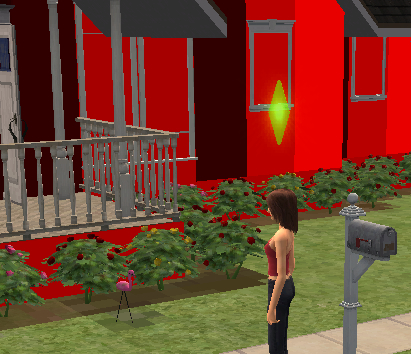
Almost, but not quite. The game installs and runs fine, the frame rate is good, but on both VMWare Fusion 2 and Parallels 4, the walls are red. Solid red. Here’s a screenshot:

I’m a little surprised that both Parallels and VMWare mess up the same detail; there must be something unusual in how the Sims does the texturing or lighting for the walls.
November 17th, 2008 at 12:25 pm
I suspect that you’re seeing the same bug on Fusion and Parallels because I think in both cases The Sims 2 is actually electing to rendering in software.
The Sims 2 has a whitelist of ‘approved’ video cards and video card manufacturers. In both VMware Fusion and Parallels, the game will see a virtual GPU name, not the name of your physical graphics card. When the game sees this, it refuses to use Direct3D at all. It will use a software renderer that it ships with.
You can test this theory by turning off 3D acceleration in Fusion and Parallels. You might even be able to test it by turning off Direct3D in the Windows “dxdiag” utility, though I’m not sure if the game will still run at all if you disable D3D in that manner.
As for the red walls, last time I tried The Sims 2 in software mode I did notice some glitches in the rendering. I suspect that the software renderer doesn’t get a lot of testing at EA or Aspyr, so I wouldn’t be surprised if several rendering bugs like this show up.
– Micah
(Full disclosure: I work at VMware, on the team that does graphics virtualization. I don’t have any inside info about Parallels, but I can assure you that we aren’t sharing any code and there are some pretty big differences in the way our respective GPU virtualization systems are implemented.)
November 19th, 2008 at 10:19 pm
Hey Micah – thanks for the comment. That would explain things, but the framerate that the game runs at makes me doubt that it’s using software rendering. I just tried it using Ctrl-Shift-S to turn on the framerate indicator in the Sims and I’m averaging about 20fps with quite a bit of stuff onscreen, and this is on my laptop.
Or maybe software rendering has just gotten a lot faster than I remember it being…
Is there any way to get VMWare to pretend to be a particular NVidia or ATI card, the way you can fake a User-Agent in some browsers?
November 20th, 2008 at 9:24 pm
Hi Steve,
Unless your version of The Sims 2 differs from the versions I’ve seen, they fall back to software rendering when the video card manufacturer isn’t ATI, NVidia, Intel, S3, or maybe a couple others. Their software renderer is indeed fast- I don’t know what it is, but I wouldn’t be surprised if they were using something like SwiftShader. It will also look pretty fast because The Sims 2 doesn’t render the entire frame every time you move- it optimizes its rendering (both in hardware and software rendering) to draw only the objects in the scene which actually change. So, it will look pretty smooth. Here at VMware we’ve tried working around their software mode check, and last time we checked there were other (more serious) rendering errors when it runs in hardware on Fusion :)
As for faking the GPU ID, we’ve considered this, but it would be difficult for various reasons. We virtualize graphics by creating a hypothetical video card, the “VMware SVGA II” card. You won’t find a physical instance of this card anywhere, but it mostly acts like a real video card, and it looks like a real video card to the VM. When The Sims (and other games) check your video card manufacturer, they usually do this by looking at the PCI card’s vendor and product IDs. These are 16-bit numbers that are baked into the silicon in any PCI card, and they’re used (among other things) for loading drivers. When Windows running in your VM detects the VMware SVGA card, it knows to load our VMware SVGA driver because there’s a .inf file on your system that links the driver to the virtual card’s vendor and product ID.
So, we could fake the vendor and product ID, so our virtual video card looks like some random NVidia or AMD card. But now we’d have to fake the driver INF file too… and this would cause conflicts if you ever used this VM with a real video card of whatever model we faked.
We could do this, and we’ve looked into implementing solutions similar to this- but we’d rather work with the game studios to have our video device added to their lists of supported cards.
Thanks!
–Micah
November 20th, 2008 at 10:03 pm
Thanks for the great response. I’m pretty blown away that their software renderer is that fast – if it wasn’t for the goofy walls I’d be happy to use it without 3D acceleration.
(I used to work for a game company and did some DirectX 3D way back when software rendering was abysmal, so it just didn’t occur to me that I might be seeing software rendering).
May 25th, 2009 at 5:04 pm
Hi guys,
any advise for the case when Sims 2.0 don’t actually fall back to software renderer but always fails with a message “DirectX 9.0c required …” when trying to start in VMWare 2? I’m running it on my iMac with NVidia 8 series card. I tried all possible upgrades of drivers – all to no avail..
thanks-
Gdrs