Gmail, IMAP, and “Account Exceeded Bandwidth Limits”
Apple Mail is failing to fetch mail from Gmail, with the following error:
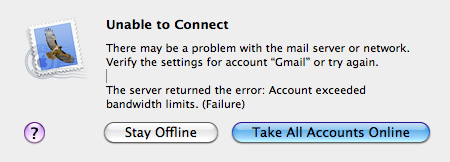
Googling this error message shows lots of other people running into the same problem. Some bandwidth limit on Google’s side is cutting me off. When this happens, I’m put in a penalty box and not allowed to connect via IMAP for some period of time.
I’m not using mail excessively. I don’t get a lot of big messages; I do get a lot of spam but there’s not much I can do about that.
Other users have complained to Google and gotten nowhere. I’m not paying for this service so it’s not like I can call a customer support line and threaten to quit. What can I do?
September 8th, 2009 at 7:02 am
I am have regrets about upgrading to snow leopard. it was only after upgrading to snow leopard that this has happened. out of the 4 days I’ve had it installed, my gmail has been locked out for a total of 48 hours, making it completely useless. this is a serious problem for me.
October 9th, 2009 at 11:40 am
For what it’s worth, I dont believe this is specific to Snow Leopard. There’ve been enough reports from people not running SL and/or not using mail.app (Thunderbird users are seeing it as well). My guess is it’s something Google recently put in (to avoid another embarrassing outage?) that’s exploiting either a flawed or unexpected IMAP implementation. Even the paying customers are getting this issue and finding Google unresponsive.
The short-term fix is to go to this URL and enter the captcha to unlock your account: https://www.google.com/accounts/DisplayUnlockCaptcha
The longer term fix? Find another provider?
More info here:http://www.google.com/support/forum/p/Google+Apps/thread?tid=0ece6b37ff80c552&hl=en&fid=0ece6b37ff80c55200047582b7218f11
November 9th, 2009 at 6:33 pm
The UnlockCaptcha doesn’t always work. Its not working today.
I’m a (paid) Google Apps user. If this isn’t fixed in 2009, I’m moving somewhere else. Like a MacMiniColo running MacOS X Server.
December 8th, 2009 at 10:18 am
This just started happening for my after upgrading to SL 10.6.2. It worked ok with 10.6.1. Frustrating.