Display driver stopped responding and has recovered.
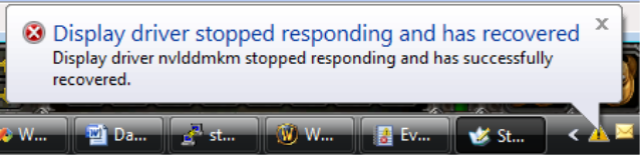
On the one hand, I’m impressed as heck that Vista managed to deal with a display driver crash while I was playing a game without even interrupting the game. On the other hand, my display driver shouldn’t be crashing…
“Display driver nvlddmkm stopped responding and has successfully recovered.”
Nothing in the event log…
March 5th, 2007 at 11:09 am
Yep! I am running vista x64 on an amd X2, 2×6800 and a creative x-fi gamer extreme sound card. Everything else i judge uncritical … :-)
I thought it would be some issue related to SLI. Do you have only one GPU?
greetings. F.L.
March 11th, 2007 at 10:58 am
same thing happens to me about every 20 mins in counterstrike 1.6 but the game does not stay open
March 16th, 2007 at 4:00 pm
Wow same thing here, I’m playing World of Warcraft, and like every 30 seconds or so, I get a black screen and I get the same error.
March 18th, 2007 at 9:47 pm
Yo same with me justin anyone have any suggestions on how to fix it cuz its driven me crazy cuz i cant play my game
March 23rd, 2007 at 8:35 am
Same thing. Brand new Gateway notebook, Vista, trying to play WOW. Just about every 30 seconds everything freezes, the screen blacks out for a few seconds, and then same error. Generic Intel graphics card. I haven’t updated the drivers yet but I will try. Any other suggestions?
March 24th, 2007 at 2:20 pm
hi, all
to fix the problem you are all getting, just simply go to the folder:
c:\nvidia\winvista\driver version number\
then open setup, and install the drivers it should then work, make sure it gets admin too.
If you still need help for any problems related to vista drop me an email at jad@webplanethosting.net
if that didn’t appear it is jad at webplanethosting dot net
you can trust me as i beta tested vista for about 7 years :) still remember good old longhorn :P
Thanks
Jad
March 25th, 2007 at 11:09 am
Hey, same thing here… UT99, and every couple of seconds (maybe it lasts til 2mins) i get the error. The name of the driver is different, but it also says “display driver xx stopped responding”…help plz..
I guess i get xp again and try vista in a year when it actually might be working ;)
March 26th, 2007 at 2:14 am
Oh god it happens to me every 20 secs or so i HATE IT
March 26th, 2007 at 8:20 pm
Same exact thing…waiting for Falcon Northwest tech support to get back to me and let me know why this is happening.
March 29th, 2007 at 5:35 pm
I am running vista ultimate with nvidia geforce 8800 and im getting the same crap. i reformatted and installed the newest nvidia driver released march 2 2007. Version 101.41. No change at all. I have been in contact with my computer manufacturer and he has no solutions either. Before i reformatted i was using version 100.65 which also had the issue.
March 31st, 2007 at 8:40 pm
Display driver nvlddmkm not responding but has recovered. Help I keep getting this message every 30 sec. Need driver update,tried everything I found on web nothing works.
April 1st, 2007 at 6:10 pm
yep right now i got the same problem…i open up WoW and itll freeze then monitor turns off, then on again, then it just keeps on doing that…i am running vista 32bit……7600gt, 1gig ram, dual core……and can someone tell me what Jad meant when he said “make sure it gets admin too.”up there in his post…i am also running 100.65 driver ill try getting the newer one but from what ive heard it still wont work
April 2nd, 2007 at 3:45 am
Oh man I thought it was just me……. I had reformatted 2x and reinstalled vista same results. I get the Display driver stopped responding and has recovered but i hadn’t noticed it until i actually loaded World of Warcraft. Then it happens every 5-10 seconds. I can’t even play “WOW” because about every 5 seconds it locks up, goes to black screen then after another 3-5 seconds unfreezes and video returns.
This is absolutely ridiculous. I was going to spend $159 to get XP2, but decided to just pony up and pay the $239 for Vista so I would have the upgrade….. (SIGH).l…
Looks like its time to go get the XP2 and waste my money there just so i can freaking play the dang game!!! (sigh)
I shoulda known better, I hated myself for upgrading to XP……(way back when)
April 2nd, 2007 at 7:10 am
I have had the same problem with 101.41 & 100.65, but it take a while for the problem to occur. Strangely, I thought one of the main differences was the separation of the driver from the kernel. Somehow it appears it is not fully separated, even tho it’s one of MS’s big selling points on the OS. I am not going to be able to test a solution I found on the web, but possibly it could help you guys out:
I have found and fixed the problem today. This is what appears to happen.
during the installation of the most current drivers 100.65 Vista, an OLD file
nvlddmkm.sys is copied into windows/system32/drivers and not the current one
in the install. As a result the new drivers are attempting to access a file
dated 11/2006 instead of 2/2007 ver 7.15.11.0065 which is in the newest WHQL
driver ver 100.65 vista 32.
Fix: Go to windows/system32/drivers and rename nvlddmkm.sys to
nvlddmkm.sys.old. Go to the nvidia directory and find the file nvlddmkm.sy_
and copy it to windows/system32. Using the cmd window (DOS box) type
EXPAND.EXE nvlddmkm.sy_ nvlddmkm.sys. When the expansion is complete, copy
the new nvlddmkm.sys to windows/system32/drivers and restart the computer.
Your computer should now work properly.
You will notice that any uninstall and reinstall of nvidia drivers will not
remove the old nvlddmkm.sys file and will not overwrite it with the newer
version. You have to do it manually. I do not know why this happens but who
cares as long it is fixed.
April 3rd, 2007 at 6:42 pm
Chawks2- Your Fix doesnt work in the command window. I either get No destination specified or Can’t open input file. I’ve typed the following:
EXPAND.EXE nvlddmkm.sy_nvlddmkm.sys
Ive done everything right with renaming and copying the correct files. Ive double checked my work and no results. Double check what you have wrote. Perhaps you mistyped something in the command window in your directions.
April 4th, 2007 at 10:29 am
Mike – try using a space in the following “^” location EXPAND.EXE nvlddmkm.sy_^nvlddmkm.sys
April 4th, 2007 at 10:34 am
Oh I forgot to mention that the above “solution” I found on the web, was not the problem on my machine. At the moment, I have no idea what caused the driver fault because my machine has been up on running my MMORPG for over 2+ days. Only time will tell I guess.
April 4th, 2007 at 12:47 pm
Michael, I though I was the only one and I must be being thick!
Spent hours the other day trying to do it!
Anyone with help???
April 4th, 2007 at 12:59 pm
Even if someone could make a script that would do it… it seems to be a big problem looking over the web…
Im not too good on that side but i have downloaded scripted hotfixs before.
April 4th, 2007 at 3:51 pm
The bottom line is nVidia Vista drivers are still immature.
April 5th, 2007 at 1:14 pm
I know… does anyone know of any alternative drivers that dont have this bug… its ruining my CSS playability!
Omega arent doing any vista Nvidia drivers yet!
(Card is a BFG 6600GT OC)
April 7th, 2007 at 8:13 am
Same thing happens with ATI drivers. I have 2 machines: 1 Vista 32bit (ATI) and 2 Vista 64bit (nVidia) and both systems do the same thing. It even does it with native M$ drivers. The 64bit machine is brand new. The 32bit machine is about a year old.
April 7th, 2007 at 10:51 am
Hi, I’ve had the same problem with the script. What you SHOULD do is type this whole section in the CMD prompt in SAFE MODE.
This is what solved my problem with the whole ‘driver has stopped responding…’ thing. I hope that it will solve yours too.
Good luck to you all.
Grtz,
Goldilox
April 7th, 2007 at 11:01 am
Sorted my problem… I was running CMD by doing WIN+R — CMD
To fix the prob we had michael, START>Accessories> Right click Command Prompt, run as ADMIN!
Then is works!
April 7th, 2007 at 4:44 pm
Still crashes the sane When I play CSS. Guess will have to wait for Nvid to get thier fingers out of thier arses!
April 9th, 2007 at 6:37 pm
I found that its easy to reduce the amount of times this happens by lowering all the graphics. Turn off AA, and all the graphics on low and this should happen less.
April 9th, 2007 at 7:05 pm
I have the same problem. When I went to the system32\drivers folder, I found the nvlddmkm.sys file and it was dated 3/2/2007 from driver build 101.41. So I’m not sure that is the fix since my was already correct and I stilll get the screen driver failure message.
April 10th, 2007 at 10:47 am
Gentlemen, I noticed the drivers being used for the chipset in device manager are using MS’s from 6/2006. If you look under “System Devices” – there are several chipset instances (ie – ICH8, PCIex etc). I decided to download the chipset identify utility from my mobo and downloaded the “Developer” chipset drivers from Intel’s website. I upgraded the chipset drivers manually for JUST the PCI Express instances , the date on the driver is newer, but not by much, figure it was worth a try seeing as Nvidia and MS are dragging their asses with new stable and mature drivers.
April 10th, 2007 at 6:38 pm
try this
extract 75.03, extract e.g. 77.77 (winrar, 7-zip etc.) copy the files from 75.03 to 77.77 (overwrite).
open the nv4_disp.inf (notepad) insert:
[SourceDisksFiles]
nvlddmkm.sys = 1
nvd3dum.dll = 1
[nv4_NV3x.Services]
AddService = nvlddmkm, 0×00000002, nv_Service_Inst
[nv_Service_Inst]
ServiceType = 1 ; SERVICE_KERNEL_DRIVER
StartType = 3 ; SERVICE_SYSTEM_START
ErrorControl = 0 ; SERVICE_ERROR_IGNORE
LoadOrderGroup = Video
ServiceBinary = %12%\nvlddmkm.sys
[nv.KMode]
nvlddmkm.sys
save nv4_disp.inf, execute setup.exe (ignore the “Security Alert” -> install now
April 11th, 2007 at 7:58 am
!!!FIXED THE PROBLEM!!!
To fix this problem, you will need to spend some time uninstalling Vista.
Once complete please follow the steps correctly
Place Windows XP disk in drive
Go through the install
Once finished installment, enjoi
VISTA IS SEXY BUT UGLY, YUK YUK YUK
April 12th, 2007 at 3:37 am
Got a new 7600gt, that doesnt have ANY problems.
Do we think this is a hardware problem? (If not il sell the 6600gt on ebay!)
April 12th, 2007 at 8:19 am
Just a side note, I have been reading in various Nvidia threads on their user forums (http://forums.nvidia.com/index.php?showtopic=25381&st=620&p=183336&#entry183336). The problem may be RAM related, but this problem DOES NOT occur with ATI cards. So, if you want to get the most BANG out of your BUCK for Vista, I suggest you return your 8800 or nvidia gpu for one that works!
I’m not going to do it, but it’s just a suggestion. I relaxed my memory timings to 5-5-5-12. Let’s see if it helps.
April 16th, 2007 at 6:41 am
There is an article over at XBit labs – all those with nvidia gpus should read:http://xbitlabs.com/news/video/display/20070412224213.html
April 21st, 2007 at 1:05 am
I also had/ maybe have problems with a Sparkle 8800GTX on a P5N32-sli plus MOB with a clean install of Vista32. I couldn’t get expand to work either. In the end used the right click method above to start CMD as administrator then CD’d to the Nvidia directory and ran it on the original file there. Afterwards copy it to System32 (or just run the installation program again). Also my monitor was found as a generic PnP rather than a Dell 3007. Installed this driver also.
April 24th, 2007 at 7:29 am
Ok, so i have installed the new ForceWare 158 Version: 158.18: Date: April 17, 2007 Beta; and am experiencing no change in the “display drive stopped working and has recovered” or it’s frequency, I was hoping this newer driver (as it says it does in invidia’s own driver release notes) that it should have cleared this problem, but Oh no! still no gaming going on at the squirty puff house hold…………..so frustrating im toying with the idea of rolling back to XP, and the use of a stable driver :)
April 28th, 2007 at 11:35 pm
I get this when playing a DVD. I dont game on my new Gateway ultrabright blue light special, but its a quick machine nonetheless.
May 2nd, 2007 at 9:40 am
I get the same thing, though im not using an Nvidia card. Mine came with a shitty integrated intel card (which will soon be replaced) and I still get the same thing. Maybe its hardware? I dunno…
May 5th, 2007 at 9:09 am
I’m having the same issue with an 8800 GTS on the newest release of drivers, which are the official relase of the beta from April. Anyone have a fix yet?
May 17th, 2007 at 7:04 pm
I got my new Gateway laptop that comes with Vista built in. You’d think that since they make a laptop that would fully support it but no. I have the same problem as all of you get. Not as much crashing but enough to kill the fun.
May 23rd, 2007 at 7:59 am
Same problem here. Had this laptop for 3 weeks and it randomly crashes from display driver failure (nvlddmkm) during anything and not just games. Its totally random and can happen when the system is under light or heavy load. I tried multiple versions of official and 3rd party drivers with no effect. Sounds like something intrinsic in the ram timing but I can’t mess with it since my laptop (Everex xt5000t) BIOS is cheap and doesn’t have that option.
May 27th, 2007 at 4:31 am
There is a fix for 8xxx graphic cards ONLY atm … if you download latest beta drivers, they should be working fine .. however, there is no info about drivers for older models … hopefully they release something WORKING soon … or i’ll stop gaming forever .. . . . bwah .. .. dont belive i actually said that …
June 3rd, 2007 at 3:01 pm
Ya so i kinda think that the driver crash is due to over load. i play eq on my brandnew vaio laptop..i was only getting the driver display problem when i had graphics all the way up…i also play 3 accounts on this laptop.. anyhow when i set eq at its lowest settings i stopped getting the display driver recover message…maybe this can apply to you guy…turn down graphics till a new vista driver is updated…cuz im sure song knows about this.. EVERYONE that plays RPG’s is hving problems…
/LFG on Cazic-Thule!!!!!!!!!!!!
July 3rd, 2007 at 5:51 pm
im new to this, just typed in my “display not responding” message into google and came across this site. Does this mean my computer could actually crash?? i’m wondering what it could be b/c I am not playing any games. Anyone have tips? How do i lower my graphics?
July 23rd, 2007 at 3:47 pm
My wife just got a new HP with the GeForce 7300 LE … it happens to her system (VISTA) when she is playing plain old solitare. Any suggestions …..
July 25th, 2007 at 6:09 am
I have this problem constantly when trying to play second life. I have tried everything to no avail. I have a sony vaio, vista x64- this crap sucks.
Any ideas on the easy fix using laymans terms, aside from- garbage dump??
September 7th, 2007 at 1:49 am
Hey Guys,
I too had the same problem, I figured out the problem it is with the RAM, If the motherboard has 4 slots for RAM classified into Bank 0(2 slots) and Bank 1(2 slots)
u have to make sure that on any bank either all the slots are occupied or none is occupied, ex if u have 3x1gb ram pluck out 1 gb so tat bank0 has 2*1 gb and bank 1 is left empty. In this case ur graphics card will work fine no error. Nvidia has to come up with some fix for this
September 8th, 2007 at 11:38 pm
same error here & what Jad says to do does not work so dont bother.
also tried chawks2 idea & i cant even find the file?????????
somebody get the fix please & email me it cnjmama@gmail TY
September 17th, 2007 at 1:56 pm
Here’s my system spec:-
Hiper Type R – 580W : Asus P5N32-Sli Deluxe : Intel Core Duo E6750 with AC Freezer Pro 7 : 2 x 1Gb OCZ Flex XLC PC2 6400 @ 800Mhz : 2 x BFG 8800 GTS OC 640Mb in Sli : 2 x WD Raptor 74Gb : 2 x Maxtor 300Gb : Vista Ultimate 32
Using 163.44 Beta driver from Nvidia and I’m getting the same problem as the rest of you. Was quite intermittent for a few days, but today it’s been happening more and more.
September 19th, 2007 at 5:57 am
hi all,
Sigh, there are even newer drivers (163.69 dated 9/11 and available on 9/17)… but they are just as bad for me. I have done all the steps(sans reformat) and no change to this display problem. I even get scene corruption after a few minutes of game play. MOHA was total waste of time due to the black screening. Worse still, I got random color flashes and false walls and lines coming from me or other objects that just went on to inifinity. Players’ uniforms would change to a negative image(similar to being lit up under a blacklight) while the rest of the scene was OK. I think I got a bad video card(MSI Nvidia 7900 gt) but not sure since I have no other problems outside of games, and BF42(my Fav) plays great for hours. I got screenshots galore, I wish I could post some here for all to see.
I found that I can reboot and play with no problems for 5 minutes or so, but If I die in game or if I get blasted by explosions the corruption begins. It seems that it is an NVidia/Vista/RAM/DirectX9(or10) problem, so we are basically screwed for now.
Specs: AMD X2 4200+ ; Gbyte m59sli-s5 MoBo; MSI Geforce 7900 GT; 2x1gb DDR2 800Mhz RAM; 2x WD 250Gb SATAII HD’s; 2x Maxtor 120Gb ATA133 HD’s; Vista Ultimate 32 -all the crap turned off.
September 19th, 2007 at 12:21 pm
Right you are. I have been through all of the following:
1. Using 32 and 64bit Home Premium, Ultimate Vista
2. Using 3 brands of memory
3. Applying all updates from Nvidia
4. Applying all updates from Microsoft
5. Applying latest BIOS
6. Getting Video card replaced
NONE of these works, Ioaded XP and it works.
Tech support at Dell says Vista drivers and Nvidia are just not mature enough and that’s all they can do. I put the FLAME ON, and asked why are you selling systems with the 8800GTX nad Vista and they do not work? So many people have this problem? They are looking into it more and I may possibly get a MB upgrade. Not sure if that will fix the issue though. This is a terrible problem that I really do think should have been caught before released. I have several posts on Dell’s, Microsofts, and Nvidia’s websites about this. Thought I would post here as well.
September 23rd, 2007 at 12:49 pm
Is anyone still getting error “Display driver nvlddmkm stopped responding and has successfully recovered”?
Im getting error with 163.7 geforce drivers, sometimes after hours of playing, sometimes after 5min, games stalker, company of heroes, and bf2.
Card is 8800 gtx with vista 64
September 23rd, 2007 at 2:05 pm
i think these latest 2 patches are the solution:
esspecialy since the exact erromessage is in the description of microsoft.
http://support.microsoft.com/?kbid=938979
http://support.microsoft.com/?kbid=938194
let me know please if it works i have sended my system back to shop if it works i get it back :)
ilja
ilja.hony@vergelijkshop.nl
September 24th, 2007 at 6:49 am
Been having the same problem ever since instally my Geforce 7950GT, but I seem to have found a solution that works for my system. I have gone 2 days without any “Display driver stopped responding and has recovered” errors. All I did was remove Microsoft Update KB938194 which is suppose to be An update is available that improves the compatibility and reliability of Windows Vista. Since uninstalling this update games that would crash no longer do.
September 24th, 2007 at 11:19 am
I’m having the exact same problem in 64-bit Vista Ultimate. I had it when playing BioShock, and I have it again with Quake Wars. It is driving me INSANE. I’ll be in the middle of a GREAT Quake Wars match, and this error will occur, crashing everything. I’ve tried SEVERAL “fixes” none of which fix ANYTHING. Microsoft and NVIDIA are LAZY bums…
September 25th, 2007 at 5:19 am
ok
so im not alone with this s***
every ms patch added but nothing works, new and older drivers tested etc but nothing works eith 8800 gtx crap
September 26th, 2007 at 4:57 am
I’ve now got a massive problem with my Nvidia 8800GTS – at least I think it is. I run Vista + XP on my system (XP for the games, since Vista is so shite). I updated the drivers on both OS and now all hell has broke loose. In Vista the screen blacks out every other minute and I get the “Display driver nvlddmkm stopped responding and has recovered” text come up. I chuckle to my self and think ‘oh well, at least I’ve got XP’.
Now, XP will work – for a time. Then the whole system just freezes and I cannot do anything. It won’t run any games, and struggles if I have more than 2 windows open.
Connected? I think maybe…
I have removed the drivers, installed the original drivers on both XP + Vista and still the same fault comes up. Two operating systems and neither work! Any ideas what I can do? Or is it a possibility that the actual graphics card is broken….
Help, I’m not that great with PCs and this is really doing my head in….
September 26th, 2007 at 6:50 am
Same problem here with Vista 32. GeForce 8800 GTX, Core 2 Quad, 2 gb ram. Downloaded every update and patch. Happens with Bioshock, World in Conflict and many others.. Crash time varies from few seconds to few hours.
September 26th, 2007 at 9:07 am
Hello, finally some progress against crashing and “Display driver nvlddmkm stopped responding and has successfully recovered.”
I been running stable now 2 days, playing games without single crash.
My system is [Amd 64 X2 6000+] [inno3d 8800 gtx OC]
[4GBram] [GA-M57SLI-S4] [Xfi champion] [3 * 320 raid0] [Vista 64 Ultimate] [Tt Toughpower 850]
My fix is here:
1 unninstall nvidia drivers
2 Let Vista install display driver itself. Now display driver is 11.9.2007 / 7.15.11.6369 (check device manager/display adapter)
3 Use following settings in nvidia control panel
anisotropic filtering = 4x
antialiasing gamma correction = ON
antialiasing mode = override ….
antialiasing seting 4x
antialiasing transparency = OFF
conformat texture damp = OFF
error reporting = ON
extension limit = OFF
force mipmaps = none
multi display…= SINGLE…
texture filtering anisotropic sample optimization = OFF
Texture filtering negative lod bias = ALLOW
texture filtering quality = HIGH QUALITY
texture filtering trilinear optimization = OFF
triple buffering = OFF
Vertical sync = use 3d application settings
October 1st, 2007 at 3:11 am
The Video card is faulty. The card manufaturers clock them too fast out of box…
Ive had the same problem with a 7900GT TOP (ASUS) and now a 8800GTS 640MB OC (MSI).
October 7th, 2007 at 5:45 pm
Hey, I used to have this problem, but for some reason it vanished after a patch.
Until a few days ago.
I, like many other SWG enthusiasts, enjoy the earlier version of SWG better than the current, so therefore I downloaded and installed the emulation of a previous version. I made a character, and I just loaded in, and not 2 minutes into playing it happened. It hadn’t happened in several months. I have to restart my machine before I can play other games as well or else I get the same error. This error only happens when I try to play the Star Wars Galaxies Emu.
October 8th, 2007 at 7:13 pm
Yeah, same here. Just started back up again. I’m going to go into the updater and see what it downloaded that borked my graphics again. They’ve already downloaded two sound driver packs that turned off my SB card and defaulted to the internal. Vista is starting to piss me off….
October 9th, 2007 at 9:41 pm
Ok every one i fixed this problem. I havent got the error for 2 days. What i did was, first i clicked start, then on the search box type %temp%,double click the folder and delete every thing on the right side. Once that was deleted I went to start, Left clicked on computer,properties,advanced system settings,advance,performance settings (were it says visual effects blah blah,advanced,change. ok here is the hard part. On the bottom the screen onced u clicked chang its says “reccomended settings” type that amount in the maximun size box, and mininum size box take out 1200 from what you put in the maximun size box. After that click set apply and restart your computer. (REMEMBER ONLY DO THIS IF YOUR COMPUTER HAS ALOT OF HARD DISK SPACE). When your computer restarts it should be working w/o that problem.
Computer Specs:
Operating System: Windows Vista™ Ultimate
Processor: Intel(R) Core(TM)2 Extreme CPU Q6850 @ 3.00GHz (4 CPUs), ~3.0GHz
DirectX Version: DirectX 10
Card name: NVIDIA GeForce 8800 Ultra
HDD: Samsung 320GB SATA 7200
Sound: X-Fi Sound Blaster Xtreme Audio
October 9th, 2007 at 9:44 pm
O and 4gb of ram pc26400 ocz
October 12th, 2007 at 6:02 am
I have tried everything on here and no luck, what stoped all our cards working ?
Is Nvidia even aware of this at all ?
October 12th, 2007 at 11:38 am
This sucks – I’m having the ‘display driver has stopped responding’ problem after trying oh-so-many ‘fixes’ listed here and on other boards. My NVidia 8800 Ultra can’t run at it’s full blazing glory, and on World of Warcraft I have to turn all setting down to get the crashing from happening so frequently. Makes me wish I had stayed with WinXP, my old NVidia 6600, and my Pentium D 3.0 dual core. I was getting a much better experience on that without the cost of upgrading.
I’m also only running 2GB of my 8GB of RAM because of compatibility problems across the board, including a problem with my Hauppauge TV Tuner card where it will not stream live video with more than 2GB of RAM installed. Apparently Microsoft fixed the issue with the Windows Vista SP1 due out early next year, but a lot of damn good that does me right now.
Shame on you NVidia and Microsoft – we trusted you and look where it got us.
October 15th, 2007 at 6:55 pm
Listen all u DirectX 10 Users If Your Are experienceing “Display Drivers Stopped Working and Has recovered or Screen Freezes” try taking off DirectX10 and use DX9 and all graphics on high it will work w/o issues.
Computer Specs:
Operating System: Windows Vista™ Ultimate
Processor: Intel(R) Core(TM)2 Extreme CPU Q6850 @ 3.00GHz (4 CPUs), ~3.0GHz
DirectX Version: DirectX 10
Card name: NVIDIA GeForce 8800 Ultra
HDD: Samsung 320GB SATA 7200
Sound: X-Fi Sound Blaster Xtreme Audio
RAM: 4GB Of OCZ PC 6400
October 21st, 2007 at 3:13 pm
Hi guys,
Basically after not being able to run Planet Extreme for more than a few minutes or World in conflict, I’ve been playing so far for 3 days with no issues (fingers cross)
I read everything from driver, DX10, temperature and voltage related, etc…
But after tinkering with this for a few days and along the line of what klasu recommended above…(I think) the issue appears to be related with the Nvidia driver setting for “Textures” and “Adjust image setting with preview”.
Running with 163.69, without even reinstalling drivers etc…
I have:
“Adjust image setting with preview” : Let 3D application decide
“Manage 3D settings” (Global settings): main thing here is around “Texture” management.
- Texture filtering (TxF) – Anisotropic: Off
- TxF – Negative LOD Bias: Clamp
- TxF – Quality: Performance
- TxF – Trilinear optimization : Off
You could play with they setting around these options.. I was just happy that I was able to play without crashing :D
But as per some Nvidia forum, I concur, it is related to “Texture” management..
Bets of luck!
E6850, Vista Ultimate, 8800 GTX XFX
October 23rd, 2007 at 11:36 am
# klasu Says:
September 26th, 2007 at 9:07 am
Hello, finally some progress against crashing and “Display driver nvlddmkm stopped responding and has successfully recovered.”
I been running stable now 2 days, playing games without single crash.
My system is [Amd 64 X2 6000+] [inno3d 8800 gtx OC]
[4GBram] [GA-M57SLI-S4] [Xfi champion] [3 * 320 raid0] [Vista 64 Ultimate] [Tt Toughpower 850]
My fix is here:
1 unninstall nvidia drivers
2 Let Vista install display driver itself. Now display driver is 11.9.2007 / 7.15.11.6369 (check device manager/display adapter)
3 Use following settings in nvidia control panel
anisotropic filtering = 4x
antialiasing gamma correction = ON
antialiasing mode = override ….
antialiasing seting 4x
antialiasing transparency = OFF
conformat texture damp = OFF
error reporting = ON
extension limit = OFF
force mipmaps = none
multi display…= SINGLE…
texture filtering anisotropic sample optimization = OFF
Texture filtering negative lod bias = ALLOW
texture filtering quality = HIGH QUALITY
texture filtering trilinear optimization = OFF
triple buffering = OFF
Vertical sync = use 3d application settings
WORKS!!!!!!!!!!!!!!!!!!!!!!!!!! THANK YOU!!!!!!!!!!!!!!!!!!
October 23rd, 2007 at 4:01 pm
Forgot to say: driver version 163.75 (beta) solved the problem. :)
October 30th, 2007 at 2:19 pm
omg plz
i have the same problem is display driver stopped responding and has recovered
but i dont have anything like “nvidia” driver
i dont know what to do now
plz help or i have to quit my racing game seriously
October 31st, 2007 at 10:20 am
Davidcao,
On Desktop, right-click and there will be “NVIDIA Control Panel”. Click there and change the settings.
November 1st, 2007 at 5:59 am
my display drivers crash as soon as windows sidebar loads on boot and says it has recoverd but it clearly has not. when playing any game fps is extremely choppy and lucky if im getting 20 vista ultimate edition is load shi* wait 5 years maybe then microsoft will roll out stable and compatible version of vista. until then im going back to the faithful xp pro ( playing games over 100 fps) using 2 nvidia 7300gt 512mb ram in sli config
November 2nd, 2007 at 6:52 pm
jason,
Is the problem caused by microsoft or by nvidia? I have also an ATI card and it works perfect. I think nvidia people are not good enough to make decent drivers.
November 2nd, 2007 at 9:09 pm
It seems as though this prob has been going on for months now. Still no fix. Im starting to really pissed
off.
November 3rd, 2007 at 12:31 pm
Yeah I don’t have Nvidia so I can’t even apply any of these fixes to test them out >.
November 4th, 2007 at 11:52 pm
We shouldn’t have to lower our settings in order to avoid the bug. I have a monster machine that should be able to handle these settings no problem. Medicating the problem by lowering in game settings isn’t enough.
November 10th, 2007 at 10:55 pm
Still no fix? This has been going on THAT long and still no fix?
I have tried a lot of the things on this board, but I’m now 100% it’s not a driver issue (at least not an Nvidia one) because I have this problem on my ATI card, and I have read many posts by other people that also have ATI cards.
I don’t know WTF to do, and I’m worried that I’ll still have this when I get my 8800gt next week.
November 16th, 2007 at 1:28 pm
It’s some sort of compatability issue with Vista, I recently formatted the same rig i’ve been running XP on for 6+ months with no problem, and now occaisonally this happens. It’s pretty annoying, and while vista is nifty and all, I can’t see any reason at this point in time to use it over XP. Maybe for the Vista SP2, but once I backup my data I’m going back to xp.
November 16th, 2007 at 9:24 pm
I get this message when I am publishing a video on Windows Movie Maker, why???? I got my laptop on June, and I can’t publish a video:( I don’t get any messages when I am playing CSS, please help to fix Windows Movie Maker :)
Or can you send me a email telling me how to fix this thing :)
a_sardor@hotmail.com
Thank You
November 21st, 2007 at 5:57 pm
I have this problem with my inspiron E1705 laptop which has ibm gfx. I’m not thrilled, to say the least.
I was getting this message (and the blackout/pause) every 3 minutes or so with WoW/BC, but after installing an update from microsoft that someone up above recommended, its down to every 10-15 minutes, which quite honestly seems like a lifetime :P
November 21st, 2007 at 6:49 pm
Here is one more trick to try, remove vista hotfix KB938979
i removed it a while ago, but at least so far no nvlddmkm errors.
But maybe im just lucky today…
November 22nd, 2007 at 9:28 pm
Found this posted by Dostoyevsky77 on the nvidia forums, tried it, and found my drivers all seemed to have different dates, even after a fresh install, so I did what it suggested, posted below, and now all have the same date. So far, seems to be working:
I used to suffer this problem, but probably for different reasons. If you’re not overclocking, you probably don’t need to worry about heat (adding much better cooling completely solved my issue). Nevertheless, you should be aware that Vista will try to automatically update your video driver if you don’t take the initiative yourself. As well as being kind of annoying, the Vista update driver is utter krap & is known to cause this problem by installing over some existing drivers, but not others leaving you with a b@stardized driver version.
Stickywulf developed this method that you should use each time you update your driver. It also helps you to force Vista from automatically installing a krap driver in case you forget to check frequently on your own:
1. Control Panel=>Windows Update=>Change Settings=>”Download updates but let me choose whether to install them”.
2. Download the latest driver from the nvidia website. http://www.nvidia.com/content/drivers/drivers.asp
3. Go to Device Manager, select your display adaptor, and uninstall it, choose to also delete drivers when prompted.
4. Reboot computer into safe mode by pressing f8 when the computer boots, when prompted to install new display driver choose “never install a driver for this device”
5. Navigate to c:\windows\system32\drivers\ and rename the file nvlddmkm.sys to nvlddmkm_old.sys. Take note of the date of this file
6. Navigate to c:\windows\system32 and rename any other file of the same date as nvlddmkm.sys which begins with the letters ‘nv’
**ADDED FOR CLARITY***
For examples:
nvcplui.exe become nvcplui_old.exe
nvd3dumx.dll becomes nvd3dumx_old.exe
etc..etc..etc..Repeat for all files with the same date as the file you found in step 5, they begin with the letters ‘nv’
If it is too tedious to rename all the files, you can simply delete them, or move them to a different folder.
*********************
6a. For 64bit Vista, repeat step 6 in c:\windows\sysWOW64
7. Reboot to normal Windows, if prompted again to install a driver choose “never install a driver for this device.
8. Install the driver which you downloaded from the nvidia website.
**EDIT: Innocuous words that were interpreted by this forum as naughty words had their spellings slightly modified.
Hope this helps out.
November 23rd, 2007 at 1:54 pm
A system restore fixed it. So far The problem started after I installed a DVD player because Vista doesn’t come with one.
December 6th, 2007 at 2:20 pm
This is bull how these companies will sell a computer with an operating system and graphics card that are not even compatible…I’m getting the same error message as everyone else too. Would the best bet be to get rid of Vista all together and just install XP? Can you run DX10 in XP? F these hoes.
December 20th, 2007 at 11:57 pm
Hi, gents, any recent development of this ?
In fact I just chat with a DELL tech support, he told me that since Nov07, DELL has ‘fixed’ this problem on their XPS720 series (don’t know how). I am not sure I can take his word for it though.
I was about to buy a new PC but this has been the decision-killer, never seen a problem like this lasting over a year now !
December 23rd, 2007 at 1:57 am
Ok this fix worked for me, and I am fairly confident that it will work for others. I have an AMD 64 4000+ on an Asus A8N-SLI motherboard with an EVGA Nvidia 7900 GPU.
When the “stopped responding” problem first started, it was immediately after I let Windows update the Nvidia driver. I KNOW FOR A FACT that the drivers from Microsoft’s update site, The Nvidia site, and EVGA’s site will all cause the problem. I knew this right away, but I thought I could fix it since I usually can make things work in these sorts of situations. I found out later that I was dead wrong.
Furthermore, Microsoft and Nvidia do not seem to care at all that people are having these problems. I have not seen any official statements on the issue. I have seen about 1000 complaints about it all over the net, however. So here is how I ended up fixing the problem myself. I think if you do this, it will fix it for you too.
After trying every fix in the world to no avail, I reinstalled Vista and used the “Hide this update” thing in the auto-update settings to prevent Windows from ever updating the Nvidia driver. You can do this by selecting “View available updates” when it asks you for updates, then right-clicking on the “Nvidia driver” section and choosing “Hide update”. As long as I do not update the driver from what comes with Vista, I never have the problem.
As of today I tried getting the most recent drivers from EVGA, along with the most recent release of DirectX. This is 6 months later and the same problem is still there. To undo the damage this time, I went into Device Manager, right-clicked “Nvidia 7900″ under “Display Adapters”, and chose “Properties”. Then I clicked the “Driver” tab and clicked on “Roll back driver”. This removed the driver I had just installed, and now again everything works fine.
I hate to say it, but I don’t think this problem is ever going to be addressed by Microsoft or Nvidia. So I am stuck using a very outdated graphics driver from August 2006 until I save up enough money to buy an ATI card. I was hoping I wouldn’t have to do that, but it is my plan now. Good luck with this, it is one issue that really is stumping a lot of people.
December 25th, 2007 at 3:39 pm
Hate to break it to you Adam, but ATI users are having the same exact problem. The only difference is the driver name. This leads me to believe that the problem is definitely on Microsoft’s side.
December 28th, 2007 at 3:03 pm
I have Vista Ultimate 32 bit and have had the same problem with 8600gts in sli and with an ati hd 3870. I haven’t had a single problem up until a month ago. I let Vista update everything. I wouldn’t count on solving your problems by buying an ati card. The only thing I know that works is reinstalling Vista and as soon as you install any other video driver, the problem occurs.
December 29th, 2007 at 4:49 pm
Okay, so I unistalled the driver in device manager (even though the driver was the correct one) and let windows uninstall the driver software. Then I restarted and stopped vista from installing whatever driver it could find. Then I installed the newest driver from ati as administrator. Now everything works fine. I’m not connected to the internet on this computer I’m talking about though. I’ve disabled automatic updates so we’ll see how long this lasts.
January 6th, 2008 at 11:11 pm
Im having the same problem as all of you and have tried just about everything,I even sent in a bug report to NVidia. only thing I havent tried is not using DX10 and the reinstall and use the driver windows suggests and not updateing the driver to the latest or at all…I wonder how those fixes have worked out for the ones that have tried them? I also wonder if people running XP,XP Pro,or XP 64 bit are getting along and if they have thease issues? I dont seem to be having any issues on my older XP machine,matter of fact it ran pretty well.I just wanted to see the new operating system and the new DX10 stuff in action. This reminds me of when I updated to windows ME from 98 2nd edition which ran like a top,that was a mistake too and ended up going back to 98! Hope this thread continues and someone comes up with a real fix. Thank you all and I will keep trying too.
My sys specs:
EVGA 680i MB,Intel E6750,8800 Ultra,150 Raptor,3 gigs ram,Vista Home Premium 64
January 22nd, 2008 at 12:02 pm
Oh god, I have tried everything! I had this pc for about 3 weeks…had some graphics driver issues at first but thought I had them worked out for the last 2 1/2 weeks, now all of a sudden out of nowhere this stupid display driver error. I am so fed up with vista I would like to smack bill gates in the head! I reallt regret buying a system with Vista, and am ready to wipe the whole system out and install xp…only issue is I have been told that some of thehardware on the newer pc’s XP won’t recognize or have drivers for etc, etc…and ofcoarse when you buy a pc thses days they give you NO disks, drivers or anything! A $2000 paper weight!!
January 25th, 2008 at 8:44 pm
Moopioman, thank you so much… I tried every trick i could find, but the only thing that worked was removing vista hotfix KB938979.
January 25th, 2008 at 11:17 pm
Alright…this problem has been going on for over a year now and STILL no fix…I honestly want to know what the heck those guys are doing…I seriously would just love to sit and watch a microsoft tech work and see what they do….is it seriously going to take years to fix this problem that thousands of people are having! I just recently built my computer (no older than 15 days) and just started getting this problem with Vista 64-bit and I have tried everything i’ve seen on forums and nothing works.. I have seriously lost all respect for microsoft…I feel like they dont even care about their consumers and just crave money so they send out an unfinished OS that has a ton of problems just so they can make more money…
I guess theres nothing I can do but wait for an update that ACTUALLY fixes the problem for everyone and not just some people while others still have to suffer…so untill then i’m sticking with XP and putting that garbage vista in the trash where it belongs!
Specs:
Quad q6600 2.4GHz
4x 1024 Crucial Balistix
8800GTS
GamerXtream 750watt PSU(so that rules out PSU causing the problems as other people have mentioned)
Vista 64-bit (Not for long….)
January 30th, 2008 at 6:52 am
Its neither a nvidia or a ati problem. It is a vista problem. Many ppl have the same setup but with windows xp and it works fine.
Heres a page thats has some solutions http://www.repairyourpcnow.com/resources/atikmdag-has-stopped-responding.php?comm_page=2#
February 1st, 2008 at 11:20 am
Just wanted to post this and let you know that I used the fix Jal posted on november 22, 2007 and it worked. ONE WORD OF CAUTION. DO NOT DELETE ALL FILES THAT START WITH NV as Jal suggested. several of these files are critical such as NVSTOR32.sys. without this file vist WILL NOT BOOT. Also, there were two additional files that were critical to networking. however after i restored those files the system is running perfectly. no more display driver error messages. hope this helps and good luck
Antec Nine Hundred
750W Toughpower PSU
evga 680i SLI Motherboard
Q6600 Go stepping CPU oc’d @ 2.8
Ultra 120 Premium CPU Cooler w/ 120mm silenX
EVGA 8800GTX
Thermaltake GPU Cooler
2x1GB Mushkin DDR2 1066
2x 500GB WD Caviar SE16 HDDs
2x Samsung 18x DVD+/-RW
Superpanel
Windows Vista Home Premium 32
February 6th, 2008 at 4:13 pm
heres an update. it worked for several days however i started getting the error message again yesterday out of the blue. anyone with any new thoughts?
Bob
February 7th, 2008 at 4:51 pm
Well here is what I’ve done and it should work for a lot of you.
1) go to c:>windows>>system32>>drivers>>nvlddmkm.sys
2) delete nvlddmkm.sys
3) go to c: >> nvidia >> setup
4) install it again
5) a new nvlddmkm.sys should appear, check for it
6) restart computer
7) e-mail riceyasian86@gmail.com if it worked for you
The old nvlddmkm should be deleted prior to installing the new one.
I’m using 169.25 and the problem has stopped for now. For at least a week now (6 days)
So e-mail if this works for you so I can go around posting this anywhere and everywhere I can. If not, and it worked, post it on all boards that you can find.
I hope this works for you all
February 7th, 2008 at 4:52 pm
****step 4 edit****
4) Install your driver again by going into the driver number folder.
THEN click setup
k
February 10th, 2008 at 1:39 am
It isnt a vista, nvidia, or ati issue, It is a memory issue, One of you sticks is bad and the bios diag is not enough to tell you have to actually pull the cards out to tell which one or ones are bad. I tried everything from new video cards to pc restore and after month of searchin i finally found it. ppl who are pulling the sticks out and getting good results are right but its because they are takin out the faulty sticks, If you put a good one in its place you can go back to full gaming experience and no more driver error.
February 10th, 2008 at 1:42 am
and also the renaming file thing wont work because when you download a new driver it will put same files back in with the same date. (already tried all that and it does not work). trust me when i tell you that its bad memory issue. save your self sometime and effort and focus on the memory …..kendoigii@yahoo.com
February 16th, 2008 at 2:12 pm
# ken Says:
February 10th, 2008 at 1:39 am
It isnt a vista, nvidia, or ati issue, It is a memory issue, One of you sticks is bad and the bios diag is not enough to tell you have to actually pull the cards out to tell which one or ones are bad. I tried everything from new video cards to pc restore and after month of searchin i finally found it. ppl who are pulling the sticks out and getting good results are right but its because they are takin out the faulty sticks, If you put a good one in its place you can go back to full gaming experience and no more driver error.
well explain this to me Ken i have a brand new system only two days old and getting this message so your still gonna tell me that the ram is bad is brand spanking new. you must think people are idiots to actually think your gonna buy a bad stick of ram
February 28th, 2008 at 10:52 pm
I’ve had the same problem for a few months now, however the strange thing is it’s never happened to me while I’m playing games. I play some pretty demanding stuff too. It’s mostly only ever been while running windows media player, listening to music or watching dvd’s. The interesting thing is I literally *just* finished running windows update and downloading an update for my graphics card (nvidia 8800gtx ultra on dual monitors) I rebooted my machine as usual, started working in photoshop again and it hit me with that error not five minutes into me going back to work. Now it doesn’t stop doing it, I can’t work. I ended up here after doing a search for solutions, and thought I’d post this in case it helps someone figure out the problem. I’m assuming it’s got something to do with the way nvidia have (badly) coded the drivers. I’ve owned this machine for around six months now and I don’t remember it doing this with the original drivers for the card. I’m tempted to go back to those drivers and see if it happens then.
March 1st, 2008 at 7:56 am
Try this http://support.microsoft.com/kb/938194/en-us
March 1st, 2008 at 2:30 pm
hi guys i had this same problem and it took me about a week of looking at forums and i never got anywhere but i found a fix that might be worth trying i cleard all my movies and games on to dvds as i was going to reinstall and i downloaded nvidia driver 169.25 and gpu-z.0.1.7 and i deleated the new nvidia driver and installed 169.25 and installed gpu-z0.1.7 and tried the games that were crashing and i havent had that anoying thing on my screen since oh my specs are
q6600
8800gtx bfg oc
4gig xms2 corsair 6400
zalman resinator v2 watercooling
antec 900 gamer case
samsung 2232bw moniter
creative extreme gamer sound card
creative t9700 7.1 audio
logitech g15 keyboard
logitech presision mouse
i think its worth a try i know everyones problem isnt the same but give it a try it might just work for you as it did for me
March 4th, 2008 at 10:53 pm
I tried every fix on the net for this message but I think I have found a solution that may work for everyone!
Display driver nvlddmkm stopped responding and has succcessfully recovered.
READ THIS IT SHOULD FIX YOUR PROBLEM!!
I have found that if you use the default driver that comes with Windows, you will no longer get this error. I know that many advancements in the past two years are not included bacuase the driver is old, but at least it works. I play Everquest II at full speed all the time.
Here is some information on it that I found by going under Device Manager and clicking Properties on my Display Adapter.
Driver Provider: NVIDIA
Driver Date: 8/21/2006
Driver Version: 7.14.10.9686
Digital Signer: microsoft windows
This is the driver that Windows uses when you first install Vista. I have used both the 32-bit and 64-bit versions of Vista and I know it comes with both of them. My copy of Vista is about 1 year old, I’m not sure if newer installments come with an updated driver..
ASUS A8N-SLI
AMD64 4000+
EVGA NVIDIA 7900
2 GB Corsair matched RAM
WD Raptor 74 GB HDD
March 4th, 2008 at 10:59 pm
As a supplement to last post, this default driver is present after reinstalling Windows Vista if you need to do that as a last resort.
I have tried the new drivers offered over the past year from NVIDIA, and they always cause the error message. All I had to do to make the system stable again was go under Device Manager, click Properties for my Display Adapter, click the Driver tab and then the Roll Back Driver button. This makes everything work again.
NOTE: I think the Roll Back Driver feature only goes back one, so only try one driver at a time, then roll back, or you may lose that default Windows driver that works.
March 27th, 2008 at 5:20 am
Knowledge8069: That is not a fix, that is a work-around, and an un-acceptable one. Those drivers won’t play most games released since vista was released. If you wanted to play everquest, why not install XP since the game is DX9 only? I guess your work-around makes sense if you are constantly crashing at your desktop though. Nice find.
My letter sent directly to the Windows Vista Global Support Manager, as well as the Microsoft Services Technical Support Manager (I have friends…)
I have removed the email alias and name of the Microsoft Employee in question to protect the idiotic:
To Whom it May Concern
I will recap the issue one more time to provide some additional insight in the event that this issue lands in the lap of someone that cares to help me…
First of all… This is the worst customer service experience of my life. After plunking $225 down for this VISTA ULTIMATE X64, I am left with a $2500 word processor. I can’t play games (DX9 or DX10), which is what this computer was built for, nor can I do any graphically intensive work because “the display driver has stopped responding and recovered” after 3 minutes in. If you google this error you will see literally THOUSANDS of people are experiencing this problem (if not hundreds of thousands). I have tried dozens of WHQL certified drivers ranging from Forceware 71.84 to the current 169.21, all versions experience the same problem (Yes, I have removed the previous driver with drivercleaner after booting to safe mode prior to updating to a newer driver set). Now, one would be quick to point the finger at Nvidia because the event triggered upon the driver resetting is a 4101 event for “nvlddmkm.sys”. However if you read through the forums, you will see many ATI users also experiencing the problem. For them it is atikmdag.sys that fails and is recovered by windows (also consider there are FAR less ATI owners then Nvidia owners). This problem is related to Vista’s TDR “feature” (Timeout Detection and Recovery). It is TDR that detects that my video driver is about to fail and restarts it… When TDR is disabled a hardlock occurs.
My computer specs are attached to this mail. I have replaced:
4 graphics cards (started with an Nvidia 7950, replaced with 8600GT, then with another 8600gt with 512mb, then with my current 8800GT. Every card experienced this problem)
3 motherboards (different chipsets, intel, Via, and Nvidia)
3 pairs of memory
2 Power Supplies (Running a 750watt OCZ now with 4 +12v rails rated at 24 amps)
3 hard drives
2 copies of Vista (when Home Premium started this behavior I went out and purchased Vista Ultimate, it is no better)
I’ve formatted and re-installed a total of 5 times…
I’ve tried “underclocking” all of my hardware down to the point that I was running 1 memory module (rated at 1066MHz) at 667MHZ, underclocking the FSB, and running my 2.66GHz Core2 at 2.0GHz… I still crash. This is not a hardware issue. If I load XP on my rig, everything runs fine. I can play until I pass out without any problems whatsoever. I believe the issue is within the DX10 API. The games I have tried are certified for Windows Vista and have the Games for Windows logo.
After many weeks of exchanging phone calls with your “support” center in India (I assume they are in India based on the thick accents), I wait at home for hours for a schedules call and eventually get a call from a guy (xxxxxxxx) who remotely connects to my computer and literally starts playing solitaire to repro the issue… No, unfortuantely, I am not kidding… Nobody has been able to actually comprehend what my problem is, much less fix it. There is a distinct language barrier that I can not seem to get past when dealing with the support center overseas. I have asked numerous times for this to be escalated to the next tier of support, but have been told a number of times by many people that there is not a “next level of support”. This “support” that is offered is completely worthless to me. I know more about vista and it’s “features” then any of the folks I have spoken with from support so far. At this time, I want this issue ESCALATED to the NEXT LEVEL OF SUPPORT! I’m finished talking to the frontline support people who read their little scripts to me and don’t even attempt to comprehend what my problem is. Microsoft is already fighting a class action lawsuit over issues like this with Vista, and I can see why. You offer the worst support I have encountered in my life, have I mentioned that yet? I am a Network Systems Analyst for one of the highest traffic websites in the world, so you could call me an advanced user, yet your support people talk to me as if I were 4 years old. Your people do not know what TDR is or how it works, or doesn’t work (I’ve had to explain it to every single one of them), they do not even understand what DirectX 9/10 is, and they keep referring me back to hardware manufacturers and software venders.
Yesterday, xxxxxx failed to do his job correctly and did not retrieve the msinfo or system information files from my computer that he said he needed to escalate my issue. He has called me twice asking that I email him these files. Both times the e-mail has bounced back undeliverable. How difficult is it for your support people to open a hotmail account that I can send the files to? Apparently, very difficult, because they won’t do it…. They literally told me to simply e-mail it again… so I did, and it bounced back undeliverable… again… I am at my wits end here. I paid good money for this bloated OS and my new top of the line computer and now I can do nothing with it at all… sure is pretty though. I would like someone to contact me as soon as possible to let me know they are engaged and investigating. My contact information is below and my next step is to see an attorney. Thank you.
—————-
Check my original post for updates on what (if anything) I am able to find out:
http://i.nconspicuo.us/2007/03/28/nvidia-nvlddmkm-vista-driver-fix-here-is-the-solution/
April 1st, 2008 at 5:05 am
Hey glad i found this bloq, but still having driver display crashes whenever loading Battlefield Midway. I,ve read about 3 different solutions but none have worked (could be operator error here) any help would be apprecitated
April 4th, 2008 at 10:33 am
Ahh I guess I thought EQ2 used the newest version of DirectX. Yeah I can see how it would not work for some people. But at least it will stop the problem.
Maybe in the worst case scenario people could install XP in a separate partition to play games needing newer drivers..
April 10th, 2008 at 5:25 am
“The Display Driver has stopped responding and recovered” error is simply a preventive BSOD. The cause for the BSOD could be any number of things… a stick of bad memory, faulty video card, CPU, or failing hard drive. It could even be a software or driver issue in some cases. This is why some people have fixed it using various methods and some others who have swapped hardware have also had success where others have not. Each case is unique and this TDR (timeout detection and recovery) feature only kicks in to save you from a bluescreen and losing all your work. In that respect it is actually a cool feature.
So… how do we fix it. Well… there is no easy answer for this unfortunately. The best thing you could do it to disable TDR in the registry to allow the stop error (BSOD) to happen naturally. The idea of allowing the BSOD to run it’s course it so that you can note the information within the blue screen trap. You can post the information on hardware forums or try to get Microsoft support to help you. Try process of elimination first. Run one stick of memory at a time. Clock everything down to stock. Test something that you know will crash your system and try to reproduce the issue.
If all else fails, write down the model number of your memory, motherboard, and video card and keep a txt file saved with your system specs. Make a new post in the support forums for each hardware manufacturer. I have open tickets with XFX, Microsoft (managment escalation), Intel, and Corsair. I have swapped everything but my processor at this point and that is next. I’m still working with Microsoft on this to find out what the source of my error might be.
April 22nd, 2008 at 1:25 pm
Hi all,
I’m running vista home premium 64 with factory overclocked 8800gt card, gigabyte motherboard, q6600 cpu, 8gig 800mhz ram, wd harddrive.
Ever since installing Vista I have been having the display driver problem but only when running games (WOW in particular).
After using Ntune and underclocking my graphics card down to stock speeds 600 / 900 I have had no problems for weeks.
At start up I run Ntune and load up a profile that resets my card and the computer is happy and so am I !
hope this helps.
May 28th, 2008 at 4:52 pm
Okay, so I’m not a computer geek, I don’t know a lot, but I do enjoy my one mmo, Lineage2. For the past three months or so I haven’t been able to play, since Vista did an automatic update on my display driver. I’m getting the same message, and the black flicking screen. Before the update I was running two clients at one time, with little to no lag depending on my internet connection. Now I can’t even get one client to reach the login screen. Any simple help would be much appreciated. Thank you!
June 6th, 2008 at 9:06 pm
On my laptop ive got windows vista home premium 32… and my graphics card is Mobile intel 965 express chipset family… im getting the exact same problems as u guys… playin Wow and next minute my screen flicking black and the same message…. i dunno much at all about computers nd dont really understand half the stuff thats written up there :s…
could some kind person plz explain to me in full detail how to fix this? :) because im very close to smashing my laptop off the floor :S
Thanks :D
June 6th, 2008 at 9:10 pm
Oh and the exact message im gettin is “The Display Driver has stopped responding and recovered”… nothing about that nvlddmkm thing :S
June 10th, 2008 at 7:02 am
I feel I have completed my “due diligence” on this subject. I have exhausted every avenue and option at my disposal, and I have not yet found any permanent solution. I have scoured the internet for every idea I could find, but they have been exceedingly rare among the sea of complaints and desperate pleas for help. I feel that unless there’s already a concrete resolution available, which has evaded me (and it would appear, so many others), it is time for us to seek help / reparation legally. I think that financial accountability for this problem could be assigned by a court, and that the thousands upon thousands of victims here are entitled to an explanation, at LEAST!
I propose that a class-action suit is formed, listing Microsoft (Windows Vista) and NVidia as the ‘accused.’ I’ve been PATIENT, and I’ve kept my negative words to myself LONG enough. I rationalized that, as a top-tier customer, after shelling out the cash for Vista Ultimate (64-bit) and an NVidia 8800 Ultra card, there was simply NO WAY I’d be left without an answer. 8 months have gone by, and NOTHING has been offered by either company, because they can’t address the issue without taking responsibility first. Their lawyers tell them not to admit any wrong-doing, because then we’d all have means to demand refunds (or more).
The next step is to deny them the honorless option upon which they’ve relied for FAR too long; denial of fault.
What do you think?
June 11th, 2008 at 4:05 am
[...] goolging. Came to this post on the SteveX Compiled blog: Display driver stopped responding and has recovered – from 15 months ago. Among the 115 [...]
June 16th, 2008 at 11:15 pm
To UnlicensedFish,
This issue isn’t exclusive to Nvidia; ATI owners suffer the same problem!!! I own a HD3870 and all I get are the dreaded “Display driver stopped responding and has recovered” while gaming in Vista Ultimate 64. At any rate it’s time for Microsoft to get off their duff and fix this issue seeing that they are the common denominator between Nvidia & ATI.
June 24th, 2008 at 6:47 am
Hello everyone …
I built a new box a week ago and promptly received the above error.
Spec –
————————–
Q6600 oc to 3.2Ghz
4Gb of crucial ballistix
9800GTX
Abit IP35Pro
————————–
Days of googling and numerous attempts at resolving the issue from the driver/windows side, I decided to address the issue as a heat problem.
After using Rivatuner to increase the VGA fan speed to 100%, I can safely say that the stability of the system has increased enormously. Where as before I was getting crashes every 8 – 12 minutes, I’m only having issue now every 30 – 40, irrespective of the application.
I’ve just purchased a Thermalright HR-03-GT which I intend to mount it to the graphics card tomorrow along with an 80mm fan. I’ve also purchased a fan for the door of my Antec 900 case to ensure that I get good airflow.
Hopefully this will resolve my issue, but in any case I will post my results here…
Peace.
June 30th, 2008 at 3:23 am
Hello!
Just bought my new comp and got the same damn msg. I really can’t believe this.
Geforce GTX 280, Q6700 4gb of 1066 DDR2 on ASUS P5K.
Windows Vista 32 ULTIMATE.
I just bought Age of Conan as well, I’m playing it on full details
I can hardly play for 20min and then it tilts. The game works great. FPS really high.
I’m working atm and found this thread. Gonna try everything when I get home.
I really can’t figure out why in the hell I pay shitloads of money to get a new comp which is incompatible with goddam* everything! :D
September 5th, 2008 at 2:31 pm
Hi.
I’ve had this computer for probably well over a year now, and previously I was able to play all sorts of games without problems. However, recently I’ve noticed that my copy of The Sims 2, which I’ve played for months now perfectly, has been laggy. I attributed this to the fact that I had turned my settings up and installed a new EP, but last night after the game stopped responding for a few seconds and I immediately turned it of I got this error. I’m wondering if I should be concerned about this or just treat it as a passing glitch. My parents payed a lot of money for this computer, and I would hate it to be rendered unusable by such a persistent and unsolved issue.
According to my computer properties, I have a Windows Vista Home Premium 32-bit, Intel Core 2 CPU, 4400 @ 2.00 GHz 2.00 GHz (whatever that means), 2046MB RAM, and an NVidia GE Force 8600. I think my computer is one of the nicer ones and should not be having issues.
I’d just like some information as to whether there is a fix out yet and if I should even be worried at all.
Thanks for your time,
-Steph
September 14th, 2008 at 6:15 pm
I’ve had my computer for almost a year now. About 5 months ago I started getting this error. I have tried just about everything I have found in every thread on the web. Sometimes it works fine for weeks, then one day it just starts again with errors and I go through all the crap I did the month before to fix it. Sometimes it only works for a day or two and I have to go through all the crap again. It stated again this morning and I have gone through all the crap I have for the last 5 months and my device driver is still failing after 8 or 9 hours of installing/uninstalling, updating, restoring, recovering…
Here is my solution:
First I am going smash the computer into as many pieces as possible. Then I am going to fill three boxes with those pieces. One box will be sent to Microsoft with a very polite letter explaining how I feel that they produce nothing but crap and I will never buy thier worthless products again. The second box will go to nVidia, with a similar letter and the third box goes to Dell. (yes, with a letter) Then I am going to buy a Mac.
I think it is rediculous that people spend a few thousand dollars on a “gaming computer” that cant even play a game. Dell says it’s not their computer, nVidia says its not thier video card or driver and Microsoft says it’s not due to windows/vista. Every manufacturer that has a piece of equipment related to this problem blames the other manufactures for the problem. They obviously don’t care, they already have my money, and in return I have a $2000 paper weight. Well, minesweeper and solitare still work, I guess that counts towards a “gaming system” I’m tired of making phone calls once a month to try and get this fixed. Hope you all have better luck than I have.
September 28th, 2008 at 10:26 pm
Well I had a gaming addiction until I purchased a Vista operated system. It has effectively stopped my gaming habit due to the stop video responding crash everyone else mentioned here. I still can use it for the internet and my video studio software. Games are history now.
October 21st, 2008 at 4:45 pm
For those people that decide to disable TDR and wait until BSOD appears or continue playing the game, heres the instructions, start regedit and go to the following line: HKEY_LOCAL_MACHINE\SYSTEM\CurrentControlSet\Control\GraphicsDrivers, right-click on the GaphicsDrivers bit in the sidebar and select new -> dword and name it TdrLevel exactly, leave the hex at 0×00000000, this disables the timeout detection.
October 29th, 2008 at 3:37 am
EVERYONE READ THIS RIGHT NOW!
I had this problem for the last two weeks, and been literally pulling my hair out. Recently got a new Duel core computer, knowing id update the graphics card. Bought 9800gt and 4gigs of ram, new power supply etc.
Put in graphics card and new RAM and had the same problem as every post here with the driver errors-
“Display driver nvlddmkm stopped responding and has successfully recovered.”
Tried everything, uninstalling drivers, putting on latest, changing NVIDIA control panel -all nothing.
BUT saw the post about RAM causing an issue. So I pulled out my 4 gigs of ram, and put in my old 2gig. WHAT THE FUCK, It worked! no driver crash whatsoever, Quake 4, Bioshock etc all running great.
Go and try other RAM right now if your shit isnt working!
October 29th, 2008 at 5:51 am
Did anyone find a solution yet? I’ve tried everything and it’s damn useless. I just can’t delete XP because I don’t have a copy, and even if I had, it’s a computer for my work, so I can’t lose any single document from it… I don’t even play games on it, I just work with folders and some graphics, and bam – it crashes with this well-known message, burn it in hell…
October 29th, 2008 at 4:34 pm
SOLUTION!
Ive had the same problem with the display driver error, and tried almost everything. Brand new computer, and 9800 gt video card. Ive been pulling my hair out for the past 2 weeks. My last resort was to take out my new 4gig of RAM, and put in my old RAM as someone suggested on this site.
IT WORKED!!!!!!!!!!!!!!!!!
One of my new RAM sticks was corrupt! Thats what was making my games crash! I cannot believe it. Please try this, im sure its your problem as I tried installing new drivers, removing old ones, screwing with NVIDIA control panel, all nothing. It was my RAM. I hope this helps!
November 12th, 2008 at 2:32 am
***MAY HAVE A SOLUTION***
Ive had this problem with both 2 gigs of Team Xtreem RAM and 4 Gigs of Crucial Ballistix Tracer RAM on Vista Ultimate 32 bit.
I *think* I may have found a solution which *may* help some. I tried this a few days ago and haven’t had any problems to do with the “Display Driver Stopped Responding and Has Recovered” Issue.
What I did is downloaded two things:
1) Newest Nvidia drivers (178.24)
2) Driver Cleaner Pro
After uninstalling display drivers I rebooted. I then ran Driver Cleaner Pro and selected it to clean “Nvidia” (or similar). I then rebooted and installed the newest set of Nvidia drivers. I haven’t had the problem in a two weeks or so and have been gaming for multiple hours without any problems. This then draws the conclusion that the Display Driver Stopped Responding and Has Recovered problem may have something to do with Nvidia’s uninstaller or files being left behind.
I’m not saying this will fix everyone’s problem as its such a broad problem, but it may have fixed it for me.
GOOD LUCK!
November 22nd, 2008 at 8:22 am
I’ve tried many of the suggestion on this page and several form others, but the 1 that seems to b working for me ( 3 days on and no reocurrence, happend once an hr before) is chawks2 suggestion near the top of the page I ran across the same suggestion here: http://www.eggheadcafe.com/software/aspnet/29415832/display-driver-nvlddmkm-s.aspx
January 1st, 2009 at 2:15 pm
I had this same problem. My computer was only a few days old and it started doing this a lot. I called Dell, they sent a repair guy to my house he put in a new video card and replaced all the RAM 4GB. After that I never had the error message again.
Dave G
January 12th, 2009 at 5:51 pm
I have had this problem for 8 months now. I read every forum and solution on the net that i could find. I only fixed it two days ago but I have not had a problem even with games that were garenteed to bring up this dreaded problem. I know it sounds very simple and Im not sure it will work for everyone. Im not sure if anyone has tried this solution but it worked for me and it is alot more simple than anything I have tried. Ok is all I did was go too the “control panel”. Go into the “power options” and set your computer too “High performance”. Like I said, 2 days and not a single error message. If this doesnt help, you may have to put in a bigger power supply. I hope this works for some people. Good Luck.
January 18th, 2009 at 5:49 pm
I have had this problem with my Nvidia 8700m-GT video card in My less-than-a-year-old Alienware MX15. The driver is from 2007, and there was nothing new on Alienware’s site. To fix this problem,
I dowloaded this: http://www.nvidia.com/object/geforce_notebook_winvista_179.28_beta.html
Which is the Nvidia driver for notebook. Of course, it would not install on notebook, despite being the latest release. Flippin Alienware.
So I downlad dthe river, expanded it to a folder and ran this:
http://www.driverheaven.net/nvmodtool.php
The Nvidia Mobility modder altered the installer and I was successfully able to use Nvidia’s new release driver.
I am not sure if this will help anyone… But I found it useful to fix my Mx15. I also turned of Aero.
I have played fallout 3 without the crashing I Was getting so far, so I hope this problem is permanently fixed.
I am not an expert, or affiliated with mobility modder software.. So use at your own risk. But it was helpful, so I thought I’d post.
January 20th, 2009 at 1:42 am
I have a vista 32 bit and the driver is crashing. About 2 yrs ago i had this problem until a friend of mine gave me a website to download either a patch or a driver update and it cleared the whole flashing problem up. this only happens when im playing world of warcraft. i had to reformat my computer due to the system slowing down and the problem returned. i must have deleted that update i downloaded. now i cant find any solutions. anyone know what im talking about?
February 7th, 2009 at 10:34 am
I’m going to do this but:
I have had the same problem with 101.41 & 100.65, but it take a while for the problem to occur. Strangely, I thought one of the main differences was the separation of the driver from the kernel. Somehow it appears it is not fully separated, even tho it’s one of MS’s big selling points on the OS. I am not going to be able to test a solution I found on the web, but possibly it could help you guys out:
I have found and fixed the problem today. This is what appears to happen.
during the installation of the most current drivers 100.65 Vista, an OLD file
nvlddmkm.sys is copied into windows/system32/drivers and not the current one
in the install. As a result the new drivers are attempting to access a file
dated 11/2006 instead of 2/2007 ver 7.15.11.0065 which is in the newest WHQL
driver ver 100.65 vista 32.
Fix: Go to windows/system32/drivers and rename nvlddmkm.sys to
nvlddmkm.sys.old. Go to the nvidia directory and find the file nvlddmkm.sy_
and copy it to windows/system32. Using the cmd window (DOS box) type
EXPAND.EXE nvlddmkm.sy_ nvlddmkm.sys. When the expansion is complete, copy
the new nvlddmkm.sys to windows/system32/drivers and restart the computer.
Your computer should now work properly.
You will notice that any uninstall and reinstall of nvidia drivers will not
remove the old nvlddmkm.sys file and will not overwrite it with the newer
version. You have to do it manually. I do not know why this happens but who
cares as long it is fixed.
[IMG]http://i237.photobucket.com/albums/ff174/mrznovce/2-7-20094-20-07PM.jpg[/IMG]
My sistem:
[IMG]http://i237.photobucket.com/albums/ff174/mrznovce/2-7-20094-30-23PM.jpg[/IMG]
NVIDIA GT 8800 512 MB
February 22nd, 2009 at 6:07 am
I also get this error message from time to time (not often, I could say it’ s once a week or even monthly) when playing games, but now that I read all this I don’ t know what to blame…. the hardware or the software part… Anyway I downloaded from the NVIDIA site the so called “NVIDIA System Tools with ESA Support” (http://www.nvidia.com/object/nvidia_system_tools_6.03.html) for Vista 32bit, which comprises of an overclocking tool (nvidia perfomance or something like that…), some sort of sistem monitor and an update manager. The really nasty thing about them was that they ALWAYS CRASHED when I was running them and there wasn’t even a BSOD or something… everything just stopped working… even the hard drive…. Pretty weird huh? Especially about the sistem monitor… which shouldn’t do any harm… I uninstalled them now… but this is pretty stupid… My computer is an AMD X2 5200+ 2GB RAM Gforce 8600GT graphics and Asus M2N mobo(the chipsets are also NVIDIA)….
February 28th, 2009 at 7:01 am
I have this problem with Ati HD4870 1gb, ” display driver stopped responding and has recovered. ” I really dont know what to do, can somebody help me ? I have newest drivers CATALYST, vista 64bit.
March 1st, 2009 at 4:21 pm
Not that it helps you guys at all but do you know the first post for this issue on this blog was almost 2 years ago from today.
This really stinks for me but I feel even worse for the people who have no choice to Rollback to XP. I just recently chose to make a little more use of my 64 bit processor and have 4gb of memory actually show up in my OS because I paid for it. I started off using Windows XP for the first 7 months after building this unit and for the most part had no issues gaming with my new and old games CS Source all the way to ~ new World in Conflict. until I decided to load VIsta 64bit so I could use the hardware that I had paid for like I said.
I consider myself to have some moderate Windows PC Troubleshooting knowledge or at least some reasoning and logic skills to figure out the cause would be this or that.
Now coming across all the comments for 2 years leading to the last one I’m looking at from Feb 7th 2009.
I tried all the driver related solutions involving renaming the mentioned driver specific file and replacing it all the way to deleting it all together and reinstalling the Windows default, to the newest drivers off of Nvidia and third party sites.
I still seem to be having the issue while attempting to play World in Conflict.
roxy’s post gives me some hope that there is a specific stable driver if it is a driver issue because in her case it sounds like it. It would be pretty shitty if that was the case.
What makes me not think that the problem is driver related is the same issue arising on ATI GPU based machines. If a driver fixed your issue thanks to all those that posted, I hope everyone comes back to check this and posts a solution if found or just provides status updates that the problem occured again or the amount of time it has been working flawlessly if it hasn’t
Then looking back on what else is in this post no one could disprove it wasn’t a hardware issue. It’s really hard to believe that it’s a hardware issue for as many as it has affected so far and for basic things like playing solitaire or even second-life I don’t consider demanding. One user had his video card replaced [along with the memory] but that could have involved a driver change as well, so that could be chalked up to either being an issue. Then again none of the users that had their hardware replaced seemed to repost about having the issue again, except for one user Xer0daze who seemed to have unlimited hardware at his disposal. And it’s believable in some cases if you save things or buy a lot of PC parts. Again leading me to believe it might not be a hardware issue.
As far as having to lower specs in a game or in the Nvidia control settings. This IS unacceptable, you shouldn’t have to do this especially if the hardware is relatively new and again, some of the simple things some users are doing when it happens does not lead me to believe it’s a setting issue or that you are pushing your hardware too hard.
Removing the hotfix I could not do because the hotfix was not listed in my list of installed updates. I assume this may have been a removed hotfix by now because of SP1 being released or I just was not recommended for it.
One of the few links posted has to do with a pre-SP1 fix so that didn’t help either.
Some users removing DX10 reported success and some came back and did not. I was partially leaning towards removing this being the solution however the error continued with my machine shortly after.
I guess I am not contributing a real solution but it seems to me because it is such a broad problem it does legitimately sound like it would be Vista’s version BSoD was allowed [with "TDR removed"]. Reaching this conclusion without even seeing what a Vista BSoD looks like or removing TDR to see it first hand. Basically if it were happening in XP it would be a BSoD problem. AND being that there are such broad solutions to BSoD problem because almost every single one that occurs for users in XP has a different solution. Driver/Hardware or other Software…. It doesn’t sound like there is one official solution so thats probably why there is no fix for it yet.
I think it is just different in everyones case if that makes sense, I am still surprised a more direct way of finding out what your specific issue might be hasnt come up in 2 years.
For my machine I am leaning towards the hardware being the problem but so far after through testing of all HDs and memory with memtest and PC Doctor I have found nothing that could be the cause. The only thing I have left to do is to call corsair and have them replace my memory assuming I am still qualified.
Tell me if I am wrong but I don’t think we will find a general fix or patch for this anytime in 2010 either wit how broad the issue spans. Which is just going to make me reboot to my XP partion which if I had failed to mention I still have (not to rub it in anyone’s face).
I will tell you I had some issues even in XP with Windows giving me a BSoD and rebooting but when I got stable videocard drivers it seemed to stop. That was the only side note I had but that also makes me think it still could lie under driver or hardware issues.
March 2nd, 2009 at 12:35 pm
I take it no one has come up with other solutions? I have run though everything on here including some others from other site still to no avail.
March 5th, 2009 at 1:42 pm
Well, I’ve rolled back to XP, haven’t installed any updates yet, except SP2 and it still get the error. I’m starting to wonder if maybe it isn’t HW related.
March 5th, 2009 at 1:48 pm
I cannot believe there is no 100% fix for this issue, even after going back to XP? Does this mean that I cannot play my games online? CS:S and World of Warcraft (which I pay for monthly!)
God I HATE windows so much.
@arcoldwell
How is that XP partion working out for you? If so how? I’m running XP .. now :’(
March 8th, 2009 at 12:21 am
Is anyone running Vista Ultimate with a dreamscene as your background? I was and that was the only thing causing this error for me worked fine before dreamscene crashed during and went back to normal after i changed to just a pic background
March 9th, 2009 at 9:00 am
*edit partition (SPELLINGZ!)
Anyway, tried to play wow through that annoying error and now my mini map and all combat text is messed up, I also get these weird lines at the top of my screen now. Going to go pickup a new GFX card today see if that is the problem.
Wish me luck!
March 9th, 2009 at 11:43 am
I cant even run google earth without the crash.
im getting sick of it. ill try a few things out on theis thread but im not too good when it comes to computers. i hope i dont mess something up.
March 22nd, 2009 at 4:05 am
I had this same problem and i talked to my uncle who is a computer specialist for Arizona State University is all he did is set the programs that make the driver fail to not use hardware accleration. So in other word turn off hardware acceleration and the problem goes away. As for you Nvidia users on vista. Ether use the nvidia suite to set up graphic profiling for you games or use the games internal set up do not use both, They will try to change each others decision and cause a display driver overload and crash. My recommendation is to just set the nvidia program to use application settings it will solve a lot of problems and make your game run way better.
March 23rd, 2009 at 9:13 am
This is a known issue ATI and NVIDIA with VISTA (32 & 64 bit). This is not ATI or NVIDIA problem … Its Mircro$oft buggy SO “Vista”.
I had this problem with an 8800GTS 320 and with ATI 3870 also … Reinstalled Windows XP 64 bit and 32 bit and the problem dissaperead. The issue appeared more if the vidcards were OCed. I’ve been having this problem for months and after I rolled back to Windows XP (32 or 64bit) the issue completely dissaperead…
Blame Mircro$oft or they lack of solving this issue.
March 23rd, 2009 at 9:15 am
BTW John you uncle is retarded if he turned off hardware acceleration because that would be a big performance hit ;)
March 23rd, 2009 at 12:17 pm
@ John
noob question : And how do I turn off hardware acceleration and what possible side effects might occur? *blush
March 23rd, 2009 at 12:17 pm
edit : I m using ATI not nVidia
March 23rd, 2009 at 2:16 pm
The problems arent what you guys are saying. Its not RAM, drivers, or anything like that. Its your overheating issues. I have running a 8800 Ultra. With my origanol build, I had these problems with Vista Ultimate when running EVE Online. The game would crash with the “Display Driver Broken” message you guys are getting. However, with Rivatuner, I recorded the temperatures of my PC’s components. Sure enough, when the driver crashed, my video card was at 86 degrees C!!!! Immediatly I went and bought a new cooling system, and not I dont have the crashes anymore. Didnt do a sinlge thing with software or editing of files. You guys are just throwin random shit at the fan.
April 3rd, 2009 at 7:23 am
Here is something I have not seen reported in conjunction with this issue. I am also getting an error message (and none too friendly) which reads “Windows Host Process RUNDLL32 has stopped working.” There seem to be a few fixes for this I have found on other sites, but the fact that both started to occur at exactly the same time on a system that is less than two years old seems too coincidental. Another coincidence is that I had a tech out to repair my television cable and in the process he tweaked the internet cable at the source box by ‘trimming” the prong. My concern is that I had the internet up at the time so I am wondering if that could have something to do with this issue. Both error messages appeared within five minutes of his departure.
I have taken my computer in for service and they update drivers as I have done and it works fine there. I leave with hope, only to have it dashed the moment I plug everything back in at home. I spoke with my internet provider and they said that the drivers may have been messed up by the tech’s tweaks. They sent out another tech to re-install them but it turned out it was the same guy so he wouldn’t even try to re-install them as tech support said he would (this will be an issue for another time). I am hoping to have one last go with my internet support to see if that is an issue since the one commonality I see above is that we all have internet.
Just thought I’d throw another log into this mess.
April 15th, 2009 at 2:58 pm
ITS BECAUSE U ARE USING TOO MUCH DETAILS WHEN PLAYING……………video card’s memory gets overloaded and crushes or something like that
April 18th, 2009 at 11:05 pm
I have windows XP and vista 32 installed in the same machine. I HAVE ZERO issues with XP. To this date I have receieved the dreaded error in VISTA all the time. Boot back to xp .. no error.
I believe its related, still, to Vista and/OR drivers. But I see that this occurs on many other manufactures cards, so I blame VISTA. Sad that they have not fixed it as of yet. Shame really.
April 25th, 2009 at 8:32 am
I went to control panel > Power Options and clicked on the button for High Performance.
Have not seen the problem since.
April 28th, 2009 at 4:17 pm
An update from my end… because people tend not to update when they get their system running properly. Out of all the possibilities I have listed I have come to the conclusion Vista with the combination of my video card driver was not enough to manage the temperature of video card or handle the load. This jumps back to running games at settings that are too high for your system (or what Vista considers too high).
I could be wrong, but going back to Vista not meshing well with ATI or Nvidia drivers I think in MY particular case my card is overheating or Vista is just not correcting or handling the extra weight I’m dropping on my video card whereas XP was able to correct it or handle it some how.
The reason I think this in my case is because I have no problem running basic games and watching HD video even WOW will run on what appears to be the maximum settings on my computer and not have a problem for hours at a time.
The problems I was having were when I was running World In Conflict or Left4Dead or CS Source or Crysis. [Higher Detail Games]
My solution so far… I searched for a tool to monitor Vid Card temps and increase my fan speed, a friend recommended Riva Tuner courtesy of Guru3d.com. Good for basic and advanced users. I upped my fan speed a little which in turn brought down my temp a few degrees which apparently helped. For a few weeks I have been running Left4Dead and CS Source no problem.
World In Conflict I still had an issue with though. To fix it, I disabled DX10 rendering. Now I’m not blaming it on DX10 but I do think you need to have a bit of a higher end card to even take advantage of just some of the features of DX10. Mine is capable but I don’t think it actually should be recommended. NOTE: When I disabled DX10 rendering my average framerate stayed at between 30-75 fps on the benchmark test for WIC as opposed to a range of 7-50fps. If you are trying to run DX10 compatible games, it doesnt mean you need to run it with DX10. Running it with DX9 will bring you a step closer to its XP performance counterpart. They are still of course working out a million and 1 kinks with DX10 too.
I have not been playing WIC as much but it has been working without a problem for the little time I have been playing it.
Again I still think the problem varies per person. But it has to do with Vista managing your hardware problems badly. I could have been running my games fine at higher temps with XP and it might not have just cared.
PS —-The reason I switched back to my Vista partition is my XP partition became infected with some BS malware. Forced me to deal with the problem.
PPS—- Another thing to add my friend recently purchase an HP Pavillion Desktop with an AMD Phenom X4 in it and added in a Radeon 4870 and runs Home Premium 64bit on it. We share steam accounts and he plays WOW on a regular basis. No problems as of yet for him and hes had it about a month. I think there is hope out there for Vista users who can’t switch or gamers who made the purchase not expecting this….
May 18th, 2009 at 8:28 pm
I HAVE A 100% FIX!!!!!!!
LOOOK
LOOK
LOOK
LOOK
LOOK!!!
THIS FIX IS SIMPLE AND EASY!!!!!!!!!!!!!!!!!!!!!!!!!!!!!!!!!!!
THIS FIX IS SIMPLE AND EASY!!!!!!!!!!!!!!!!!!!!!!!!!!!!!!!!!
Go to Control Panel > Programs (Click Uninstall a program In blue letters) >Then In the top left it says “View installed updates” > Scroll down for Update (KB952287) > Uninstal update > Restart>
WHALA!!!
PROBLEM SOLVED!!!!!!!!!!!!!!
!!!!!!!!!!!!!!!! The reason is because that update for some reason causes this problem (Unknown)
YOUR WELCOME!!!
May 23rd, 2009 at 9:55 pm
No luck!!!!
Uninstalled the HotFix (Update), restarted, played Crysis for about 3 mins………… error returned!! This is RIDICULOUS! I have seen forums reporting this for two years, and no REAL resolution!
I have been playing numerous games with no issues, but Crysis must be pushing the envelope!
Games with no issues:
RS – Vegas
RS – Vegas2
BF2
BF2142
MOH – Airborne
COD4
COD – War at World
Far Cry 2
AOE III
System:
Dell XPS630i
Nvdia 9800 GT (512MB DDR3)
6GB RAM
Vista 64-bit Home Premium
1000 watt PSU
Sure would like nVidia to come up with a solution!!!
May 28th, 2009 at 6:14 pm
Please could everyone take into account this IS NOT just a Vista problem…I have XP and I’m running into the same issues as you people…
June 4th, 2009 at 9:19 am
Hey, I;m having the same problem. I have tried new video cards, didn’t work. I put in my old ram, didn’t work. I system restored back to factory setting……didn’t work. WTF is this issue. It isn’t Nvidia because i tried a different brand of video card. It’s not defaulty ram because I put in my old crap and the problem continued. I took my computer to a store to see if i can have xp installed and he said that HP computers with factory installed vista can not downgrade to xp. He ran a test on it and blamed the problem i was having on a Trojen Virus, i was about to choke him but i desided to leave the store. Nothing is on my computer now except WoW, internet explorer, and other small dumb fills my computer has. The problem continues, WHY!!!!!????
June 7th, 2009 at 12:27 pm
AAAAAH! (freaking out) that happened to me too! coz’ of that i cant play Flyff! i was just playing then later on after a few seconds EVERYTHIN turns black!!!!!!!! damn vista! could anybody help me???
June 8th, 2009 at 8:58 pm
So i’m having the same problem. I just purchased the Sims 3 the day it came out, about a week ago. The first time i played it, it was all fine. But the 2nd time, the screen went black and then that stupid error appeared.
I tried many things to fix it, but nothing worked. I also have a Vista comp.
And whyyy does no one know how to fix it?
June 12th, 2009 at 11:37 am
Problem started appear with XP SP3,same problem after installation of Vista SP2…So far it looks like hardware problem…
June 25th, 2009 at 12:35 am
FIXED. i DUNNO WHAT IS CAUSING IT, BUT I OPENED MY PC AND MY GRAPHIC CARD WAS SO HOT THAT I COULDNT TAKE IT OUT. hERE IS WHAT U HAVE TO DO, WORKED FOR ME. i JUST TOOK MY GAME GRAPHICS DOWN TO MEDIUM AND NO CRASHES. TRY IT.
June 25th, 2009 at 12:10 pm
Bad news – same problem on Windows 7 64 bit with Nvidia 260 card.
June 25th, 2009 at 4:26 pm
I have Nvidia 8600gt and Vista and it happens in COD4 at least once a day. I also just get a ‘Direct X’ error that throws me out of the game (seems to happen more when I have Xfire running). Just last week the 8600gt quit working (display works if I hook up to Intel integrated display on mother board though). So I bought a new 550 watt power supply (mine was only 300) stupid Dell, and that wasn’t problem so now I was going to get a 9800gt but after reading this I’m thinking maybe not but get a ATI Radeon 4870 instead. However, most of the reviews for those say they run REALLY hot. I don’t know what to do. I did just notice that NVIDIA has a driver update that just came out last week so you guys might want to try that
June 27th, 2009 at 10:05 am
Solution: I had exactly the same problem whenever I play any game on either Vista or Windows 7. I have the HP Pavilion notebook PC with Nvidia Geforce. This is because of hardware/software malfunction due to any of the recent update/installation. To fix, I have updated BIOS firmware from HP website then reinstalled latest Nvidia driver. These in turn resolved the issue.
Note: Please ignore this, if this is already addressed.
July 13th, 2009 at 11:38 am
i paid for a Vista and that problem begun, screen locks up for few seconds is really disturbing.
i dont think i will pay for a microsoft product anymore
August 6th, 2009 at 12:33 pm
ive had this XPS 630i for about a year now , never had any problems. until lately im getting this error ” Display driver nvlddmkm stopped responding and has recovered ” while playing call of duty 4. the screen would go black for like 5-6sec then everything came back. But since 2 days ago its getting worst. i downloaded the new patch for world of warcraft , logged on the game and was getting crashes , screen , graphic / sound freezes and now its doing the same thing with call of duty 4 , only way out is to restart my computer. i have two Geforce 8600gt in sli and when the crashes occured i opened my comp case and couldnt even touch my GPU cards because they were so hot. Its getting worst day by day i am now getting these red lines everywhere accros my screen when it crashes and its crashing even when im not doing anything on it. i tried updating my nvidia drivers and my bios driver nothing changed. if anyone has or had this problem please i could use some help
Thanks
August 13th, 2009 at 7:56 am
Hey..
i have that problem to, and it seems so be possible that it can comes of very difference errors..
i don’t know all of them but my problem was that my graphic card was overheated.. has anyone here tried to take out the card and vacuum ALL over the card but NOT touch it with the vacuum cleaner, and you must ONLY touch the card on the edges, if you touch it any where els it maybe not work again.
if it dont work after you vacuum it your card has bin overheated.. and then you have to by a new one..
some cards are more sensitive to head than others is.. my old graphic card was an nvidia geforce 8800 GT, and that is a sensitive one.
use this as a last way out.
August 22nd, 2009 at 4:47 pm
Rick, your cards are bad man. Replace the hardware.
September 7th, 2009 at 9:20 pm
# Spitfire2170 Says:
March 23rd, 2009 at 2:16 pm
“The problems arent what you guys are saying. Its not RAM, drivers, or anything like that. Its your overheating issues. I have running a 8800 Ultra. With my origanol build, I had these problems with Vista Ultimate when running EVE Online. The game would crash with the “Display Driver Broken” message you guys are getting. However, with Rivatuner, I recorded the temperatures of my PC’s components. Sure enough, when the driver crashed, my video card was at 86 degrees C!!!! Immediatly I went and bought a new cooling system, and not I dont have the crashes anymore. Didnt do a sinlge thing with software or editing of files. You guys are just throwin random shit at the fan.”
I have to agree with this guy after doing all this other stuff. I just added a BFG geforce 285gtx OC2E to my system and it is the first time I ever saw this error (was running 8800gt 512 OC). I downloaded Riva tuner from guru3d.com and cranked the fans to 100% (they were set to adaptive and 25%). No crashes or device driver errors for 8 hours straight gaming. Before I was getting them at login every time I started graphic intense games. My fans now set to start at 100% when windows starts until I can get more cooling.
sys specs:
Win 7 RC 7100
Intel E8600
4gigs Mushkin Ram DDR 1066 PC 8500
BFG 285gtx OC2E
OCZ ModXStream Pro OCZ700MXSP 700W ATX12V V2.2 / EPS12V SLI Certified CrossFire Ready
RAIDMAX SMILODON Extreme Case
September 10th, 2009 at 4:39 pm
omg i cant even play runescape because of the fricking whatever thingy. it only happens when i got down stairs or ladders though. it is so annoying!!!!!!!!
September 20th, 2009 at 8:17 pm
Same problem on Widows 7 running GEForce 9500. Only happens once in a while. I do not play games on this PC. Running Windows 7 54 bit with 6 GB of RAM
September 20th, 2009 at 8:17 pm
Tyoe. That’s 64 bit
October 12th, 2009 at 7:19 am
Just go to this
http://www.nvidia.com/Download/Scan.aspx?lang=en-us
it will search for your driver and give you a download link to update your driver, fixed my problem :D
October 18th, 2009 at 12:12 am
Okay so I had this problem for a while and one of the things that was posted here worked.. I uninstalled my Video card drivers of my gtx 295 via device manager. (Make sure to click DELETE drivers as well if the option is there) Then restart your computer and Vista will then go and download the drivers for you. DO NOT UPGRADE YOUR DRIVERS! Vista does that for you. The reason is that the file that is being corrupted has a problem in vista where when you install new drivers that file IS NOT REPLACED!! So the file is conflicking with other things, since its out of date. Anyways I hope i have helped at least one person because Im happy my computer is fixed… Anyways i cant wait for windows 7 to fix all this!! F U VISTA!!!
November 20th, 2009 at 12:27 pm
had the same problem with mine when i tried to play call of duty 6. worked out that my graphics card was overheating causing it to crash. have been playing it with the case off since and instead of glitch every 30 seconds now it’s down to about every 5 minutes.
November 21st, 2009 at 8:36 am
the smae thing happen to me too.
what can i do about it???
November 22nd, 2009 at 1:56 pm
i had the same prob as you guys ,red everything to fix this problem ,no luck .but for me it turned out to be a non functioning fan on my power supply ,and my power supply was only 300w ,not big enough ,so i changed power supply for 600w with large fan and put in an extra slot fan no more error and no more overheating ,,the error is generic not a software problem like i first thought,,,,i can play games again yeah!!!!!!!!!!!!
November 23rd, 2009 at 2:53 pm
Guys, I had this issue and I have started to attempt to fix. So far, My first attempt was this.. I have Asus p6t with 285gtx nvidia bfg Graphics card. Before I mess with any settings.. I am going to assume that The latest driver download is giving me issues. Ever since i downloaded the latest driver download from nvidia which was about.. maybe 3 weeks ago, I have been having the display adapter unresponsive and recovery issue.
What I did was I went to Device manager, and I clicked on Display Adapter. I “Uninstalled” it. Once you do this. Don’t panic. Just restart your computer… ok once you are restarted you will see that your computer will recognize your hardware but will have no driver to associate your adapter….. my windows Vista 64bit AUTOMATICALLY installed a display adapter driver for my video card. Now, I have a program called Driver Detective, which will detect any outdated drivers on your system. I recommend you get it. Anyway, I ran the scan and it actually said that my display driver was up to date.. Driver Detective recently underwent through an update and in the update it made it so that it did not require you to take action regarding the current driver software for nvidia display adapters.. meaning, it accepted the older “windows version” i currently had installed… Now, I went to the nvidia website and clicked on driver download section and ran a “scan” of my hardware to check my current driver and sure enough. My driver (the one windows automatically installed) was the earlier driver version of the latest driver.
Anyway, I ran some games and have had no error or flickery messages. Nothing, all clear as of now *knock on wood* I checked my frame rates and they are all still kick ass high. Every thing as far as “performance” goes is still peaking. I have no complaints at all. I paid for top quality 285 gtx video card performance and I am STILL getting it with a slightly earlier driver version.
Anyway, I’ll keep u posted if i get any issues.. as of now all seems fine. It may be that the newer driver display adapter is causing these issues.. if yuo notice, everyone who is having these problems are people who all have the LATEST driver updates… sometimes u gotta take a step back to take 2 steps forward. /cheers.
November 26th, 2009 at 8:17 am
I have a ATI x1550 graphics card and im running Windows 7 ultimate. I recieve the same error every 20 seconds or so. its so irritating! any fixes for ATI drivers??
November 30th, 2009 at 11:35 am
I’m using vista sp2 32bit
I have the same problem when i play cs 1.6.I think the problem is with the driver,
i notice that the problem started after upgrading to nvidia’s latest driver.
Going to change to an older driver now,let ssee whether the problem solves.
December 3rd, 2009 at 1:49 am
hey i have a nvidia 9600gt with quad core proceessor and 4 gb ram / i am running windows vista 64bit . and i am getting the same problum too .
earlier when i used vista 32 bit i didnt had any problum but when i installed windows 7 i satrted getting some problum so i switched to windos vista . and the same old stupic message started popping .
even some high res ideos are not able to play properly . i don know what to do . i have read many foroms on web but nothing worked for me . i found out that its not a new problum , its der from the time when vista was launched nov 2007 . and its still continewing .
i don know hat to do next . if someone has same problum then help mem .
December 3rd, 2009 at 3:12 am
and also i want to tell . that most of the players are also not able to play hd videos properly . hd videos could only be played on quick time player/
December 3rd, 2009 at 2:45 pm
This is a fix post. I was not able to try the Microsoft “fix” because it required a valid Windows verification and I was only able to bring the machine up in safe mode where it is not possible to start the license server (license server is required for authentic Windows validation) – those geniuses at Microsoft made it impossible to try their fix if the problem was preventing the machine from booting all the way up (i.e. that is, all the way up on the video side).
I was able to keep the Vista installation by renaming the driver from nvlddmkm.sys to nvlddmkm.sys.old in safe mode, and then rebooting into normal mode (go to \Windows\system32\drivers to do the rename). After rebooting I changed my screen resolution to 1280×1024 successfully and then rebooted the machine again to see if would hold the video mode and reboot properly, and it did (note that I was not able to do a normal boot prior to this change, on our 17″ Gateway laptop). So I don’t have all of the support that you get from the nvlddmkm.sys driver, but atleast I can use the machine at a nice screen resolution without having to install another OS.
I did not read every post on this very long thread, so if someone else had already proposed this fix then I apologize for repeating it here. BTW – I was not expecting this to work, it was simply a last-ditch effort before installing another OS (I already had the OS CDs out when I tried this). Hope this helps :-)
December 8th, 2009 at 6:21 am
hey i solved the prob. i went into the power settings and changed it to performance mode . and everything dissipeared . now its working fine . even i played dirt 2 at full resolution still its working fine
December 15th, 2009 at 6:11 pm
2 day old HP Pavilion elite, i7-920 “Super ” system.9 gig ram, 2.33ghz speed, ter h.d.;!
: locked up twice, then display Driver stopped respd, 6-7 times, locked up picture image.
Not real happy!
Are others having this problem, or similar?
Rabid Rob
January 5th, 2010 at 11:50 am
TDR Problem Solved for me, downclocking my ECS Nvidia GTX 275 GPU from 665 mhz to 645 mhz and reducing another 20 mhz on the Memory clock. I used EVGA Precision tool and until now the problem has been 100% solved.
January 19th, 2010 at 8:59 pm
I recently got more disk space on my Acer Aspire 3680-2682 so I could play the Sims 3. However about five minutes into the game, I get the same message and quite frankly, it’s pissing me off. I don’t know alot about computers but I would greatly appreciate the help. Is there a different solution?
Please? :)
January 27th, 2010 at 6:36 pm
Hey everyone.. seems like they have fixed it for windows 7 with the “KB977074″ update!
hooray!
February 6th, 2010 at 5:45 am
This it the solution:
1. Control Panel=>Windows Update=>Change Settings=>”Download updates but let me choose whether to install them”.
2. Download the latest driver from the nvidia website. http://www.nvidia.com/content/drivers/drivers.asp
3. Go to Device Manager, select your display adaptor, and uninstall it, choose to also delete drivers when prompted.
4. Reboot computer into safe mode by pressing f8 when the computer boots, when prompted to install new display driver choose “never install a driver for this device”
5. Navigate to c:\windows\system32\drivers\ and rename the file nvlddmkm.sys to nvlddmkm_old.sys. Take note of the date of this file
6. Navigate to c:\windows\system32 and rename any other file of the same date as nvlddmkm.sys which begins with the letters ‘nv’
**ADDED FOR CLARITY***
For examples:
nvcplui.exe become nvcplui_old.exe
nvd3dumx.dll becomes nvd3dumx_old.exe
etc..etc..etc..Repeat for all files with the same date as the file you found in step 5, they begin with the letters ‘nv’
If it is too tedious to rename all the files, you can simply delete them, or move them to a different folder.
*********************
6a. For 64bit Vista, repeat step 6 in c:\windows\sysWOW64
7. Reboot to normal Windows, if prompted again to install a driver choose “never install a driver for this device.
8. Install the driver which you downloaded from the nvidia website.
February 10th, 2010 at 1:05 am
Hey guys, getting the same error, except mine seems to happen more frequently and every 5 or so times my computer bluescreens.
Just tried Jad’s idea with reinstalling the files, will keep you posted if it helps!
February 19th, 2010 at 6:55 am
Hey, I have been havng this problem for about 2 months now. I have tryed every fix I was able to find on line. I got a Nvidia Geforce 9400 GT for christmas, and only had it not even 3 mounths. I even switched vid cards with my room mate on his computer, to see if he would have the same problem on his comp, sure enough same thing on his comp. So I am starting to think it’s a hardware issue, meaning Nvidia products suck! I am going to call the Nvidia Tech support phone number tomorrow, and see if I can get a refund or at least have them send me a different model vid card, one that isn’t fail.
March 18th, 2010 at 6:00 pm
this has been bugging me for months then i read and followed this post:
Rodrigo Says:
January 5th, 2010 at 11:50 am
TDR Problem Solved for me, downclocking my ECS Nvidia GTX 275 GPU from 665 mhz to 645 mhz and reducing another 20 mhz on the Memory clock. I used EVGA Precision tool and until now the problem has been 100% solved.
i did exactly the same. installed program and turned down graphics a smudge and so far all is stable and well!!!
April 18th, 2010 at 3:03 am
The Crysis crashes occur most frequently during the last two chapters of the game in single player.
The last chapter (Fight on Carrier Deck) is the source of many crashes. Vista, Win7, Intel, AMD, Nvidia, ATI hardware and drivers make little difference.
The game was evidently not fully debugged for DX10/11 in all chapters.
The only “universal” cure seems to force the game into DX9 mode.
July 20th, 2010 at 1:49 pm
If the guy above me’s laptop wasnt overheating all the time then they would have stopped and thought about what they were posting. Should have checked out http://notebookcoolingpads.info and bought a cooling pad!
September 8th, 2010 at 4:09 pm
The power management seemed to work for me as well!
October 19th, 2010 at 11:28 pm
Problem sloved! Get a new video card! It worked for me! LOL!
December 12th, 2010 at 8:56 pm
I posted my findings way back on March 1st, 2009 at 4:21 pm and completely forgot about this thread and to update it. Just because I came accross it again if anyone is still having this issue.
My problem was my video card.
So in conclusion, try all software fix suggestions in this thread if that does not solve it, test all hardware thoroughly.
Since then I have also upgraded my OS to Win 7 which I still had the issue with my video card at the time. However upgrade my video card since and solved the problem. I believe it was an incompatible card or possibly defective however I only had the problem with a few games not all games.
December 30th, 2010 at 4:27 pm
I highly doubt this to be a software-based issue in that I frequently disk image my operating systems so I have the ability to go back to previous installs where the system was functioning fine. This allows me to automatically determine hardware from software issues in that I can go back to a fresh, known good, operating system on the fly. Where it was working before, and nothing has changed, this tells me it’s a hardware issue.
I am running Dual SLI nVidia GTS 450′s.
My system started crashing during a COD MW2 session. Since then I receive the error shortly after bootup. Windows 7 Explorer crashes, shortly thereafter my entire system freezes up. The system is in IDLE state when this occurs.
Here is what I have done so far.
1. Updated Asus M4N98TD BIOS. No change.
2. Let the system sit, shut off, overnight to see if it’s a cooling issue. No change. Same behavior shortly after booting up.
3. Restored old image created after fresh Windows 7 install with no additional software installed. No change. This rules out any possibility of a software-based update being a variable. This system was working fine, with the same image for days before.
4. Disabled SLI in Windows 7 and removed one of the GTS 450 video cards. No change.
5. Moved the card to a different slot (I have two at x16). No change.
6. Switched out the card with the 2nd single card and did steps 4 & 5. No change.
7. Was using a Corsair 800 watt PSU. An 1100 watt PSU is on order and will be in on Monday.
If that doesn’t work I will be switching out the RAM sticks one at a time and running only one stick (I have 4 x 2GB RAM).
If that doesn’t work I will be switching to an IDE hard drive. I notice that browsing “My Computer” can trip the error quicker–especially if I browse a network resource (NIC card? Doubt it).
If that doesn’t work, I will install an Intel Pro 1000 NIC card and disable the onboard NIC–just to rule out the possibility.
I am on my 2nd motherboard and a 2nd CPU. I’m relatively sure that they are both in good working condition.
I have an after market CPU heatsink/fan on order although my temperatures look very good as it is.
This is an error that didn’t exist for several days after building a new system and will not go away regardless of hardware (so far).
March 19th, 2011 at 12:39 pm
The system will Freeze for about 1 second then a black screen flicker, it comes back with the this message right below the screen.
“Display driver stopped responding and has recovered
Display driver NVIDIA Compatible Windows Vista Kernel Mode Driver, Version 179.85 stopped responding and has successfully recovered.”
I tried everything, installed many drivers(latest etc…), even reinstalled my OS.
Im using NVIDIA Geforce GTX260m (notebook). And my OS is Windows 7 Home Premium x64
PLS Help guys.
March 27th, 2011 at 11:08 am
Hi
I’ve read this tip somewhere a while ago. Finally today I tried that on my PC. The black screen flicker and the error “Display driver NVIDIA……” is gone.
Here you go:
- open NVIDIA Control Panel
- under 3D Settings click on “-Adjust image setting with preview”
- on the right side panel mark “Use my performance emphasizing:……..”
- slide the slider from Quality to something between (to Balanced)
- DONE
The problem solved – at lease for my GeForce 7600 GT working on Win7 64.
June 27th, 2011 at 5:22 am
Turn the clock speed of your graphics card down. Use Evga precision. It fixed all the freezing for me and someone else I know who was having the some problems. None of the other fixes people have posted about did a thing.
My GTX560 must have been too high even at factory settings.
July 25th, 2011 at 11:51 am
I’m having these problems, and when i format(reinstal OS) my computer, i can run my games in FULL HIGH mode.
But over time(i think some updates on system), the problem returns, and when i format my computer again, i can play my games without problems, and over time the problem returns, a LOOP.
I think an update of the system because it.
Anyone have any tips on how to solve?
thx